
Organizations are increasingly moving workloads to the cloud to improve scalability, operational flexibility, and infrastructure efficiency. Among the available cloud migration strategies, Lift and Shift Cloud Migration remains one of the most widely adopted because it enables businesses to migrate existing workloads with minimal architectural changes.
While Lift and Shift accelerates cloud adoption, choosing the right workloads and planning post-migration optimization are equally important for long-term success. This article explains how Lift and Shift Cloud Migration works, when it is the right migration strategy, and the best practices that help organizations optimize performance, control costs, and support future cloud modernization.
What Is Lift and Shift Cloud Migration?
Lift and Shift, also known as Rehosting, is a cloud migration strategy that moves applications, virtual machines, databases, and supporting infrastructure from an on-premises environment to a cloud platform without significantly changing the application's architecture.
Rather than redesigning or modernizing applications before migration, organizations relocate existing workloads to cloud infrastructure while preserving their current operating model. The primary objective is to migrate workloads quickly, allowing businesses to begin using cloud infrastructure with minimal disruption to existing operations.
This approach is commonly used when organizations need to exit a data center, modernize aging infrastructure, or accelerate cloud adoption without investing significant time in application redevelopment.
Unlike cloud-native modernization strategies, Lift and Shift focuses on moving workloads first, with optimization planned after migration.
Because existing applications continue operating in a familiar architecture, organizations often experience a shorter migration timeline and lower initial implementation effort compared with more extensive modernization projects.
How Lift and Shift Migration Works
Although Lift and Shift minimizes application changes, a successful migration still requires careful planning and execution. Simply copying workloads from one environment to another without understanding dependencies can introduce operational challenges after migration.
A typical Lift and Shift migration follows a structured lifecycle that helps organizations move workloads while maintaining application availability and business continuity.
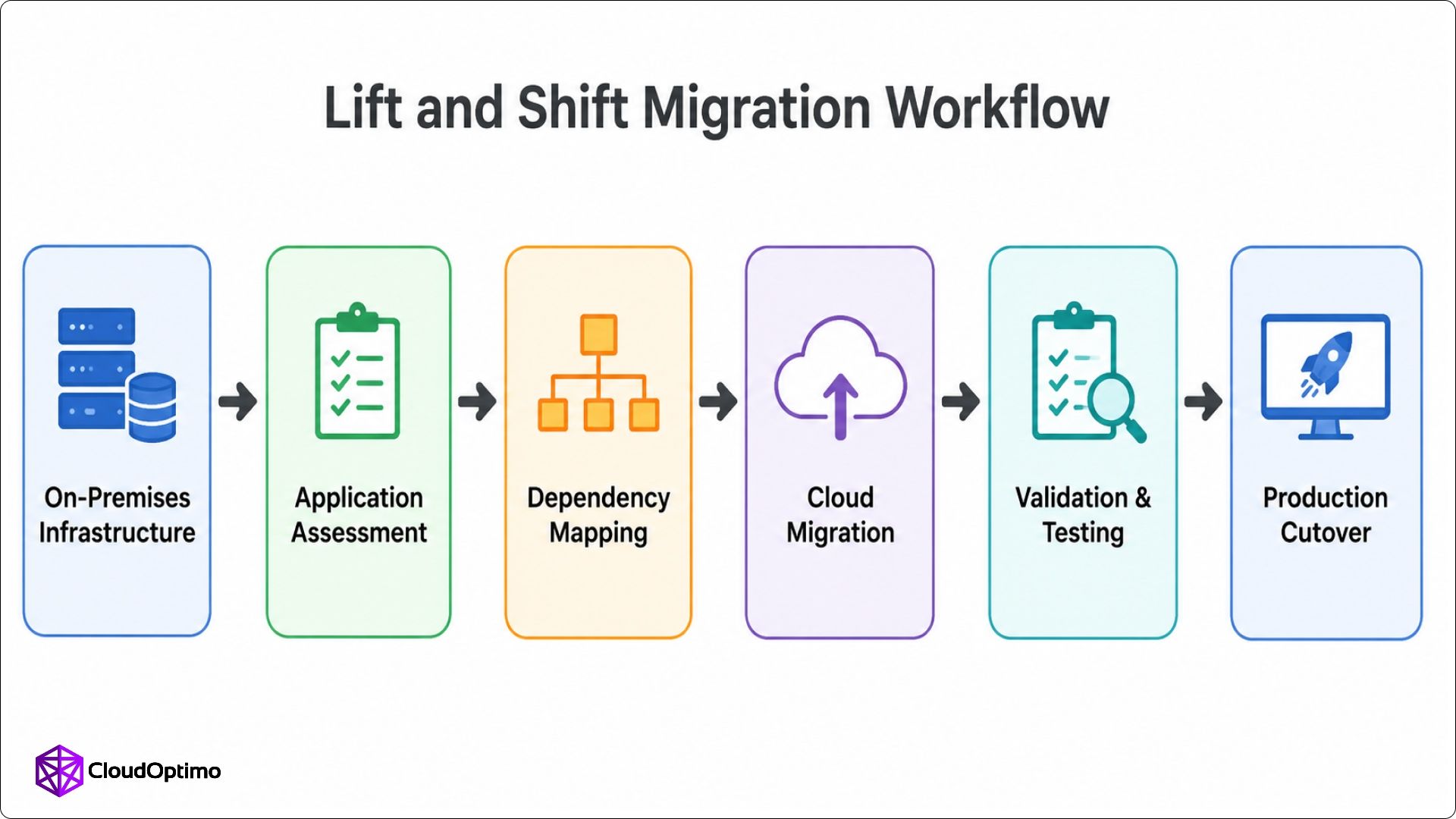
Figure 1: The workflow illustrates the sequential stages of a Lift and Shift Cloud Migration, from assessing existing workloads to validating applications before production cutover.
The process begins with an application assessment to evaluate workloads, infrastructure, networking, storage, and application dependencies.
The next step is dependency mapping. Enterprise applications rarely operate independently, and understanding communication between databases, APIs, storage systems, and supporting services helps prevent unexpected issues after migration. Accurate dependency mapping also allows migration teams to organize workloads into logical migration groups.
After dependency mapping, workloads are replicated to the target cloud while preserving existing configurations.
Validation confirms application functionality, security, connectivity, and performance before production cutover.
The final stage is the production cutover, where live traffic is redirected from the on-premises environment to the cloud infrastructure. Monitoring during this phase helps ensure application stability and allows engineering teams to respond quickly if adjustments are required.
Following a structured migration lifecycle reduces operational risk while creating a stable foundation for future cloud optimization initiatives. Rather than treating Lift and Shift as the final destination, many organizations use it as the first step toward broader cloud modernization and infrastructure optimization.
Understanding the migration process is only one part of a successful cloud migration. Organizations also need to understand the practical advantages that make Lift and Shift one of the most widely adopted cloud migration strategies.
Benefits of Lift and Shift Cloud Migration
Organizations often choose Lift and Shift Cloud Migration when migration speed and operational continuity are higher priorities than immediate application modernization. By preserving the current application architecture, businesses can accelerate cloud adoption while minimizing disruption to day-to-day operations.
One of its biggest advantages is migration speed. Since applications are relocated rather than rebuilt, projects typically require less development effort than modernization initiatives. This allows organizations to move critical workloads within shorter timelines, making Lift and Shift particularly useful for data center consolidation, hardware refresh programs, or cloud adoption initiatives with fixed deadlines.
Another advantage is business continuity. Existing applications continue operating with minimal architectural changes, reducing the need for extensive redevelopment or retraining. Development teams can focus on maintaining application stability while infrastructure teams manage the migration process.
Another important advantage is that organizations can begin cloud adoption without immediately redesigning existing applications. This phased approach enables businesses to migrate workloads quickly, establish a cloud presence, and plan modernization activities based on operational priorities rather than migration deadlines.
Once workloads are running in the cloud, organizations can take advantage of services such as monitoring, disaster recovery, automated backups, and infrastructure automation while modernizing applications at their own pace.
For many organizations, Lift and Shift also reduces migration risk. Existing application behavior remains largely unchanged, making it easier to validate workloads after migration and identify infrastructure-related issues without introducing major application modifications.
Challenges of Lift and Shift Cloud Migration
Although Lift and Shift Cloud Migration simplifies infrastructure migration, additional optimization is usually required to fully benefit from cloud-native capabilities. Because applications are migrated with minimal architectural changes, organizations often need additional optimization after migration to improve performance, cost efficiency, and operational management.
The following table summarizes the most common challenges.
| Challenge | Impact |
| Higher Cloud Costs | Oversized compute and storage resources may increase operational expenses. |
| Technical Debt | Existing application architecture remains unchanged, delaying modernization. |
| Performance Optimization | Workloads may require resource tuning and network optimization after migration. |
| Software Licensing | Existing licensing models may not align with cloud deployment. |
| Operational Management | Monitoring, backups, security, and infrastructure optimization remain the organization's responsibility. |
Organizations that migrate workloads without rightsizing often discover additional opportunities to reduce cloud costs after deployment. Virtual machines, storage, and networking resources originally designed for on-premises environments may consume more cloud resources than necessary.
Technical debt also remains unchanged because applications continue using their existing architecture. While this speeds up migration, organizations should plan future modernization initiatives to improve scalability and cloud-native adoption.
Performance is another area that requires attention after migration. Reviewing compute sizing, storage performance, and network configuration helps ensure workloads operate efficiently in the new cloud environment.
Finally, organizations should review software licensing before migration and establish operational practices for monitoring, backups, security, and ongoing resource optimization to maximize long-term cloud value.
Despite these considerations, Lift and Shift remains a practical migration strategy for many enterprise workloads. The key is understanding when it aligns with business and technical objectives.
When Should You Choose Lift and Shift Cloud Migration?
The success of Lift and Shift Cloud Migration largely depends on selecting the right workloads. It is most effective when migration speed, operational continuity, and infrastructure modernization take priority over immediate application redesign. While it is not the best approach for every workload, several common scenarios make it a practical cloud migration strategy.
One of the most common use cases is data center migration. Organizations replacing aging hardware or closing on-premises facilities often need to migrate large numbers of workloads within a defined timeline. Lift and Shift allows these applications to move to cloud infrastructure without delaying migration for application redevelopment.
It is also well suited for legacy enterprise applications that continue supporting important business processes. Modernizing these systems before migration may require significant engineering effort, making rehosting a more practical first step. Once workloads are stable in the cloud, organizations can evaluate modernization opportunities based on business priorities.
For many enterprises, cloud-based disaster recovery strategies also benefit from Lift and Shift. Replicating workloads into cloud environments improves recovery capabilities while avoiding major application changes. This provides greater operational resilience without requiring immediate architectural transformation.
Another common scenario involves organizations with limited migration windows. Regulatory requirements, business deadlines, or infrastructure lifecycle events may require workloads to move quickly. Lift and Shift enables cloud adoption within these constraints while preserving existing application functionality.
However, Lift and Shift may not be the ideal strategy for every workload. Applications that require extensive scalability improvements, cloud-native services, or significant architectural redesign may benefit more from approaches such as replatforming or refactoring. Evaluating application characteristics, business objectives, and long-term cloud strategy helps determine the most appropriate migration approach.
Lift and Shift vs Other Cloud Migration Strategies
Lift and Shift is one of several cloud migration strategies available to organizations. While it focuses on moving workloads with minimal architectural changes, other approaches emphasize optimization, modernization, or replacing existing systems. Selecting the right strategy depends on application complexity, business objectives, migration timelines, and long-term cloud plans.
For organizations prioritizing speed and operational continuity, Lift and Shift is often the preferred choice because it minimizes redevelopment effort. However, applications that require greater scalability or cloud-native capabilities may benefit from alternative migration approaches.
The following comparison highlights where each strategy is most appropriate.
| Strategy | Best For |
| Rehost (Lift and Shift) | Fast migration with minimal application changes |
| Replatform | Moderate optimization while retaining the core application architecture |
| Refactor (Re-architect) | Building cloud-native applications with improved scalability and resilience |
| Repurchase | Replacing existing applications with SaaS solutions |
Many organizations combine these strategies based on workload requirements.
Choosing the appropriate migration strategy should balance technical requirements with business priorities. Evaluating workload dependencies, operational goals, and future modernization plans helps organizations select the approach that delivers the greatest long-term value.
After selecting Lift and Shift as the preferred migration strategy, organizations should focus on optimizing cloud resources to maximize long-term value.
Cost Optimization After Lift and Shift Migration
Completing a Lift and Shift migration marks the beginning of cloud optimization rather than the end of the migration journey.
Rightsizing aligns compute resources with actual workload demand, improving utilization and reducing unnecessary cloud costs.
Organizations can also optimize compute costs through pricing models such as Reserved Instances, Savings Plans, or Committed Use Discounts, depending on the cloud provider. Matching predictable workloads with long-term pricing options helps reduce infrastructure expenses while maintaining consistent performance.
Storage optimization is equally important. Frequently accessed data can remain on high-performance storage, while backups, archives, and infrequently used datasets can be moved to lower-cost storage tiers. Lifecycle management policies further improve efficiency by automatically transitioning data as access patterns change.
Another important optimization area is resource utilization. Temporary environments, idle virtual machines, unused storage volumes, and inactive load balancers often remain after migration. Regular infrastructure reviews help identify unused resources and prevent unnecessary cloud spending.
Cloud-native scaling features also contribute to cost optimization. Instead of maintaining fixed infrastructure capacity, organizations can use autoscaling to adjust resources based on workload demand. This improves infrastructure utilization while maintaining application availability during periods of changing traffic.
The following practices commonly deliver the greatest cost optimization after Lift and Shift migration.
| Optimization Area | Benefit |
| Rightsizing | Matches compute resources with actual workload demand |
| Reserved Pricing | Reduces long-term compute costs for predictable workloads |
| Storage Tiering | Optimizes storage costs based on data access frequency |
| Resource Cleanup | Removes unused infrastructure resources |
| Autoscaling | Adjusts capacity automatically as demand changes |
Continuous monitoring, rightsizing, and resource optimization help organizations maximize cloud performance while controlling long-term infrastructure costs.
Lift and Shift Migration Best Practices
Successful Lift and Shift projects rely on careful planning before migration and continuous optimization afterward. Organizations that assess dependencies, migrate workloads in phases, and validate cloud performance generally achieve more stable production environments.
One of the most important practices is identifying application dependencies before migration begins. Enterprise applications often interact with databases, authentication services, messaging systems, and external APIs. Understanding these relationships reduces migration complexity and helps prevent service interruptions during production cutover.
Migrating workloads in planned phases is equally valuable. Rather than moving every application simultaneously, organizations can group related workloads into migration waves. This allows engineering teams to validate each stage, resolve issues efficiently, and reduce operational risk throughout the migration program.
Testing should continue after workloads reach the cloud. Functional validation, performance testing, security verification, and monitoring help confirm that applications continue operating as expected in the new environment. Early validation also provides opportunities to optimize cloud resources before production demand increases.
Regular monitoring, performance reviews, and cost optimization help organizations maximize the long-term value of their cloud infrastructure after migration. Establishing these practices early helps reduce migration risk while creating a strong foundation for future cloud modernization initiatives.
Frequently Asked Questions (FAQ)
1. Why is my cloud bill higher after a Lift and Shift migration?
Workloads migrated without optimization often retain the same infrastructure sizing used in on-premises environments. Rightsizing virtual machines, optimizing storage, removing unused resources, and using cloud pricing options such as Reserved Instances or Savings Plans can significantly improve cost efficiency.
2. Should applications be optimized before or after Lift and Shift migration?
Most organizations migrate first and optimize afterward. This approach reduces migration complexity while allowing optimization decisions to be based on real workload behavior in the cloud.
3. Is Lift and Shift suitable for every application?
Not always. Lift and Shift works well for legacy applications, data center migrations, disaster recovery initiatives, and projects with limited migration timelines. Applications requiring significant scalability improvements or cloud-native capabilities may benefit more from replatforming or refactoring.
4. Can Lift and Shift support future cloud modernization?
Yes. Many organizations use Lift and Shift as the first phase of their cloud migration strategy. Once workloads are stable in the cloud, they can gradually adopt containers, managed services, serverless computing, or other cloud-native technologies based on business priorities.

