
1. What is Terraform, and why does it exist?
Terraform is an open-source tool that lets you define cloud infrastructure, including servers, networks, and databases, in text files, then create and manage that infrastructure automatically. It exists because managing infrastructure by hand doesn't scale past one engineer or one environment.
The problem with managing infrastructure by hand
Say you build a web application by clicking through the AWS console: a VPC, a couple of EC2 instances, a security group, an S3 bucket. It works. Then you need to build the same setup again for staging. Then production. Then a teammate joins and asks how the network is configured, and the honest answer is "however I clicked it eighteen months ago."
Nothing is written down. Nothing is repeatable. If the production VPC gets deleted by accident, rebuilding it means remembering, or reverse-engineering, every click that created it in the first place.
| Aspect | Manual (Console Clicks) | Terraform (Infrastructure as Code) |
| Repeatability | Redo every click by hand for each environment | Run the same config for dev, staging, and production |
| Documentation | Lives in someone's memory | Lives in version-controlled .tf files |
| Change visibility | No record of what changed or why | terraform plan previews every change before it is applied |
| Disaster recovery | Rebuild from memory, if you're lucky | Rebuild infrastructure by running terraform apply using the same configuration |
| Team collaboration | Tribal knowledge; easy to duplicate work | Shared source of truth stored in Git |
What "infrastructure as code" actually means
Infrastructure as code means describing your servers, networks, and databases in a text file instead of creating them by hand. The file becomes the record of what should exist. Terraform is one tool for doing this: you write configuration files in a language called HCL (HashiCorp Configuration Language), and Terraform reads them and builds the matching infrastructure on a cloud provider.
Why declarative beats a script
Terraform is declarative. You describe the end state you want: three EC2 instances, an S3 bucket with versioning turned on, and Terraform works out the steps needed to get there.
An imperative script, by contrast, says "run these commands, in this order": create this, then that, then this, regardless of what already exists. Terraform doesn't work that way.
You're not writing "create this bucket." You're writing "this bucket should exist, with these properties." Terraform compares that description against what is actually running and calculates the difference. Run the same configuration twice against infrastructure that already matches it, and Terraform does nothing on the second run. Change one property, and only that property changes. That comparison step is the foundation for everything else in this article.
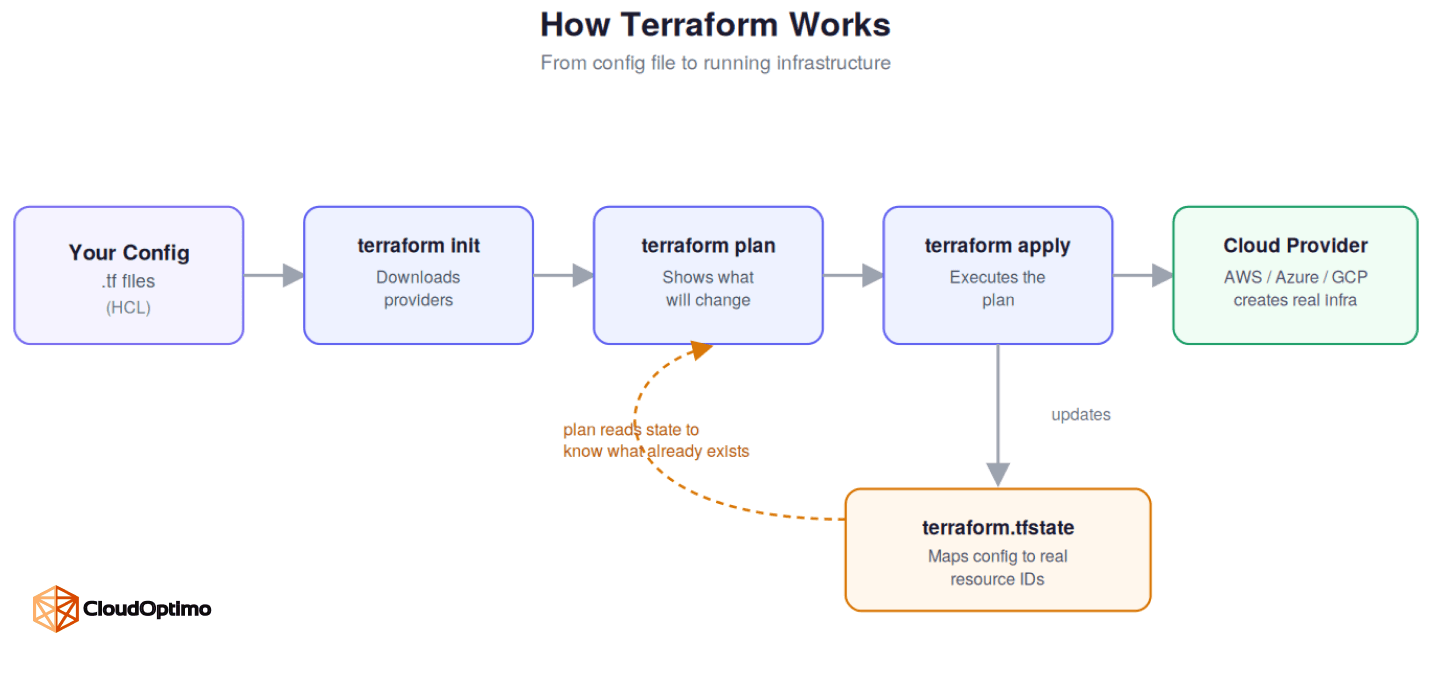
Terraform reads your config, checks it against the state file, shows you a plan, then applies only the changes needed. Nothing happens outside that loop.
2. Before you write any Terraform
Terraform has a low barrier to entry: there's no server to stand up, no account to create. Here's what you actually need before writing a single resource block.
What you need installed
You need the Terraform CLI, a free download from HashiCorp, and credentials for whichever cloud provider you are targeting (an AWS access key, for example). Terraform itself does not require a server or an account of its own. It runs from your terminal or your CI/CD pipeline and talks directly to your cloud provider's API.
Credentials are typically supplied as environment variables (AWS_ACCESS_KEY_ID, AWS_SECRET_ACCESS_KEY) rather than hardcoded in .tf files. A code editor with a Terraform extension, such as the official HashiCorp extension for VS Code, is worth setting up early too. It adds syntax highlighting and formatting that catches simple mistakes before you ever run a command.
What a Terraform project actually looks like
A Terraform project is usually a folder of files ending in .tf. A small project might look like this:
my project/ main.tf variables.tf outputs.tf terraform.tfvars |
main.tf holds resources, variables.tf holds inputs, and outputs.tf holds values you want to expose. There is no strict requirement to split files this way. Terraform reads every .tf file in a directory as one combined configuration, so the split is for humans, not for the tool.
It's worth adding a gitignore file early as well. Terraform generates a local .terraform directory and a .terraform.lock.hcl file that don't belong in version control.
3. The core building blocks
These three elements, providers, resources, and data sources, appear in nearly every Terraform configuration you'll write. Understanding what each one is responsible for prevents most beginner mistakes.
Providers: how Terraform talks to a cloud
A provider is a plugin that lets Terraform interact with a specific platform: AWS, Azure, GCP, Kubernetes, Datadog, GitHub, and hundreds of others listed in the Terraform Registry. It translates your configuration into API calls against that platform.
terraform { required_providers { aws = { source = "hashicorp/aws" version = "~> 5.0" } } } provider "aws" { region = "us-east-1" } |
Every resource block you write belongs to a provider, and each provider has its own set of resource types and arguments. Pin provider versions explicitly, as shown above. An unpinned provider can introduce breaking changes on a routine terraform init, and debugging why a working configuration suddenly fails is a bad way to spend an afternoon.
Resources: the things Terraform creates
A resource is something Terraform creates and manages: a virtual machine, a subnet, a database instance. Use a resource when Terraform should own that thing's entire lifecycle, including modifying or destroying it to match your configuration.
resource "aws_instance" "web" { ami = "ami-0abcd1234" instance_type = "t3.micro" } |
The AMI ID and instance type here are illustrative. In a real project, you would look up a current AMI for your region, often through a data source, rather than hardcoding one that may go stale or not exist in another account.
Data sources: the things Terraform only reads
A data source is something Terraform reads but does not manage, often infrastructure that already exists outside Terraform or was created by another Terraform configuration..
data "aws_vpc" "default" { default = true } |
If a piece of infrastructure is owned by another team or another tool, it belongs in a data source. Treat it as a resource by mistake, and Terraform will eventually try to change or delete something it does not actually own.
Together, these three blocks answer three different questions: what should Terraform connect to, what should Terraform own, and what should Terraform simply be aware of.
4. Your first workflow: init, plan, apply
Every Terraform change, from a single tag update to a full environment build, goes through the same three-step loop.
- terraform init downloads the providers your configuration needs and sets up the backend where state will be stored.
- terraform plan compares your configuration against what is currently running and shows exactly what will change.
- terraform apply executes that plan, after asking for confirmation.
A fourth command, terraform destroy, tears down everything the configuration manages. It's used far less often, but it follows the same rule: it shows a plan and asks for confirmation before doing anything irreversible
Reading a plan output without panicking
The plan output uses a small set of symbols. Learn these four and you can read any plan.
| Symbol | Meaning |
| + | Resource will be created |
| - | Resource will be destroyed |
| ~ | Resource will be updated in place |
| -/+ | Resource will be destroyed and recreated |
That last one is worth slowing down for. A one-line variable change can trigger a full replacement without warning if you do not read the plan carefully. Skipping this step, and applying changes on faith, is how production databases get recreated by accident.
On anything that matters, save the plan before applying it: terraform plan -out=tfplan, then terraform apply tfplan. This guarantees the plan you reviewed is exactly what gets applied, with no drift in between the two steps.
Read the plan every time, not only when the change feels unfamiliar. Everything Terraform does when you run apply, it can only do correctly because of one file it keeps track of behind the scenes: state, covered next.
5. The concept beginners misunderstand most
State is the part of Terraform that trips up almost everyone at first, mainly because it works silently in the background until something goes wrong.
What state actually is
Terraform state is a file, usually named terraform.tfstate, that maps your configuration to the real world resources it created. Without it, Terraform would have no way to know that the aws_instance.web block in your code corresponds to a specific, already running instance in AWS. State is what makes the comparison in terraform plan possible in the first place.
You rarely need to open this file directly. Commands like terraform state list and terraform show let you inspect what Terraform currently believes exists, without touching the raw JSON.
Why state can't live in Git or on one laptop
State often contains sensitive values, including database passwords and private keys, in plaintext. It should never be committed to version control. It should also never live only on one engineer's machine. If a teammate runs Terraform with no state file present, Terraform assumes nothing exists yet and will attempt to create resources that are already running, usually failing partway through with naming conflicts, or worse, succeeding and creating duplicates.
Remote backends and locking, explained simply
The fix is a remote backend: a shared location, such as an S3 bucket paired with DynamoDB for locking, or a managed option like Terraform Cloud, where state lives and every engineer and CI job reads from the same source of truth.
terraform { backend "s3" { bucket = "my-terraform-state" key = "prod/network/terraform.tfstate" region = "us-east-1" dynamodb_table = "terraform-locks" } } |
Locking is what stops two people, or two pipelines, from running apply against the same state at the same moment. Without it, two concurrent applies can corrupt the state file. This is not a hypothetical. It has happened during a rushed Friday deploy on more than one team, and untangling the corrupted state took longer than the original change would have.
Once state is centralized and locked, the same configuration can safely be reused across teams and environments, which is exactly what variables and modules are built for.
6. Making configuration reusable
Hardcoding values works for a single environment. It breaks down the moment you need a second one. Variables, outputs, and modules exist to solve that.
Variables and outputs
Variables let you reuse the same configuration across environments instead of hardcoding values for staging and duplicating the whole file for production.
variable "environment" {
type = string
default = "staging"
}
That variable can then be referenced anywhere in the configuration, for example var.environment inside a resource's tags, instead of typing "staging" or "production" directly into the resource block.
Outputs work in the opposite direction. They expose values from one configuration so another configuration can use them, such as passing a VPC ID from a networking setup into an application setup.
output "vpc_id" { value = aws_vpc.main.id } |
Modules, and what makes one good
A module is a reusable, self-contained Terraform configuration, often something like “a standard VPC” or “an RDS instance with our default backup policy,” that other configurations call with different inputs. Modules are how Terraform scales past a single team or a single environment.
module "vpc" {
source = "./modules/vpc"
cidr_block = "10.0.0.0/16"
}
Internally, that module is just another folder of .tf files with its own variables and outputs. Calling it this way passes cidr_block in as an input and, typically, receives something like the resulting VPC ID back as an output.
A good module keeps its interface small: a handful of well documented inputs and outputs, not forty optional variables covering every edge case anyone has ever hit. A module built to handle every possible situation is usually harder to use than three plain resource blocks.
Once configuration is reusable across environments, the next question is how those environments should actually be separated, which is where workspaces come in.
7. Handling multiple environments
Every environment needs its own state, so that a change to staging never accidentally touches production. Terraform offers two different ways to achieve that separation.
Workspaces
Terraform workspaces let you maintain several distinct states from the same configuration, commonly used to separate dev, staging, and production.
terraform workspace new staging terraform workspace select staging terraform apply |
They are genuinely convenient for quick experiments, since switching environments takes one command rather than moving to a different directory.
Why most teams use separate configs instead
That convenience is also the risk. Workspaces make it simple to run terraform apply against the wrong environment by forgetting which one is currently selected, since the command line gives no strong visual warning before you apply. On a production account, that is a costly mistake.
For anything that matters, most teams are better off with separate state files and separate directories per environment. This trades a bit of duplication for a guarantee: it is not possible to apply to production by mistake while pointed at a staging directory. Some teams pair this approach with a tool like Terragrunt, which generates the repetitive backend and provider configuration for each environment automatically, to keep that duplication manageable.
With environments cleanly separated, the remaining risk isn't which directory you're in. It's what happens when infrastructure changes outside Terraform entirely.
8. The Hidden Challenge of Terraform
Every concept so far assumes Terraform is the only thing changing infrastructure. In practice, it rarely is, and that gap is where most real world Terraform problems start.
What happens when someone edits things by hand
This is the sharpest edge of Terraform's declarative model. Because Terraform tracks state and infers changes from it, configuration drift, someone manually editing a resource in the AWS console, puts your state and reality out of sync. The next plan will either try to quietly revert that manual change, or propose destroying and recreating something a person changed for a good reason nobody wrote down.
Running terraform plan -refresh-only is the safest way to check for drift. It updates Terraform's understanding of what's actually running without proposing any changes, so you can see what happened before deciding what to do about it.
Bringing existing infrastructure under management safely
There is no clean fix for drift beyond discipline. Treat the AWS console as read only once a resource is under Terraform's management, and use terraform import deliberately when you need to bring existing infrastructure into a configuration, rather than letting drift build up silently over time.
terraform import aws_instance.web i-0abcd1234
This tells Terraform that an already existing instance now corresponds to the aws_instance.web block in your configuration, without creating or destroying anything.
Quick-reference glossary
| Term | What it means |
| Provider | Plugin that connects Terraform to a platform like AWS or GCP |
| Resource | Something Terraform creates and fully manages |
| Data source | Something Terraform reads but does not manage |
| State | The file mapping your configuration to real infrastructure |
| Plan | A preview of what apply will change, before it changes anything |
| Module | A reusable, self-contained block of configuration |
| Drift | When real infrastructure no longer matches Terraform's state |
With the core concepts and their failure modes both covered, what's left is putting them together into a workflow a team can actually trust
9. Frequently asked questions about Terraform
What is Terraform used for?
Terraform is used to define and manage cloud infrastructure, such as servers, networks, databases, and storage, through configuration files instead of manual console setup. Teams use it to provision infrastructure consistently across environments, track every change through version control, and rebuild infrastructure quickly if something is lost or damaged.
Is Terraform the same as Ansible or CloudFormation?
No. Terraform is a general purpose, cloud agnostic tool for provisioning infrastructure, meaning it can manage AWS, Azure, GCP, and hundreds of other platforms from the same workflow. CloudFormation does the same job but only for AWS. Ansible is primarily a configuration management tool, used to install software and configure servers after they already exist, rather than to create the infrastructure itself. Many teams use Terraform to provision infrastructure and Ansible to configure it afterward.
What is Terraform state used for?
Terraform state is a file that maps your configuration to the real world resources it created, allowing Terraform to know what already exists and calculate what needs to change on the next apply. Without state, Terraform would have no way to distinguish a resource it should create from one it created already, and would risk duplicating or losing track of infrastructure. For a closer look at how state and remote backends work in production, see Section 5 above.
Is Terraform free to use?
Yes. The Terraform CLI is open source and free to download and use, including for commercial infrastructure. HashiCorp offers a paid, managed option called Terraform Cloud with additional features like remote state storage, policy enforcement, and team access controls, but it is entirely optional; the CLI alone is sufficient for most individual engineers and small teams.
What is the difference between Terraform workspaces and separate environments?
Workspaces let you maintain multiple states from a single configuration by switching between them with one command, which is convenient but easy to misuse, since it is simple to apply changes to the wrong environment by mistake. Separate environments use distinct directories and state files per environment instead, trading some duplication for a stronger guarantee against applying to the wrong one. Most teams reserve workspaces for quick experiments and use separate configurations for anything production facing, a distinction covered in Section 7.

