
What Is a Cloud Workspace? Architecture, Benefits, and Use Cases
Employees now log in from laptops, tablets, and phones scattered across home offices, client sites, and co-working spaces. Provisioning a new physical machine for every hire, patching hundreds of scattered endpoints, and securing company data that lives on devices IT never touches has become increasingly hard to manage at scale.
The cloud workspace was built to close that gap. Instead of shipping compute and data down to the device, it keeps the operating system, applications, and files centralized in the cloud and streams only the screen to whatever device the user happens to have. This article breaks down what a cloud workspace actually is, how it is architected, and where it delivers the most practical value.
What Is a Cloud Workspace?
A cloud workspace is a virtual desktop environment, including the operating system, applications, files, and settings, that is hosted on cloud infrastructure and delivered to any device over the internet rather than installed and run locally. All computation happens on a remote server in the provider's data center; the local device simply renders the video stream it receives and sends back keyboard, mouse, and touch input.
Because the environment lives in the cloud rather than on the endpoint, a user can start a session on a laptop, pause it, and pick up the exact same desktop minutes later on a tablet, with every open file and application window intact. This model is often sold as Desktop-as-a-Service (DaaS) and is closely related to, but broader than, traditional Virtual Desktop Infrastructure (VDI).
How Does a Cloud Workspace Work?
At a functional level, a cloud workspace session follows a consistent sequence regardless of vendor:
- Authentication: The user opens a client app or browser and authenticates through an identity provider, typically with single sign-on and multi-factor authentication.
- Session brokering: A connection broker checks entitlements and routes the request to an available virtual desktop, application pool, or container.
- Session delivery: The assigned session boots (or resumes) on cloud compute, and a streaming protocol compresses the screen output into a low-latency video stream.
- Interaction: Keyboard, mouse, and clipboard actions are sent back to the cloud session in real time, while all application data stays server-side.
Everything the user perceives as "their desktop" is running on a server they never directly access. If the local device is lost, stolen, or wiped, no corporate data ever leaves the data center.
Cloud Workspace Architecture
A production cloud workspace platform is built from five layers that sit on top of the underlying public or private cloud. The diagram below shows how a user request moves from the client device down to cloud infrastructure and back.
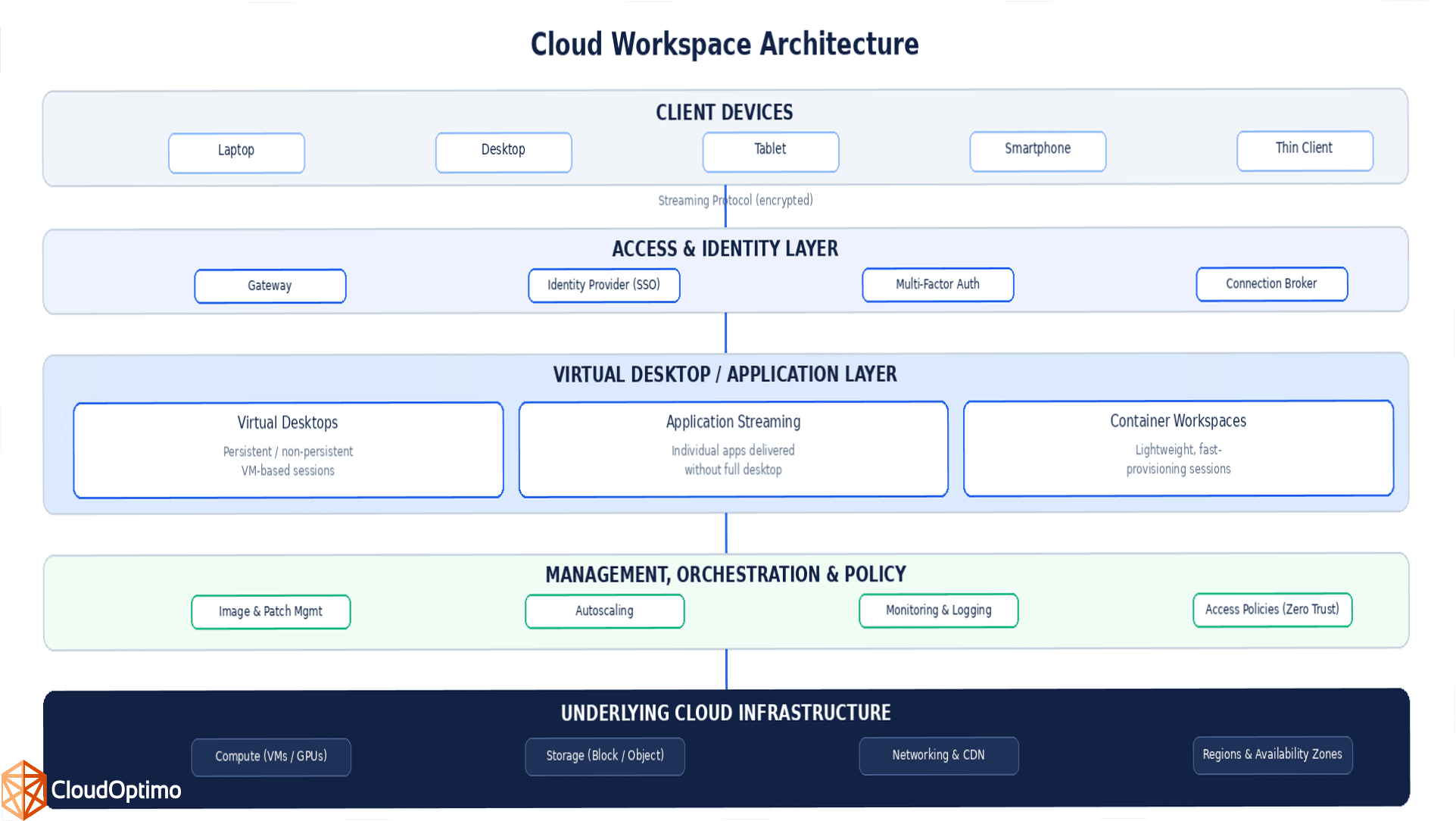
Figure: Layered architecture of a cloud workspace, from client devices through identity, session, and management layers down to underlying cloud infrastructure.
Core Components
- Identity and Access Layer: Authenticates users and enforces conditional access, SSO, and MFA before a session is granted.
- Connection Broker: Matches an authenticated user to an available desktop, application, or container instance based on entitlement and load.
- Session Layer: Delivers either a full virtual desktop, a single streamed application, or a lightweight containerized session.
- Storage and Profile Management: Keeps user profiles, documents, and settings separate from the compute instance so sessions remain stateless and easy to replace.
- Management and Orchestration: Handles image updates, patching, autoscaling, and monitoring across the fleet of sessions.
Cloud Workspace vs Traditional Desktop vs VDI
The easiest way to place a cloud workspace conceptually is to compare it against the two models it is usually confused with: the physical desktop and on-premises VDI.
| Aspect | Traditional Desktop | On-Premises VDI | Cloud Workspace (DaaS) |
|---|---|---|---|
| Where compute runs | Local device | Company data center | Public or private cloud |
| Hardware ownership | Owned per employee | Owned by IT (servers) | Rented from cloud provider |
| Scaling new users | Buy and ship a device | Add data center capacity | Provision in minutes |
| Data location | On the device | On-premises storage | Cloud storage, centrally secured |
| Access from any device | Limited | Limited to VPN/on-site | Native, from anywhere |
| Upfront capital cost | High (hardware refresh cycles) | Very high (servers, storage) | Low (pay-as-you-go) |
| Typical management model | Per-device IT support | In-house VDI admin team | Provider-managed or hybrid |
Key Benefits of Cloud Workspaces
- Faster onboarding: New employees or contractors can be provisioned in minutes instead of waiting on hardware procurement and shipping.
- Elastic scalability: Compute and storage scale up or down with headcount and seasonal demand, without buying servers for peak capacity.
- Stronger data security: Since no corporate data resides on the endpoint, a lost or compromised device does not translate into a data breach.
- Location independence: Users get a consistent desktop experience on any device, in any location, as long as they have internet access.
- Simplified IT management: Patching, upgrades, and application updates happen once on the master image rather than across thousands of individual machines.
- Lower total cost of ownership: Capital hardware spend shifts to a predictable operating expense, and idle capacity can be scaled down automatically.
Challenges and Considerations
- Network dependency: Session quality depends on a stable, low-latency internet connection; poor connectivity directly degrades the user experience.
- Latency sensitivity: Users far from the hosting region may experience noticeable input lag unless sessions run in a nearby region or edge location.
- Licensing complexity: Licensing for operating systems and applications in a multi-tenant, streamed environment can be more complex than standard desktop licensing.
- Cost at scale: Running GPU-backed or high-performance sessions at scale can become expensive without active rightsizing and idle-session shutdown.
- Compliance and data residency: Regulated industries need to confirm which cloud regions store session data to meet data residency requirements.
Security Best Practices for Cloud Workspaces
- Enforce strong identity controls: Require multi-factor authentication for every session and apply conditional access based on device posture and location.
- Apply least-privilege access: Grant users and admins only the access required for their role, and review entitlements on a regular cadence.
- Encrypt data everywhere: Encrypt the streaming session, session data in transit, and stored profiles and files at rest.
- Automate image patching: Rebuild golden images from patched base templates on a fixed schedule so every new session starts current.
- Monitor and log session activity: Centrally log session activity, file transfers, and clipboard use to support audits and detect anomalies.
Common Use Cases of Cloud Workspaces
- Remote and hybrid workforces: Employees working from home or rotating between offices get the same secure desktop everywhere.
- BYOD programs: Staff can use personal devices without corporate data ever touching local storage.
- Contractor and third-party access: Third-party contractors and vendors get time-boxed, revocable access without needing a company-issued laptop.
- Development and test environments: Engineering teams spin up short-lived, identical environments for testing without provisioning physical hardware.
- Business continuity and disaster recovery: A standby pool of cloud desktops lets staff keep working if a regional office or data center goes offline.
Best Practices for Implementing Cloud Workspaces
- Right-size compute: Match instance types (CPU, memory, GPU) to actual workload profiles instead of defaulting to the largest available size.
- Optimize for proximity: Host sessions in the cloud region closest to your users to minimize latency.
- Monitor usage continuously: Track session utilization and automatically shut down or hibernate idle desktops to control cost.
- Standardize images: Maintain a small number of well-tested golden images rather than many one-off configurations.
- Roll out in phases: Pilot with a single department before a company-wide rollout to validate performance and user experience.
Frequently Asked Questions (FAQs)
Q1: Is a cloud workspace the same as VDI?
Not exactly. VDI usually refers to virtual desktops hosted and managed on a company's own on-premises servers. A cloud workspace (or DaaS) uses the same underlying streaming concept but runs on public or private cloud infrastructure that is provisioned and often managed by a third-party provider, which removes the burden of maintaining physical VDI servers.
Q2: Do I need a powerful device to use a cloud workspace?
No. Since all processing happens in the cloud, even a low-cost laptop, thin client, or tablet can run a demanding desktop environment smoothly, provided it has a stable internet connection.
Q3: What happens to my data if my device is lost?
Nothing is exposed. Files, applications, and settings live on cloud infrastructure, not on the local device, so a lost or stolen endpoint does not put company data at risk by itself.
Q4: How much does a cloud workspace cost?
Most providers price per user, per month, based on the compute and storage tier selected. Costs scale with usage, and idle sessions can often be paused or hibernated to avoid paying for unused capacity.
Q5: Can cloud workspaces support graphics-intensive applications?
Yes. GPU-backed instances are available from major providers specifically for CAD, video editing, and other graphics-intensive workloads, though these tiers cost more than standard office-productivity sessions.

