
Namespaces are usually the first tool we reach for when multiple teams need to share a Kubernetes cluster. Add RBAC, ResourceQuotas, and NetworkPolicies, and each team gets a reasonably isolated place to run its workloads. That works well for a lot of environments, but namespaces still share the same Kubernetes control plane. CRDs are cluster-scoped, cluster-level configuration is shared, and every namespace is tied to the same Kubernetes version.
vCluster takes a different approach. Instead of giving a team another namespace inside the same Kubernetes API, it gives that team its own Kubernetes control plane. The tenant gets its own API server, controller manager, datastore, RBAC, CRDs, and cluster-scoped resources. In the default shared-node setup, that control plane still runs inside a namespace of an existing Kubernetes cluster, so the team gets its own Kubernetes environment without needing a completely separate infrastructure stack.
What Actually Runs Inside That Namespace
In the default container-based setup, the vCluster control plane typically runs inside a StatefulSet pod. The Kubernetes API server, controller manager, datastore, and syncer run together as part of that control plane. SQLite is the default embedded datastore, although etcd, PostgreSQL, MySQL, and MariaDB are available when a different backing store makes more sense.
CoreDNS normally runs as a separate pod in the same namespace and provides DNS for workloads inside the tenant cluster. The scheduler works a little differently. In shared-node mode, vCluster can reuse the scheduler from the underlying cluster instead of running another scheduler inside every tenant cluster.
From the tenant's side, it still feels like working with Kubernetes. Tools such as kubectl, Helm, operators, CRDs, and the normal Kubernetes APIs work against the tenant cluster's own API server. The main difference appears underneath that API, where vCluster decides which resources stay virtual and which ones need to be translated to the underlying cluster.
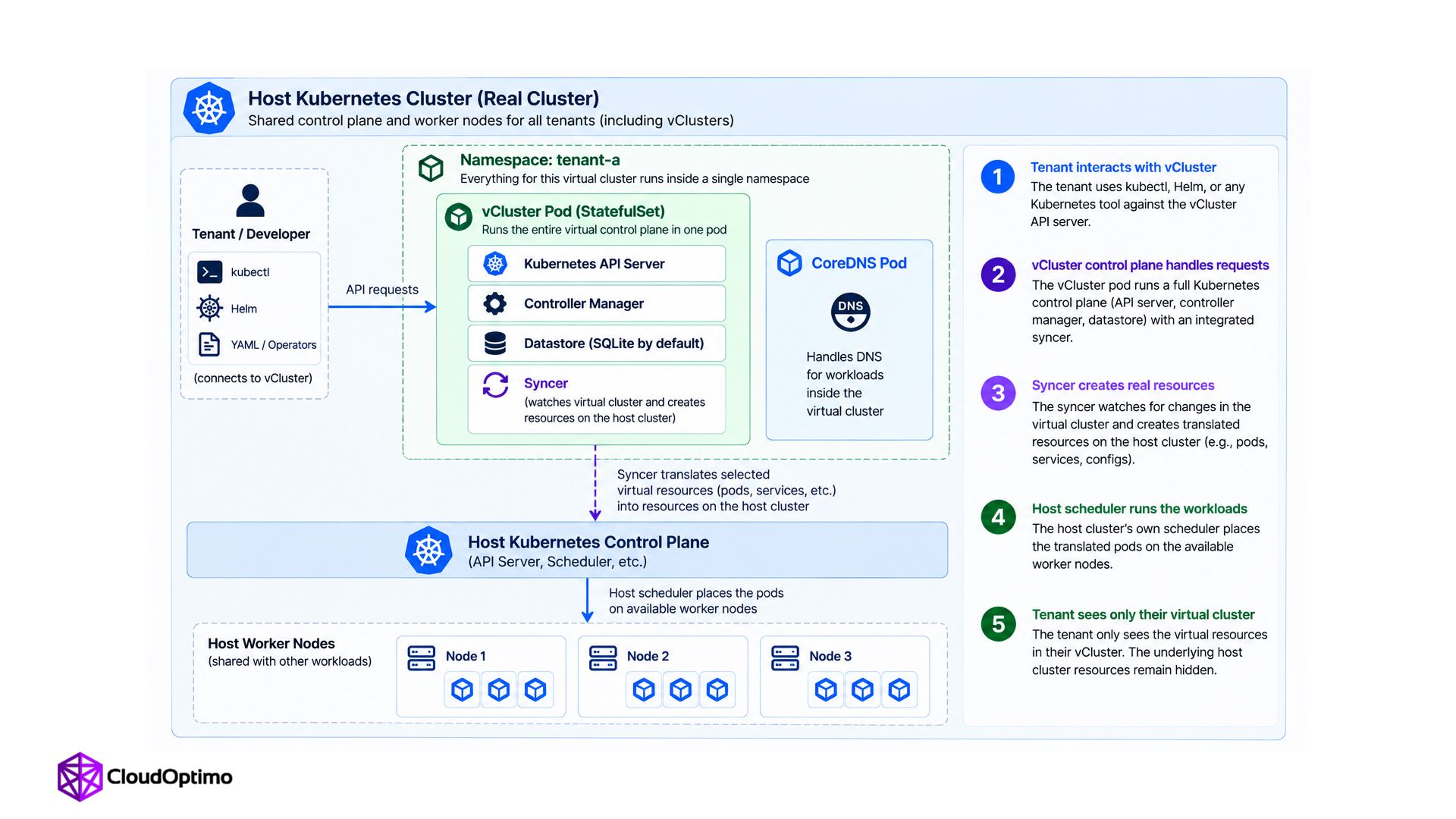
Fig-1: vCluster architecture. A virtual Kubernetes control plane consisting of the API server, controller manager, datastore, and syncer runs inside a namespace on the host cluster, with CoreDNS alongside it. The syncer translates selected virtual resources into corresponding resources on the host cluster, and the host scheduler places the resulting pods on worker nodes.
How the Syncer Connects the Two Clusters
In shared-node mode, the tenant cluster does not have worker nodes of its own. A pod can be created through the tenant's API server, but something still has to turn that virtual object into a workload the underlying cluster can actually run. That is where the syncer comes in.
The syncer watches both the tenant cluster and the underlying cluster. For resource types that are configured to sync, it creates corresponding resources on the host and keeps their state aligned. When a pod is created inside the tenant cluster, the syncer creates its translated counterpart on the host side. The host scheduler can then place that pod onto a real worker node just like any other workload.
From the tenant's point of view, most of this translation stays hidden. They work with the pod through their own Kubernetes API while vCluster handles the mapping underneath.
There is another useful side effect to this design. Most Kubernetes API interactions from the tenant go to that tenant's own control plane instead of directly hitting the underlying cluster's API server. The syncer still talks to the underlying API when resources need to be created there, but the tenant's control-plane activity is separated instead of every API request going through the same shared Kubernetes API.
What Does Not Sync by Default
The syncer does not copy everything from the tenant cluster to the underlying cluster. By default, vCluster syncs the low-level resources it needs for shared-node workloads, including Pods, Services, Endpoints, PersistentVolumeClaims, and the Secrets and ConfigMaps used by those workloads.
Many other resources are intentionally opt-in. Custom resources, Ingresses, Gateway API resources, NetworkPolicies, PersistentVolumes, VolumeSnapshots, StorageClasses, ServiceAccounts, PodDisruptionBudgets, PriorityClasses, and Namespaces require explicit sync configuration.
That distinction matters when you first start using vCluster. A resource can exist perfectly fine inside the tenant Kubernetes API without automatically appearing on the underlying cluster. If that resource needs to affect the real data plane, check whether that resource type is configured for syncing before assuming something has failed.
Understanding the Shared-Node Isolation Boundary
Shared nodes are where the isolation model becomes important to understand. Each tenant gets its own control plane, API, RBAC, and cluster-scoped resources, but the workloads still run on the underlying cluster's worker nodes. Multiple tenant clusters can therefore have completely separate Kubernetes APIs while their pods share the same physical nodes and kernel.
That model works well for trusted environments such as internal development teams, CI/CD systems, testing platforms, and engineering sandboxes. If workloads need stronger infrastructure isolation, vCluster also supports Private Nodes, where a tenant cluster gets dedicated worker nodes instead of sharing the underlying node pool.
When You Need Dedicated Nodes: Private Nodes and Auto Nodes
For workloads that need stronger infrastructure isolation, vCluster supports Private Nodes. Instead of placing tenant workloads on the underlying cluster's shared worker nodes, dedicated Kubernetes worker nodes join the tenant cluster directly. The tenant keeps its own control plane, but its workloads now run on compute dedicated to that tenant.
This also changes the role of the syncer. With Private Nodes, workload resources no longer need to be translated onto the underlying cluster's shared worker nodes because the tenant has real worker nodes of its own.
Auto Nodes builds on that model by provisioning and scaling private worker nodes as workload demand changes. It uses Karpenter for node decisions while vCluster Platform handles provisioning through the configured node provider. This keeps the dedicated-node model while removing the need to guess the right node count in advance.
vCluster, Namespaces, and Multi-Cluster Management
Kubernetes offers more than one way to give teams isolated space, and they solve genuinely different problems rather than competing on the same axis.
| Approach | Isolation model | Best fit |
|---|---|---|
| Namespace + RBAC + Quotas | Shared API server, permission-based separation | Simple cases, teams that do not need cluster-scoped resources |
| vCluster | Separate virtual API server per tenant, shared or dedicated nodes | Teams needing their own CRDs, cluster-wide permissions, or a different Kubernetes version |
| Karmada (multi-cluster) | One control plane managing many separate real clusters | Spreading workloads across regions, clouds, or genuinely independent clusters |
Karmada and vCluster solve almost opposite infrastructure problems. Karmada starts with multiple real Kubernetes clusters and gives you one place to coordinate workloads across them. vCluster starts with a smaller infrastructure footprint and creates multiple independent tenant clusters on top of it.
Karmada makes sense when workloads already span regions, clouds, or separate Kubernetes clusters. vCluster makes sense when teams need their own Kubernetes control plane without provisioning a separate physical cluster for every tenant. One brings many real clusters under common management. The other creates multiple tenant clusters from shared infrastructure.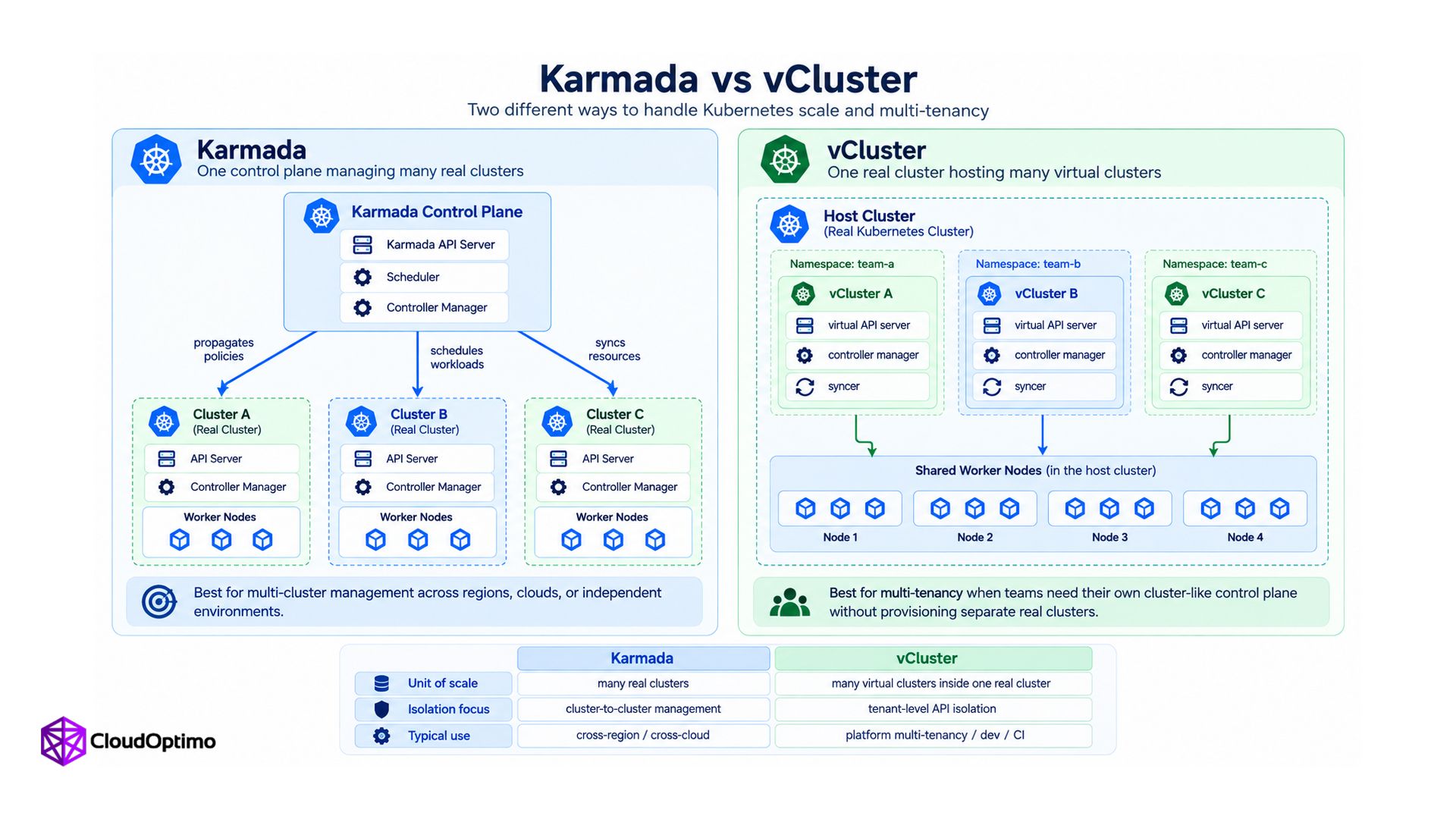
Fig-2: Karmada vs vCluster architecture : Karmada manages multiple independent real Kubernetes clusters from one control plane, while vCluster runs multiple isolated virtual control planes inside a single host cluster.
What to Check When Resources Are Not Syncing
In shared-node mode, the syncer is one of the first places to look when a resource exists inside the tenant cluster but the expected resource does not appear on the underlying cluster. Before checking logs, first confirm that the resource type is supposed to sync at all. Many Kubernetes resources are intentionally disabled from syncing by default.
If syncing is enabled, check the syncer's logs and events next. Problems with RBAC, resource translation, admission policies, or the underlying cluster can all prevent a resource from being created successfully. Looking at both sides helps here. Check what the tenant API believes should exist, then check what actually exists on the underlying cluster.
This is a useful debugging habit with vCluster in general. The tenant API shows the virtual state, while the syncer connects that state to the underlying infrastructure. When those two views do not match, tracing the resource through that path is usually much faster than debugging the workload in isolation.
Where vCluster Fits Best
vCluster fits particularly well when teams need more than a namespace but creating a completely separate Kubernetes infrastructure stack for every team would be unnecessary. Teams can get their own CRDs, RBAC, cluster-scoped resources, Kubernetes API, and a Kubernetes control plane that can be managed independently from the underlying cluster.
For internal teams, development environments, CI/CD, and testing, shared nodes can keep the infrastructure footprint small while still giving each tenant its own Kubernetes control plane. When workloads need stronger infrastructure isolation, Private Nodes let the same tenant-cluster model run with dedicated compute instead.
That is probably the most useful way to think about vCluster. The control plane and worker nodes are separate design choices. You can keep the Kubernetes control plane isolated for each team while deciding how much of the underlying compute should actually be shared.

