
A pod stuck in CrashLoopBackOff with no error in the logs is one of the most common ways engineers meet Kubernetes probes for the first time, usually the hard way. The container isn't broken. The kubelet ran a health check, decided the container had failed it too many times, and restarted it, not because anything inside the container actually crashed.
Liveness, readiness, and startup probes are all health checks the kubelet runs against a container, but each one feeds a different decision, and mixing them up is one of the most common sources of avoidable production incidents in Kubernetes. This post walks through what each one actually does, how they interact, and where most misconfigurations come from.
The Core Difference: What Each Probe Decides
All three probes run the same kind of check, an HTTP request, a TCP connection attempt, a gRPC health check, or a command executed inside the container, on a schedule set by the kubelet. What differs is what Kubernetes does with the result.
Liveness probes decide whether to restart a container. If a liveness probe fails enough times in a row, the kubelet kills the container and restarts it according to the pod's restart policy. This exists for one specific failure mode: a process that hasn't crashed but is stuck, deadlocked, or otherwise unable to make progress, and would never recover on its own without a restart.
Readiness probes decide whether a pod receives traffic. If a readiness probe fails, the pod's address is removed from the EndpointSlices backing the Service, and components like kube-proxy stop routing traffic to it. The container keeps running, nothing gets restarted, but traffic stops arriving until the probe passes again. This exists for temporary states where a container is alive and fine, but not ready to serve requests yet, or not right now.
Startup probes decide when the other two probes are allowed to start. While a startup probe is running, Kubernetes disables liveness and readiness checks entirely. Once the startup probe succeeds once, it steps aside permanently for that container's lifetime, and liveness and readiness take over. This exists to give slow-starting containers room to initialize without a liveness probe killing them mid-startup.
Quick Comparison :
| Aspect | Liveness Probe | Readiness Probe | Startup Probe |
| Question it answers | Is this container stuck and needs a restart? | Can this pod serve traffic right now? | Has this container finished starting up? |
| Action on failure | Kubelet kills and restarts the container | Pod's address is removed from the Service's EndpointSlices | Kubelet kills and restarts the container |
| Runs | Continuously, for the container's lifetime | Continuously, for the container's lifetime | Once, until it first succeeds, then stops |
| Typical use case | Detecting deadlocks or unrecoverable hangs | Waiting on a dependency, warming a cache | Slow-starting apps, large data or model loads |
| Interacts with | The pod's restart policy | Service EndpointSlices and traffic routing | Liveness and readiness, which it blocks until it passes |
Why the Distinction Matters in Practice
The reason these are three separate mechanisms instead of one generic health check is that "restart it" and "stop sending it traffic" are very different responses, and conflating them causes two opposite failure modes.
Using only a liveness probe to gate traffic means a container that's alive but temporarily overloaded, or waiting on a downstream dependency, gets killed and restarted instead of just quietly taken out of rotation. That turns a brief blip into a full container restart, which is slower to recover from and can cause a cascade if several pods hit the same transient condition at once.
Using only a readiness probe with no liveness probe means a genuinely deadlocked container just sits there forever, marked not-ready, consuming resources and never serving traffic again, because nothing is watching for the "actually stuck" case. Kubernetes has no way to know the difference between "still warming up" and "never coming back" unless a liveness probe is there to check specifically for that.
Startup probes solve a third, unrelated problem: without one, a slow-starting container has to rely on initialDelaySeconds on the liveness probe alone, a single fixed guess. Set it too short and the liveness probe kills the container before it finishes starting. Set it too long and every container, even ones that start quickly, waits out that full delay before liveness protection kicks in at all. A startup probe removes the guesswork: a fast-starting container proceeds the moment its startup probe passes, while a slow one gets the full budget it needs.
How the Fields Actually Work
Kubernetes Probe Lifecycle: Startup, Liveness, and Readiness :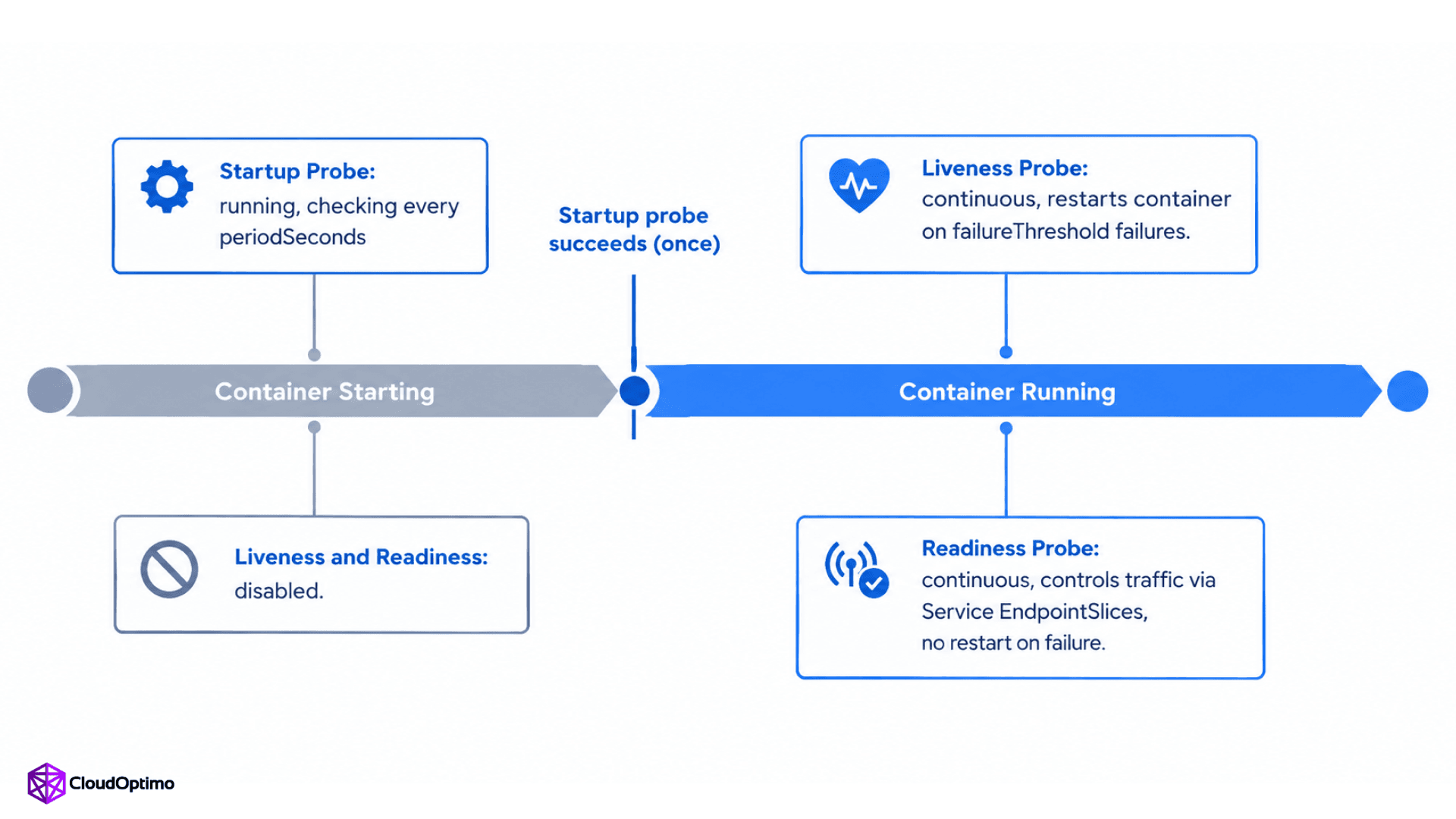
Figure: A startup probe gates liveness and readiness until a slow-starting container is ready, then steps aside permanently: liveness watches for containers that need restarting, while readiness controls traffic without touching the container's lifecycle.
Five fields control the timing and threshold behavior, and they're shared across all three probe types with a couple of exceptions.
- initialDelaySeconds: how long to wait after the container starts before running the first probe. Defaults to 0.
- periodSeconds: how often the probe runs. Defaults to 10 seconds.
- timeoutSeconds: how long to wait for a response before counting it as a failure. Defaults to 1 second, which can be too tight for checks that legitimately take longer under load, depending on the endpoint and what it verifies.
- successThreshold: consecutive successes needed to consider the probe passing again after a failure. Defaults to 1, and must stay 1 for liveness and startup probes; only readiness probes can raise it, which is useful for preventing a marginal pod from flapping in and out of load balancing.
- failureThreshold: consecutive failures before Kubernetes acts. Defaults to 3.
Here's a realistic configuration for a service with a slow startup, such as one loading a large in-memory dataset:
| startupProbe: httpGet: path: /healthz port: 8080 periodSeconds: 10 failureThreshold: 30 livenessProbe: httpGet: path: /healthz port: 8080 periodSeconds: 10 timeoutSeconds: 3 failureThreshold: 3 readinessProbe: httpGet: path: /ready port: 8080 periodSeconds: 5 timeoutSeconds: 2 failureThreshold: 3 |
The startup probe here allows up to 300 seconds (30 failures times 10 seconds) for the container to come up before liveness takes over. Once it passes, liveness checks every 10 seconds with a 3-second timeout, and readiness checks separately on its own faster cycle, since traffic eligibility can change more often than the container's basic health does.
Common Misconfigurations
Pointing the liveness probe at a dependency check. A liveness endpoint that checks a database connection means a database blip restarts every pod that talks to it, all at once, which can turn a brief outage into a much larger one. Liveness probes should check whether the process itself is responsive, not whether everything it depends on is currently healthy. Save dependency checks for the readiness probe, where a failure just pauses traffic instead of triggering a restart storm.
No startup probe on a slow-starting container. This is the classic cause of a CrashLoopBackOff with no actual crash: a model-serving pod that takes four minutes to load weights gets killed by the default liveness settings at around 30 seconds, restarts, and gets killed again. The fix is a startup probe with a failureThreshold generous enough to cover the real startup time, not a longer initialDelaySeconds on the liveness probe, which wastes that same delay on every restart regardless of how fast the container actually comes back up.
timeoutSeconds left at the 1-second default for a check that can't reliably answer that fast. An HTTP health check that normally responds in 50 milliseconds can occasionally take longer under CPU pressure or garbage collection pauses. At a 1-second timeout, that occasional slowness reads as a failure, causing pods to flap in and out of readiness or trigger unnecessary restarts. The right value depends on the endpoint's real latency under load rather than a fixed number, but for HTTP probes with any meaningful work behind them, a few seconds is a common starting point worth tuning from.
Reusing the same endpoint for liveness and readiness without different thresholds. This is fine and common for startup and liveness probes together, since a startup probe is meant to gate the same check liveness will take over. It's usually the wrong call between liveness and readiness themselves, since they answer different questions and often need different sensitivity: readiness should react quickly to short-lived issues, while liveness should be more forgiving to avoid unnecessary restarts.
When to Use Each
- Configure a liveness probe when the failure mode you're actually worried about is a process that hangs or deadlocks without crashing, since that's the specific case a liveness probe protects against. If your process reliably crashes on its own whenever something goes wrong, the kubelet's restart policy already handles that without one, and a poorly tuned liveness probe can cause more unnecessary restarts than it prevents.
- Configure a readiness probe whenever a container has any startup dependency, cache warm-up period, or condition under which it's running but shouldn't receive traffic yet.
- Add a startup probe when a container's startup time is slow or variable enough that a reasonable liveness initialDelaySeconds wouldn't safely cover it, which is common for containers loading large datasets, models, or caches, though not universal to every workload.
- Skip a startup probe for genuinely fast, predictable startups, where the added manifest complexity isn't buying you anything a sane liveness delay wouldn't already cover.
Conclusion
The three probes exist because "restart this" and "stop routing to this" are different decisions, and "still starting up" is a third state that shouldn't be judged by either rule. Liveness catches processes that are stuck and won't recover on their own. Readiness controls traffic eligibility without touching the container's lifecycle. Startup probes give slow containers room to initialize without triggering either of the other two prematurely.
Getting this right is less about memorizing the field names and more about being honest with each probe about what it's actually checking: whether the process is alive, whether it can currently serve traffic, and whether it's finished starting, three genuinely different questions that deserve three genuinely different checks.
Frequently Asked Questions (FAQs)
Q1: What is the difference between liveness and readiness probes in Kubernetes?
A liveness probe determines whether a container needs to be restarted, failing it causes the kubelet to kill and restart the container. A readiness probe determines whether a pod should receive traffic, failing it removes the pod's address from the Service's EndpointSlices without restarting anything. Liveness handles unrecoverable hangs; readiness handles temporary conditions where the container is fine but not ready to serve requests.
Q2: What is a Kubernetes startup probe used for?
A startup probe is used for containers with slow or variable startup times. While it runs, Kubernetes disables liveness and readiness checks for that container, preventing a liveness probe from killing a container that simply hasn't finished initializing yet. Once the startup probe succeeds once, it stops running and liveness and readiness take over for the rest of the container's life.
Q3: What happens if a liveness probe fails in Kubernetes?
The kubelet counts consecutive failures against the probe's failureThreshold, which defaults to 3. Once that threshold is reached, the kubelet kills the container and restarts it according to the pod's restart policy. This is meant for containers that are stuck or deadlocked rather than genuinely crashed, since a crashed process is typically already handled by the restart policy on its own.
Q4: Do I always need all three probes on every container?
No. A liveness probe is worth configuring when a stuck or deadlocked process, rather than a clean crash, is the failure mode you need to guard against; if the process already crashes reliably on its own, the restart policy handles it without one. A readiness probe matters whenever a container has a startup dependency or warm-up period. A startup probe is only necessary when startup time is slow or unpredictable enough that a reasonable liveness delay wouldn't safely cover it; fast, simple services often don't need one at all.

