
1. What is a Kubernetes Pod and Why Does it Matter?
A Kubernetes Pod is the smallest deployable and schedulable unit in the Kubernetes ecosystem. Think of it as a logical wrapper, an "atom" of your application, that contains one or more containers. These containers are guaranteed to run together on the same worker node, sharing the same networking and storage resources.
While most production workloads use a "one container per Pod" model, the true power of the Pod lies in its ability to support multi-container patterns. This is often referred to as the Sidecar philosophy. Instead of bloating your main application code with logging, security, or monitoring logic, you run a secondary "sidecar" container next to it. These containers work in such tight synchronization that they function as a single cohesive unit.
Why Kubernetes Uses This Model
Standard containers are designed to be isolated, but in real-world distributed systems, processes often need to "live and move" together. Kubernetes uses Pods to solve this by providing:
- Shared Network Identity: Every container in a Pod shares the same IP address and port space. They communicate with each other simply via localhost.
- Shared Storage: You can mount a single volume accessible to every container in the Pod, enabling seamless data exchange.
- Atomic Scheduling: Kubernetes never splits a Pod across multiple nodes. It schedules the entire unit to a single worker node, ensuring the primary app and its supporting services (like a service mesh or log shipper) are never separated.
- Simplified Management: By grouping tightly coupled processes, Kubernetes can manage the entire stack's lifecycle, starting, stopping, and scaling them as one entity rather than individual, disconnected containers.
By abstracting containers into Pods, Kubernetes provides the necessary "glue" for complex, cloud-native applications to function reliably at scale.
2. Kubernetes Pod Architecture
A Kubernetes Pod is not just a group of containers; it is a managed collection of Linux namespaces and cgroups. While it appears as a single unit, it is actually a carefully coordinated environment where multiple processes share the same "view" of the system.
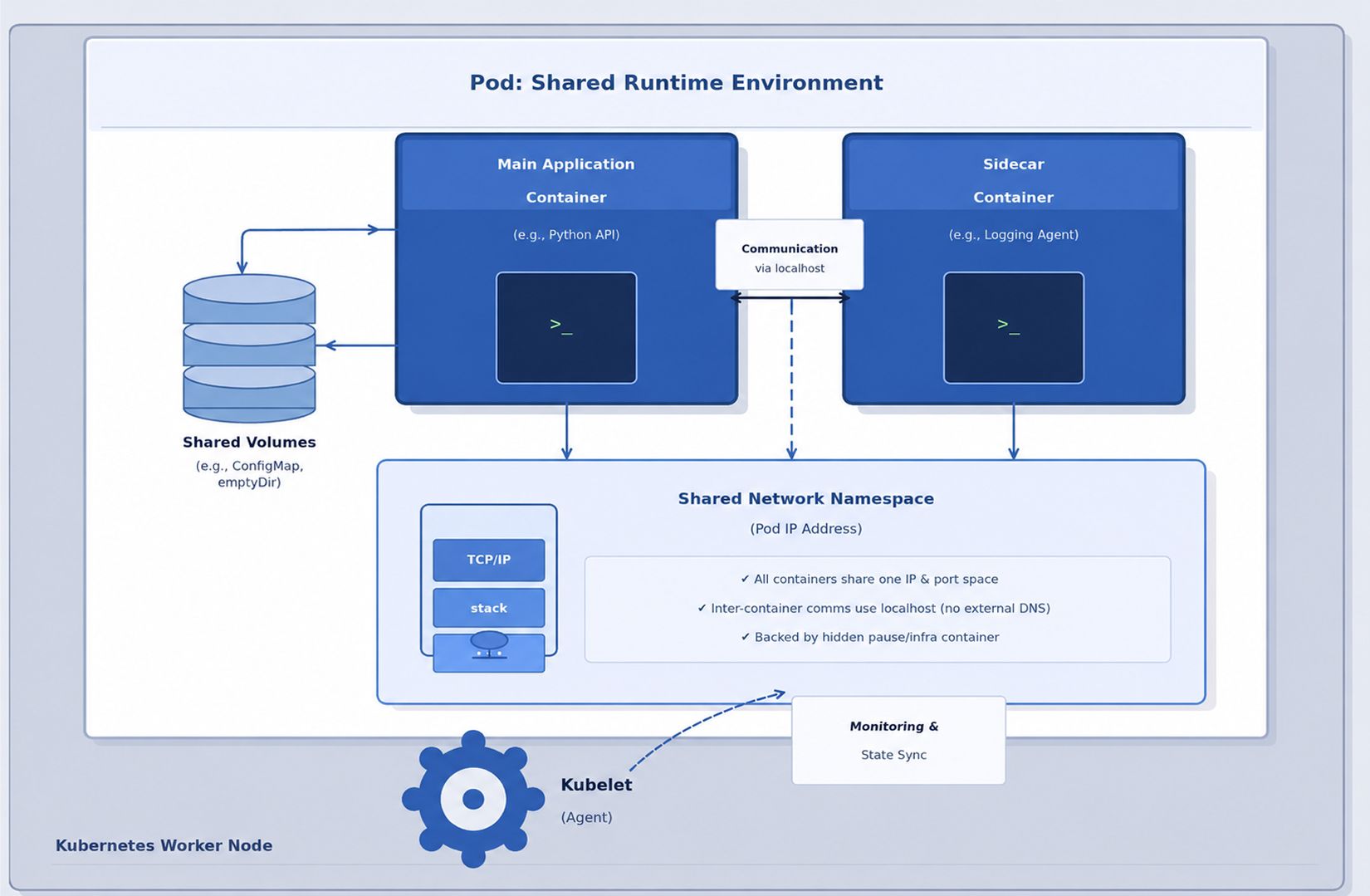
The "Pause" Container: The Pod’s Foundation
As seen in the diagram above, the heart of the Pod is the Shared Network Namespace. This is anchored by a hidden "infrastructure" container known as the Pause container:
- The Anchor: When a Pod is created, Kubernetes starts the Pause container first to "hold" the network namespace open.
- Networking: All other containers (Main Application and Sidecars) join this namespace. This is why they share a single IP and communicate via localhost.
- Stability: If your application container crashes, the Pod’s IP remains stable because the Pause container stays alive, maintaining the network stack.
The Orchestration Loop: Kubelet and Runtime
The diagram also highlights the Kubelet, which acts as the primary node agent. It continuously monitors the Pod's state and communicates with the container runtime to ensure the actual state matches your desired configuration.
Core Architectural Components:
| Component | Technical Purpose |
| Main Application | The primary process running your code (e.g., a Python API) |
| Sidecar Container | A helper process running in the same namespace (e.g., a Logging Agent). |
| Shared Volumes | Filesystems (like ConfigMaps or emptyDir) are accessible to all containers in the Pod. |
| Kubelet (Agent) | The "brain" on the node that syncs the Pod state and performs health monitoring. |
| Resource Boundaries | Hidden cgroup constraints that define the CPU and Memory limits for the Pod. |
3. The Kubernetes Pod Lifecycle
Pods are ephemeral by design. Unlike traditional servers that are manually maintained for years, Kubernetes Pods are "disposable." They are constantly created, terminated, and moved to ensure the cluster matches your desired state.
Understanding this lifecycle is key to building resilient applications. It begins the moment you send a command to the cluster.
Phase 1: The Creation Flow
When you run kubectl apply -f pod.yaml, a highly coordinated sequence of events begins:
- Validation: The API Server validates your manifest for syntax and policy compliance.
- Persistence: The desired state is recorded in etcd (the cluster's brain).
- Scheduling: The Scheduler notices the new Pod and selects the best worker node based on resource availability.
- Execution: The Kubelet on the chosen node receives the order, pulls the container images via the Container Runtime, and attaches networking and storage.
Phase 2: Pod Status Phases
Once the creation flow is in motion, the Pod moves through several defined "Phases" that indicate its current health:
- Pending: The Pod is accepted by the cluster, but one or more containers are not yet running. This includes the time spent downloading images or waiting to be scheduled.
- Running: The Pod has been bound to a node, and all containers have been created. At least one container is currently running or in the process of starting.
- Succeeded: All containers in the Pod have terminated successfully (exit code 0) and will not be restarted. This is common for Jobs.
- Failed: All containers have terminated, but at least one container ended in a failure (non-zero exit code).
- Unknown: The state cannot be determined, usually due to a communication error between the control plane and the worker node.
Phase 3: The Ephemeral Reality
The most important characteristic of the Pod lifecycle is its self-correcting nature. If a Pod enters a failed state or the node it lives on dies, Kubernetes does not "repair" the Pod. Instead, it deletes it and creates a brand-new replacement.
This is why you should never rely on a Pod's internal state or local temporary files. In a production environment, the "desired state" is the only permanent thing; the Pods themselves are just passing through.
4. Pod Networking and Service Discovery
Networking is the nervous system of a Kubernetes cluster. Unlike traditional Docker environments that rely on complex port mapping or NAT (Network Address Translation), Kubernetes operates on a "Flat Network" model.
In this model, every Pod is treated like a full VM on a network; it receives its own unique internal IP address, and any Pod can reach any other Pod using that IP, regardless of which worker node they are sitting on.
How Pods Communicate
Pod networking is handled at three distinct levels:
- Intra-Pod (Container-to-Container): Because containers in a Pod share the same network namespace, they communicate via localhost. For example, a web app on port 80 can reach its sidecar database on localhost:5432.
- Inter-Pod (Pod-to-Pod): Communication between Pods is managed by the Container Network Interface (CNI). Modern clusters typically use eBPF-powered plugins like Cilium for high performance, or Calico for advanced security policies.
- Pod-to-External: Traffic leaving the cluster is typically routed through a NAT gateway or an Egress controller.
The IP Problem: Ephemeral vs. Stable
The biggest challenge with Pod networking is that Pod IPs are not permanent. If a Pod crashes and a Deployment recreates it, the new Pod will almost certainly have a different IP address. This makes hardcoding IP addresses into your application a recipe for failure.
The Solution: Kubernetes Services
To solve the "moving target" problem of Pod IPs, Kubernetes uses Services. A Service provides a single, constant IP address (ClusterIP) and a DNS name that stays the same for the entire life of the application.
How it works:
- A Service uses Selectors (labels) to track which Pods belong to it.
- When a Pod is recreated, the Service automatically detects the new IP and updates its routing table.
- Your applications simply call a stable DNS name, such as: backend-api.production.svc.cluster.local
By using Services, you decouple your microservices from the underlying "churn" of the Pod lifecycle, ensuring that even as Pods are created and destroyed, your network traffic always finds its destination.
5. Pod Specifications: Resources and Health Probes
To move a Pod from a concept to a running process, you must define its Specification in a YAML manifest. For production-grade workloads, two areas are non-negotiable: Resource Management and Health Probes.
Resource Management (Requests vs. Limits)
Kubernetes uses these values to prevent "Noisy Neighbor" syndrome, where one greedy Pod crashes others on the same node.
- Requests: The minimum resources guaranteed to the Pod. The Scheduler uses this to find a node with enough "room."
- Limits: The hard ceiling. If a Pod tries to exceed its memory limit, it is OOM (Out-of-Memory) killed.
| resources: requests: cpu: "250m" memory: "256Mi" limits: cpu: "500m" memory: "512Mi" |
Health Probes: The Cluster's Eyes
Without probes, Kubernetes only knows if the container process is "alive," not if the app is actually working.
| Probe Type | Purpose |
| Liveness Probe | Determines whether the container should be restarted |
| Readiness Probe | Controls whether traffic should reach the Pod |
| Startup Probe | Handles slow-starting applications safely |
A common production mistake is deploying Pods without readiness probes. An application may technically be running while still loading caches, establishing database connections, or completing initialization tasks. Without readiness checks, Kubernetes may route user traffic too early and create avoidable failures during startup.
6. Multi-Container Pods
While single-container Pods are the most common pattern in Kubernetes, there are situations where multiple containers need to operate closely together within the same Pod.
In a multi-container Pod, all containers share:
- the same network namespace
- the same storage volumes
- the same lifecycle and scheduling behavior
This design is useful when containers must cooperate tightly to support a single application workload.
Common examples include a logging sidecar collecting application logs, a reverse proxy handling traffic routing, or a metrics exporter exposing monitoring data alongside the main application container.
However, multi-container Pods should be used carefully. A common mistake is grouping unrelated services into the same Pod for convenience. This creates unnecessary coupling between components, makes independent scaling difficult, and increases operational complexity.
The core principle is straightforward:
Containers should only share a Pod when they genuinely need the same lifecycle, network identity, and execution environment.
If services can operate independently, they should usually run in separate Pods and communicate through Kubernetes Services instead.
7. Pod Security and Best Practices
Pods share the host node’s kernel, which means a compromised Pod can potentially affect other workloads running on the same node. Because of this, Pod security is not optional in production Kubernetes environments. It must be built directly into the Pod specification through proper security controls and runtime restrictions.
One of the most important practices is running containers as non-root users. Containers running with root privileges increase the risk of host-level compromise if the application is exploited. Kubernetes allows this to be restricted through the Security Context configuration.
Another critical control is using a read-only root filesystem. This prevents attackers from modifying the container filesystem, downloading malicious binaries, or executing unauthorized scripts during runtime.
Privilege escalation should also be disabled explicitly using:
| allowPrivilegeEscalation: false |
Without this restriction, processes inside the container may gain higher privileges than intended, increasing the attack surface.
Container image selection also plays a major role in Pod security. Large images often include unnecessary binaries, shells, and package managers that attackers can abuse. Minimal images such as Alpine or Distroless reduce this risk by limiting the available tools inside the container.
Additional production best practices include:
- Defining CPU and memory limits for every Pod
- Using liveness and readiness probes correctly
- Avoiding privileged containers unless absolutely necessary
- Pulling images only from trusted registries
- Keeping secrets outside container images
- Regularly scanning container images for vulnerabilities
In production systems, Pod security is less about a single setting and more about reducing unnecessary privileges at every layer.
8. Kubernetes Pod vs Deployment
One of the most common misconceptions in Kubernetes is treating Pods and Deployments as interchangeable resources. They serve very different purposes.
A Pod is the smallest deployable unit in Kubernetes. It is responsible for running one or more containers together on a node.
A Deployment, on the other hand, is a higher-level controller that manages Pods automatically. It handles scaling, recovery, updates, and rollout behavior.
The difference becomes much more important in production environments.
| Feature | Pod | Deployment |
| Purpose | Runs containers | Manages Pods |
| Scaling | Manual | Replica-based |
| Recovery | Limited | Automatic replacement |
| Rolling Updates | No | Supported |
| Production Usage | Rarely standalone | Standard practice |
Standalone Pods are rarely used in real-world production systems because they are fragile by design. If a Pod crashes or the node fails, Kubernetes does not automatically recreate it unless another controller manages it.
Deployments solve this problem by continuously monitoring the desired state of the application. If a Pod fails, the Deployment automatically creates a replacement Pod.
Deployments also provide several operational advantages:
- Replica management for high availability
- Rolling updates with minimal downtime
- Rollback support for failed releases
- Automatic Pod recovery
- Horizontal scaling capabilities
- Rollout history and revision tracking
For this reason, most Kubernetes applications are deployed using Deployments rather than raw Pods directly. Pods are the execution unit, while Deployments provide the operational stability required for production workloads.
9. Conclusion: Why Pod Design is the Foundation of Production
In production environments, Kubernetes itself is rarely the root cause of instability. Most outages originate from weak Pod design, missing resource limits, poor health probes, or oversized images.
By mastering the Pod layer, you ensure:
- Predictable Recovery: Properly configured probes allow Kubernetes to self-heal without manual intervention.
- Efficient Scaling: Accurate resource requests mean your cluster scales based on true need, saving infrastructure costs.
- Resilience: Treating Pods as disposable infrastructure (stateless and replaceable) allows your application to survive node failures and rolling updates seamlessly.
Pods are the execution layer of the cloud-native world. Whether you are moving toward a Service Mesh or advanced Autoscaling, the journey starts with a well-configured, secure, and healthy Pod.

