
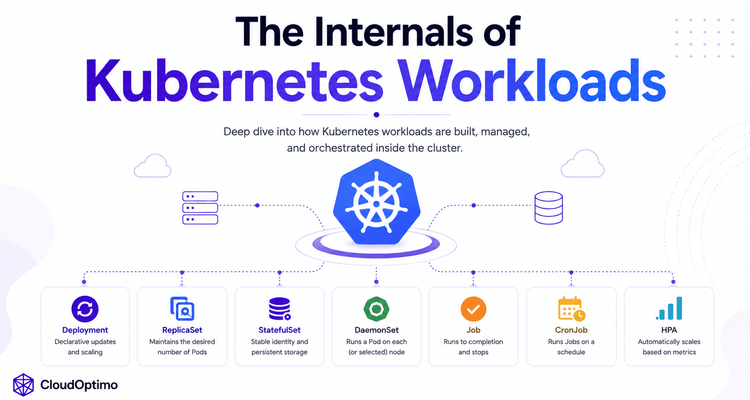
1.What Are Kubernetes Workloads?
Let’s understand how Kubernetes workloads actually work behind the scenes and how Kubernetes manages applications automatically inside a cluster.
Kubernetes workloads are the core building blocks used for running and managing applications inside a Kubernetes environment. A workload defines how containers should be deployed, scaled, updated, monitored, and maintained across worker nodes.
At the center of every Kubernetes workload is the Pod, which acts as the smallest deployable unit containing one or more containers. Kubernetes then provides higher-level workload controllers that automatically manage Pods based on the desired application behavior defined by the user.
Different workload controllers are designed for different types of applications and operational requirements:
- ReplicaSet ensures a fixed number of Pods remain running
- Deployment manages stateless applications with rolling updates and scaling
- StatefulSet manages stateful applications requiring stable identity and storage
- DaemonSet runs Pods on every worker node
- Job executes temporary workloads until completion
- CronJob schedules recurring Jobs at fixed intervals
- HorizontalPodAutoscaler (HPA) automatically scales applications based on workload demand
Instead of manually managing containers and infrastructure, Kubernetes continuously monitors the cluster state and uses controllers to ensure that the actual running state always matches the desired state defined by the user.
Understanding Kubernetes workloads is essential for learning how Kubernetes provides:
- automated scaling
- self-healing infrastructure
- rolling updates
- workload scheduling
- persistent application management
- high availability
In this blog, we will deeply explore how Kubernetes workloads function internally, how controllers manage application state, and how different workload types work together to power modern cloud-native systems.
2. Pods
What is pod?
A Pod is the smallest and most fundamental deployable unit in Kubernetes. Every application running inside a Kubernetes cluster ultimately runs inside a Pod. A Pod acts as a wrapper around one or more containers that share the same network namespace, IP address, storage volumes, and lifecycle. Containers inside the same Pod can communicate using localhost and can share data through mounted volumes, making Pods suitable for patterns such as sidecars, logging agents, and proxies alongside the main application container.
Core Characteristics of a Pod
- Smallest deployable unit in Kubernetes
- Contains one or more tightly coupled containers
- Shares network namespace and IP address
- Supports shared storage volumes
- Containers communicate using localhost
- Scheduled onto a single worker node
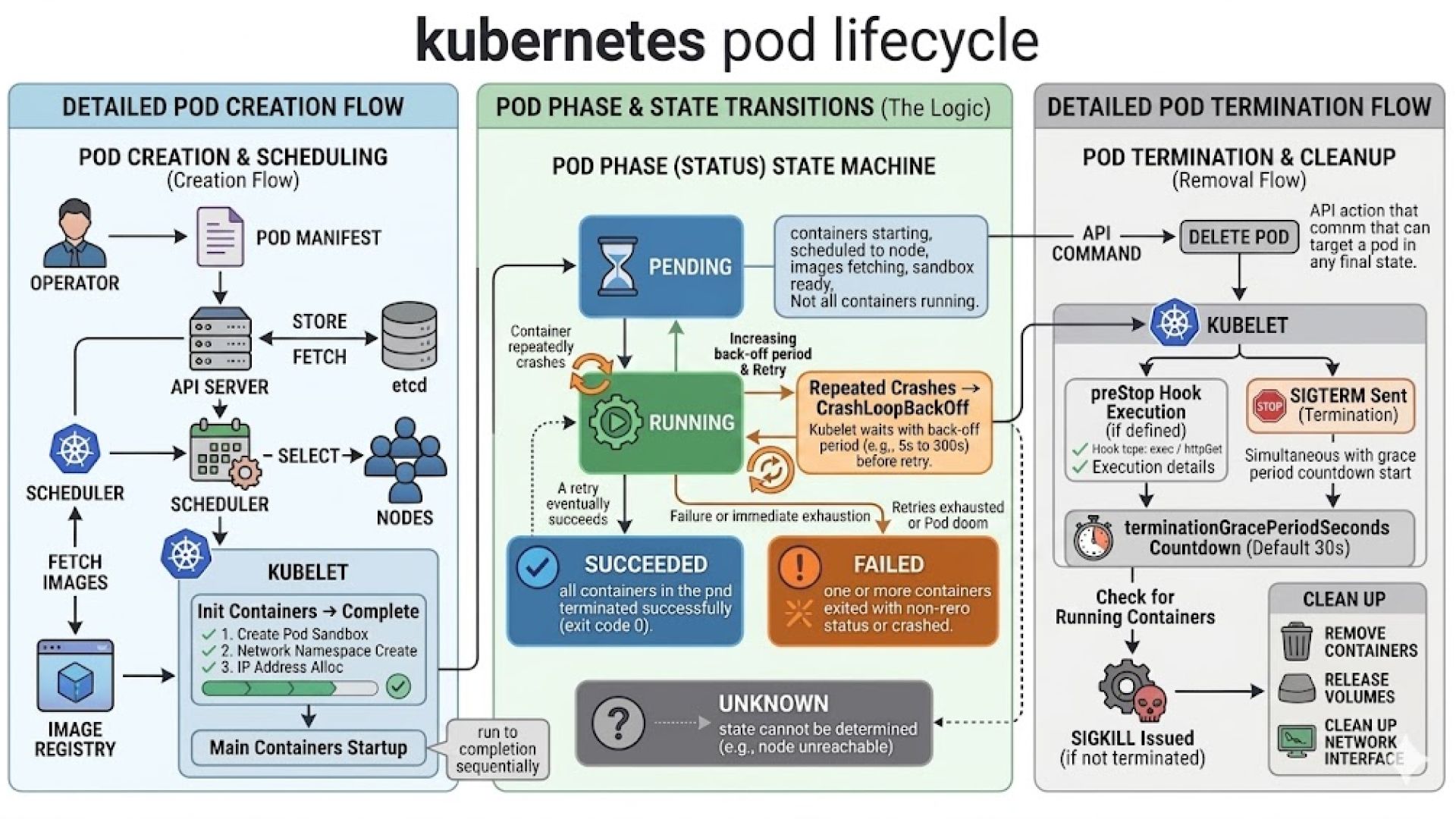
Pods are ephemeral by nature, meaning they are temporary and replaceable rather than permanent. When a Pod is created, Kubernetes stores its desired state in etcd through the API Server, after which the Scheduler assigns the Pod to a worker node. The Kubelet running on that node then pulls container images, configures networking and storage, and starts the containers using the container runtime.
Pod Lifecycle Phases
Pods move through different lifecycle states during their execution:
- Pending → Pod is created but containers are not started yet
- Running → Pod is successfully running on a node
- Succeeded → All containers completed successfully
- Failed → One or more containers failed
- Unknown → Kubernetes cannot determine Pod state
Pod Networking
Every Pod gets its own cluster-internal IP address. All containers inside the same Pod share the same IP and port space, allowing them to communicate using localhost. Communication between Pods happens through Kubernetes networking, while Services provide stable network access to Pods.
Storage & Volumes
Pods support multiple storage mechanisms that allow containers to share data and persist important files during execution. Kubernetes volumes are mounted inside containers and remain available even if individual containers inside the Pod restart.
Common storage types include:
- emptyDir → Temporary storage created when the Pod starts and removed when the Pod is deleted
- ConfigMaps → Used for storing application configuration data
- Secrets → Used for securely storing sensitive information such as passwords, tokens, and API keys
- PersistentVolumeClaims (PVCs) → Used for persistent storage that survives Pod restarts and rescheduling
- volumes → Mount files or directories directly from the worker node filesystem
Volumes help containers inside the same Pod share files, logs, configuration, and application data efficiently while enabling both temporary and persistent storage management in Kubernetes.
Internal Working Flow
In real-world Kubernetes systems, Pods form the foundational runtime abstraction upon which all Kubernetes workloads are built. Every higher-level Kubernetes workload controller ultimately exists to create, manage, scale, and replace Pods efficiently across the cluster.
3. ReplicaSet
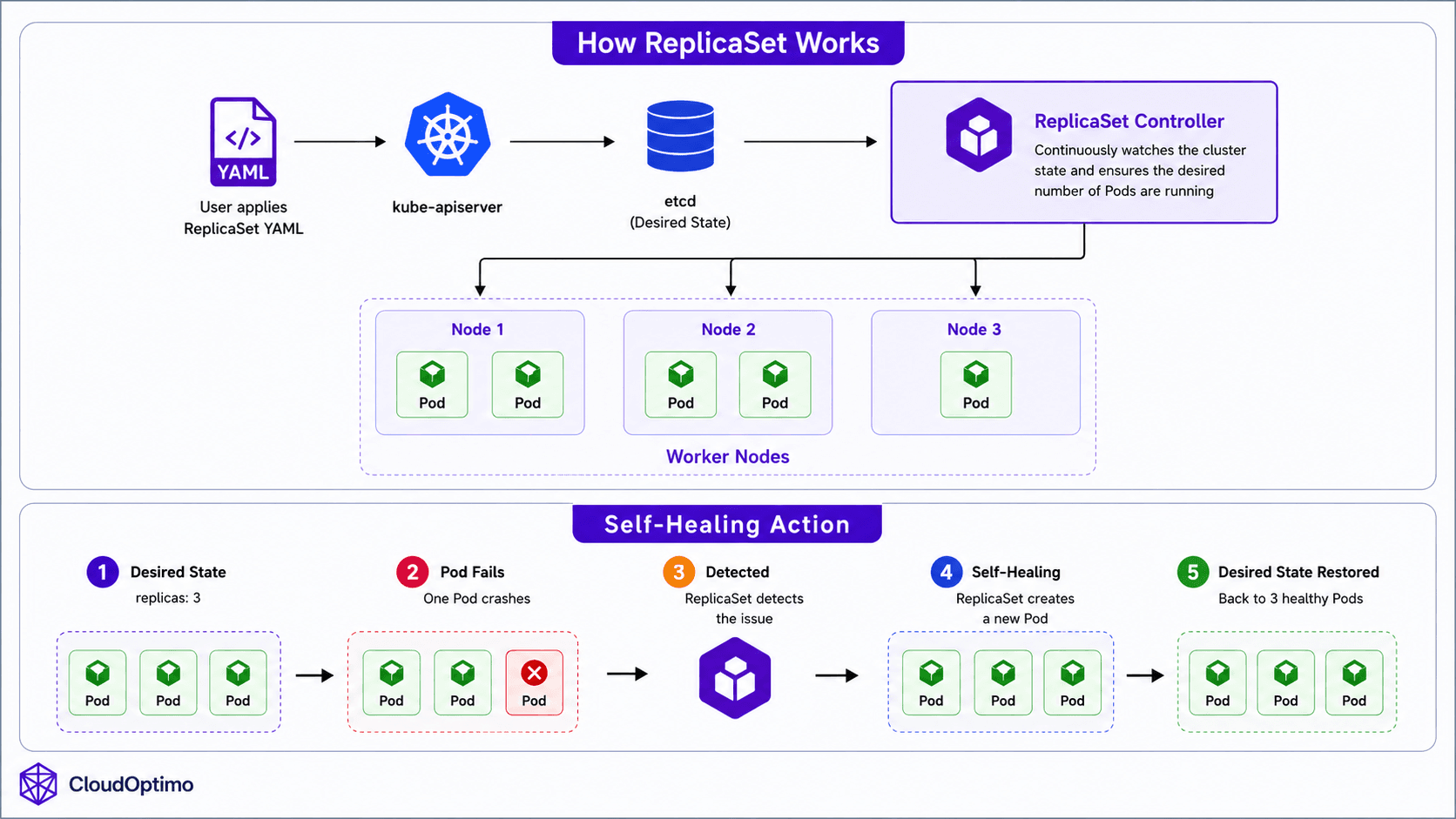
A ReplicaSet is a Kubernetes workload controller responsible for maintaining a specified number of identical Pod replicas inside the cluster. Instead of manually monitoring Pods and recreating failed ones, the ReplicaSet automatically watches the cluster state and restores missing Pods whenever necessary. This introduces one of Kubernetes most important capabilities self-healing infrastructure.
For example:
replicas: 3
Kubernetes continuously ensures that exactly three Pods remain active. If one Pod crashes or gets deleted, the ReplicaSet immediately creates a replacement Pod to restore the desired state.
ReplicaSets operate using Kubernetes’ reconciliation loop. The ReplicaSet controller continuously compares the desired state stored in etcd with the actual running state inside the cluster. If a mismatch is detected, Kubernetes automatically takes corrective action to bring the cluster back to the expected state.
The ReplicaSet controller runs inside the kube-controller-manager and continuously watches the API Server for changes related to Pods and ReplicaSets.
Labels and Selectors
ReplicaSets identify and manage Pods using labels and selectors.
Example:
| selector: matchLabels: app: backend |
Any Pod with matching labels becomes part of that ReplicaSet.
Pod Template
A ReplicaSet contains a Pod template that defines how new Pods should be created whenever additional replicas are required. This template acts as a blueprint for Kubernetes, ensuring that every Pod created by the ReplicaSet has the exact same configuration and behavior.
The Pod template includes important configuration details such as:
- Container images
- Exposed ports
- Environment variables
- CPU and memory limits
- Storage volumes
- Health probes
- Networking configuration
Whenever a Pod crashes, gets deleted, or scaling operations occur, the ReplicaSet automatically uses this template to create identical replacement Pods. This guarantees consistency across all running replicas and ensures that applications behave predictably inside the cluster.
4. Deployment: Managing Application Updates
Why Deployments Exist?
In the previous section, we understood how ReplicaSets provide self-healing by continuously maintaining the desired number of Pods inside the cluster. However, modern applications require much more than automatic Pod recovery. Applications need controlled version upgrades, rolling deployments, rollback capabilities, and scalable lifecycle management. Managing all these operations directly through ReplicaSets becomes difficult and operationally complex.
To solve this problem, Kubernetes introduces a higher-level workload controller called a Deployment. A Deployment acts as the application lifecycle management layer in Kubernetes, automating updates, scaling, self-healing, and release management for stateless applications.
Internal Architecture & Working of Deployments
Unlike ReplicaSets, Deployments do not directly manage Pods. Instead, a Deployment creates and manages ReplicaSets, while ReplicaSets are responsible for creating and maintaining the actual running Pods. This layered controller architecture enables Kubernetes to separate application lifecycle management from Pod-level self-healing operations.
Deployments are primarily designed for stateless applications where Pods can be replaced safely without preserving persistent identity or storage.
When a Deployment is created, Kubernetes stores the desired state inside etcd through the API Server. The Deployment controller running inside the kube-controller-manager continuously watches the Deployment object and ensures that the correct ReplicaSet and Pods exist in the cluster.
The internal working flow looks like this:
| kubectl apply ↓ API Server ↓ etcd ↓ Deployment Controller ↓ ReplicaSet Created ↓ Pods Created |
This layered architecture enables Kubernetes to manage application updates, scaling, self-healing, and rolling deployments in a fully automated manner.
Rolling Updates, Rollbacks & Declarative Scaling
The most important capability introduced by Deployments is controlled application updates.
One of the most powerful capabilities of Deployments is zero-downtime rolling updates. Instead of replacing all Pods simultaneously, Kubernetes gradually creates new Pods while slowly terminating older ones. This ensures that application availability is maintained while traffic shifts smoothly from old Pods to updated Pods.
Deployments also maintain revision history of ReplicaSets, allowing Kubernetes to rollback applications to previously stable versions if an update fails.
Example:
kubectl rollout undo deployment backend
In addition, Deployments support declarative horizontal scaling by increasing or decreasing the number of Pod replicas manually or automatically using the Horizontal Pod Autoscaler (HPA).
Example:
replicas: 5
Because Deployments inherit ReplicaSet behavior, failed Pods are automatically recreated to maintain the desired application state and application availability.
5. StatefulSet: Managing Stateful Applications
Why StatefulSets so useful?
Earlier, we understood how Deployments manage stateless applications using rolling updates, scaling, and automated lifecycle management. However, not all applications can be treated as stateless. Distributed databases and clustered systems require stable identities, persistent storage, and predictable startup behavior. Replacing Pods randomly in such systems can lead to data inconsistency, failed replication, and unstable cluster communication.
To solve this problem, Kubernetes introduces a specialized workload controller called a StatefulSet. A StatefulSet is designed for managing stateful applications that require persistent identity and storage across Pod restarts, rescheduling events, and node failures.
Unlike Deployments, StatefulSets ensure that each Pod keeps:
- A stable Pod name
- A stable network identity
- Dedicated persistent storage
even after the Pod is recreated or moved to another worker node.
StatefulSets are primarily used for applications where each Pod represents a unique member of a distributed system rather than interchangeable replicas.
Internal Architecture & Ordered Behavior
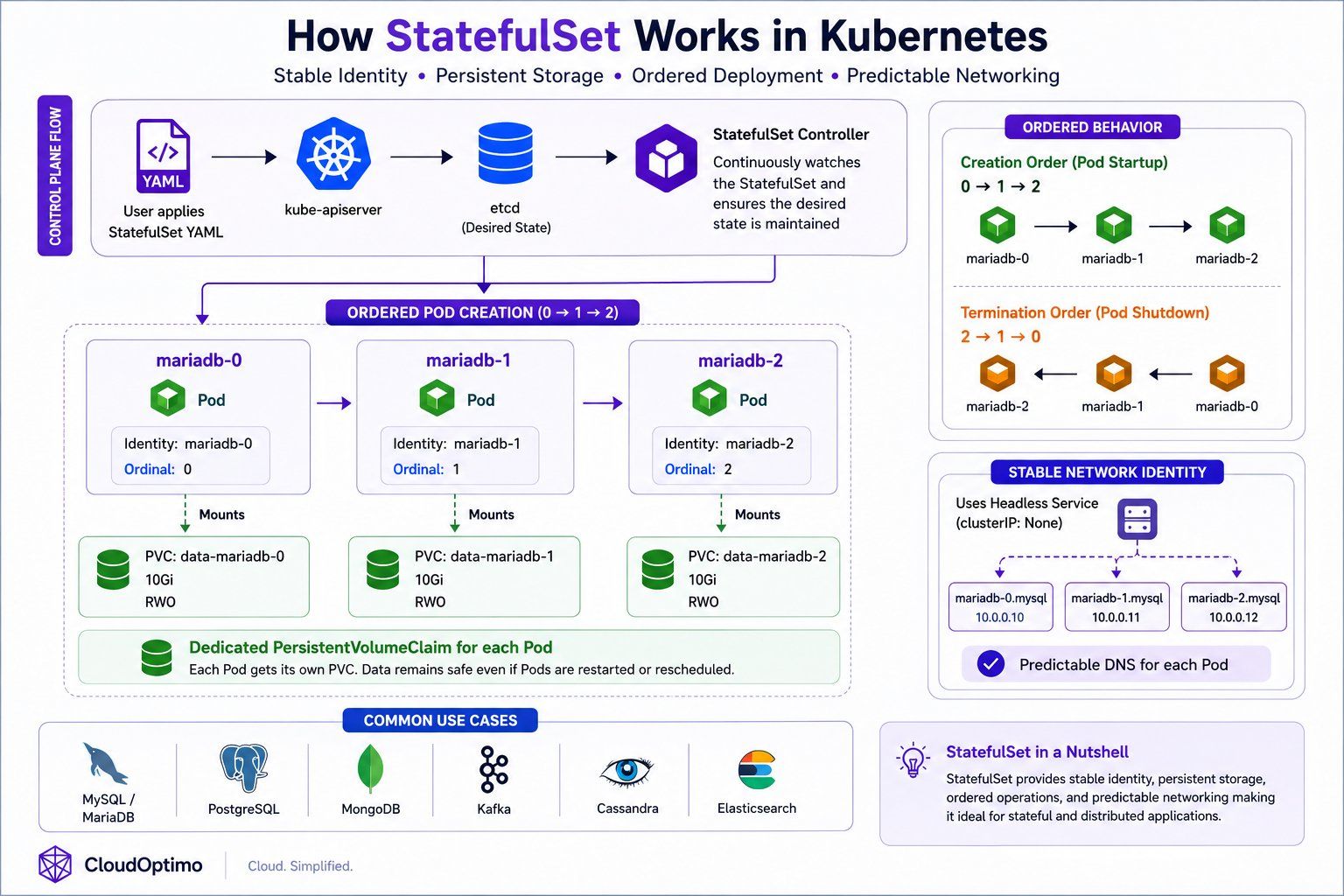
A StatefulSet manages Pods in a predictable and ordered manner. Each Pod receives a unique and persistent identity such as:
mariadb-0
mariadb-1
mariadb-2
Unlike Deployments, StatefulSets do not create Pods randomly or simultaneously. Pods are created sequentially:
0 → 1 → 2
and terminated in reverse order:
2 → 1 → 0
This ordered behavior is critical for clustered databases and distributed systems where startup order, replication order, and graceful shutdown sequences are important.
The complete internal working flow of StatefulSets, including ordered Pod creation, persistent storage attachment, and stable networking, is illustrated in the following architecture diagram.
Persistent Storage & Stable Networking
One of the most important capabilities provided by StatefulSets is maintaining stable storage and predictable networking for each Pod. Unlike Deployments where Pods are treated as interchangeable replicas, every StatefulSet Pod receives its own dedicated PersistentVolumeClaim (PVC) that remains permanently associated with the same Pod identity even after restarts, rescheduling, or node failures.
For example:
mariadb-0 → PVC-0
mariadb-1 → PVC-1
mariadb-2 → PVC-2
This ensures that application data remains preserved and consistently attached to the correct Pod throughout the application lifecycle.
StatefulSets also commonly use a Headless Service (clusterIP: None) to provide stable DNS identities for individual Pods such as:
mariadb-0.mysql
mariadb-1.mysql
This predictable identity and networking behavior is critical for distributed systems that rely on replication, leader election, cluster discovery, quorum management, and reliable node-to-node communication.
Because of these capabilities, StatefulSets are widely used for stateful and distributed applications such as MySQL, PostgreSQL, MongoDB, Kafka, Cassandra, and Elasticsearch, where stable identity, persistent storage, and reliable communication between cluster members are essential.
In real-world Kubernetes environments, StatefulSets form the foundation for running reliable databases and distributed systems because they combine stable identity, persistent storage, ordered deployment behavior, and predictable networking into a single workload controller.
6. DaemonSet: Running Workloads on Every Node
Why DaemonSets existence is very important?
So far, we explored how Deployments and StatefulSets manage application workloads by creating Pods based on replica counts and application requirements. However, some services in Kubernetes are not application-specific and instead need to run consistently on every worker node inside the cluster.
For example, monitoring agents, log collectors, security scanners, and networking components must be present on each node to collect system-level metrics, logs, and networking information. Managing these Pods manually on every node would become operationally difficult as clusters grow dynamically.
To solve this problem, Kubernetes introduces a specialized workload controller called a DaemonSet.
A DaemonSet ensures that a specific Pod runs on every eligible worker node inside the cluster. Whenever a new node is added, Kubernetes automatically creates the DaemonSet Pod on that node as well. Similarly, if a node is removed, the corresponding Pod is automatically removed.
Unlike Deployments, DaemonSets are not designed for application scaling using replica counts. Instead, the number of Pods depends directly on the number of nodes available inside the cluster.
Internal Architecture & Working of DaemonSets
When a DaemonSet is created, Kubernetes stores the desired state inside etcd through the API Server. The DaemonSet controller running inside the kube-controller-manager continuously watches the cluster for node changes and ensures that exactly one DaemonSet Pod runs on each eligible worker node.
The internal working behavior looks like this:
Worker Node 1 → DaemonSet Pod
Worker Node 2 → DaemonSet Pod
Worker Node 3 → DaemonSet Pod
If a new worker node joins the cluster:
| New Node Added ↓ DaemonSet Controller Detects Node ↓ New Pod Automatically Created |
This automatic node-aware scheduling allows Kubernetes to maintain cluster-wide background services consistently across all nodes without manual intervention.
DaemonSet Pods are usually scheduled directly onto worker nodes and often interact closely with node-level resources such as:
- system logs
- host networking
- container runtime
- operating system metrics
- filesystem data
Because of this, DaemonSet Pods commonly use:
- hostPath volumes
- privileged containers
- host networking
- node selectors and tolerations
to access low-level node resources safely and efficiently.
The complete internal workflow of DaemonSets, including node detection and automatic Pod creation across worker nodes, is illustrated in the following architecture diagram.
Real-World Usage of DaemonSets
DaemonSets are primarily used for infrastructure-level services that must run consistently on every node inside the cluster.
For example:
- Prometheus Node Exporter collects CPU, memory, disk, and network metrics from every node.
- Fluentd collects and forwards logs from containers running on each node.
- CNI networking plugins manage cluster networking on every worker node.
- Security agents monitor node-level security events and vulnerabilities.
In real-world Kubernetes environments, DaemonSets form the foundation for cluster-wide monitoring, logging, networking, and security operations because they ensure that critical background services are automatically available across all worker nodes in the cluster.
7. Job: Running One-Time & Batch Workloads
How job so useful?
In the previous sections, we explored Kubernetes workloads designed for continuously running applications and infrastructure services. However, some workloads are temporary and only need to run until a specific task is completed. Examples include database backups, data migration, report generation, and batch processing tasks.
Running such workloads using Deployments would be inefficient because Deployments continuously try to keep Pods running forever. To solve this problem, Kubernetes introduces a workload controller called a Job.
A Job is designed for running temporary or one-time tasks until successful completion. Unlike Deployments, Jobs are not meant for continuously running applications. Instead, Kubernetes ensures that the task completes successfully even if Pods fail during execution.
Internal Architecture & Working of Jobs
When a Job is created, Kubernetes stores the desired state inside etcd through the API Server. The Job controller running inside the kube-controller-manager continuously watches the Job object and creates Pods to execute the required task.
The Job controller monitors Pod execution status and ensures that the workload completes successfully. If a Pod fails before completing the task, Kubernetes automatically creates a replacement Pod and retries the execution based on the Job configuration.
Unlike Deployments where Pods remain running continuously, Job Pods terminate after the assigned task finishes successfully.
Jobs supports:
- automatic retry handling
- parallel task execution
- completion tracking
- failure recovery
This makes Jobs highly reliable for batch processing and temporary workloads.
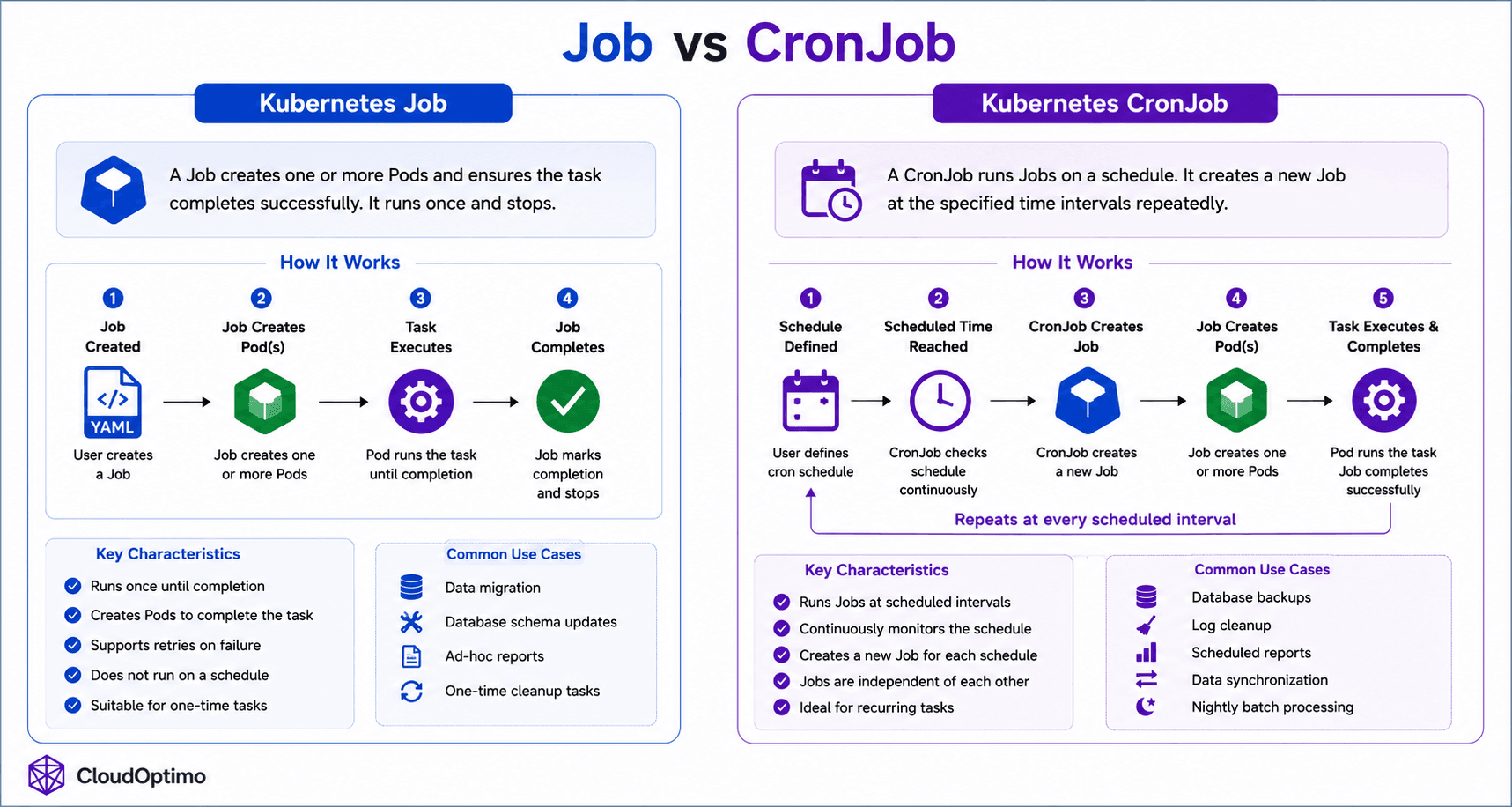
The complete internal workflow of Kubernetes Jobs, including task execution, retries, and successful completion handling, is illustrated in the following architecture diagram.
Real-World Usage of Jobs
Jobs are commonly used for workloads that must run reliably until completion.
Common use cases include:
- Database backups
- Data migration
- Batch processing
- Report generation
- One-time scripts
For example:
- A backup Job may run once every night to store database snapshots.
- A migration Job may execute schema updates before a new application release.
- A batch processing Job may analyze large datasets and terminate after processing completes.
In real-world Kubernetes environments, Jobs provide a reliable mechanism for executing short-lived workloads because Kubernetes continuously monitors task execution, retries failed Pods automatically, and ensures successful completion of the assigned task.
8. CronJob: Running Scheduled Workloads in Kubernetes
Why CronJobs exist even if we have job?
After understanding how Kubernetes Jobs execute temporary workloads until completion, the next challenge is automating workloads that must run repeatedly on a schedule. Real-world systems often require periodic execution of tasks such as backups, cleanup operations, report generation, and synchronization processes.
Kubernetes solves this using a specialized workload controller called a CronJob.
A CronJob is designed for running Jobs automatically at scheduled intervals. It works similarly to traditional Linux cron jobs by creating Kubernetes Jobs based on defined cron schedules.
Organizations commonly use CronJobs for:
- automated database backups
- log cleanup operations
- scheduled report generation
- data synchronization
- nightly batch processing
Unlike standard Jobs that execute once and terminate, CronJobs continuously monitor schedules and automatically create new Jobs whenever the configured execution time is reached. This allows Kubernetes to automate recurring operational tasks reliably without manual intervention.
Internal Architecture & Working of CronJobs
When a CronJob is created, Kubernetes stores the desired state inside etcd through the API Server. The CronJob controller running inside the kube-controller-manager continuously watches the configured schedule and checks whether a new Job needs to be created.
Once the scheduled time is reached, the CronJob controller automatically creates a Kubernetes Job. That Job then creates Pods to execute the required task. After the task completes successfully, the Job finishes while the CronJob itself remains active and waits for the next scheduled execution cycle.
Because of CronJobs internally create Jobs, they automatically inherit all Job capabilities such as:
- automatic retries
- failure recovery
- completion tracking
- parallel execution support
This layered architecture allows Kubernetes to provide reliable scheduled workload execution with minimal operational effort.
CronJobs use standard cron syntax for defining schedules.
Example:
schedule: "0 2 * * *"
This schedule runs the workload every day at 2:00 AM.
The complete internal workflow of CronJobs, including schedule monitoring, Job creation, and automated task execution, is illustrated in the above job vs cronjob diagram.
In real-world Kubernetes environments, CronJobs provide a reliable mechanism for automating scheduled operational tasks because Kubernetes continuously monitors execution schedules, automatically creates Jobs at the correct time, and ensures successful task completion through the Job controller architecture.
9. HorizontalPodAutoscaler (HPA): Dynamic Scaling in Kubernetes
Why HPA comes in picture?
We explored how Kubernetes workloads such as Deployments, StatefulSets, DaemonSets, Jobs, and CronJobs manage application execution and lifecycle operations inside the cluster. However, modern applications often experience continuously changing traffic patterns and workload demand.
For example, backend APIs, microservices, and web applications may receive sudden spikes in traffic during peak hours and very low traffic during off-peak periods. Manually scaling Pods for these changing workloads would become inefficient and operationally complex.
To solve this problem, Kubernetes introduces a workload controller called the HorizontalPodAutoscaler (HPA).
An HPA automatically increases or decreases the number of Pods based on resource usage or custom application metrics. This enables Kubernetes to dynamically scale applications in real time while maintaining application performance, availability, and efficient resource utilization.
Internal Architecture & Working of HPA
The HorizontalPodAutoscaler continuously monitors application metrics such as:
- CPU utilization
- memory usage
- custom metrics
- external metrics
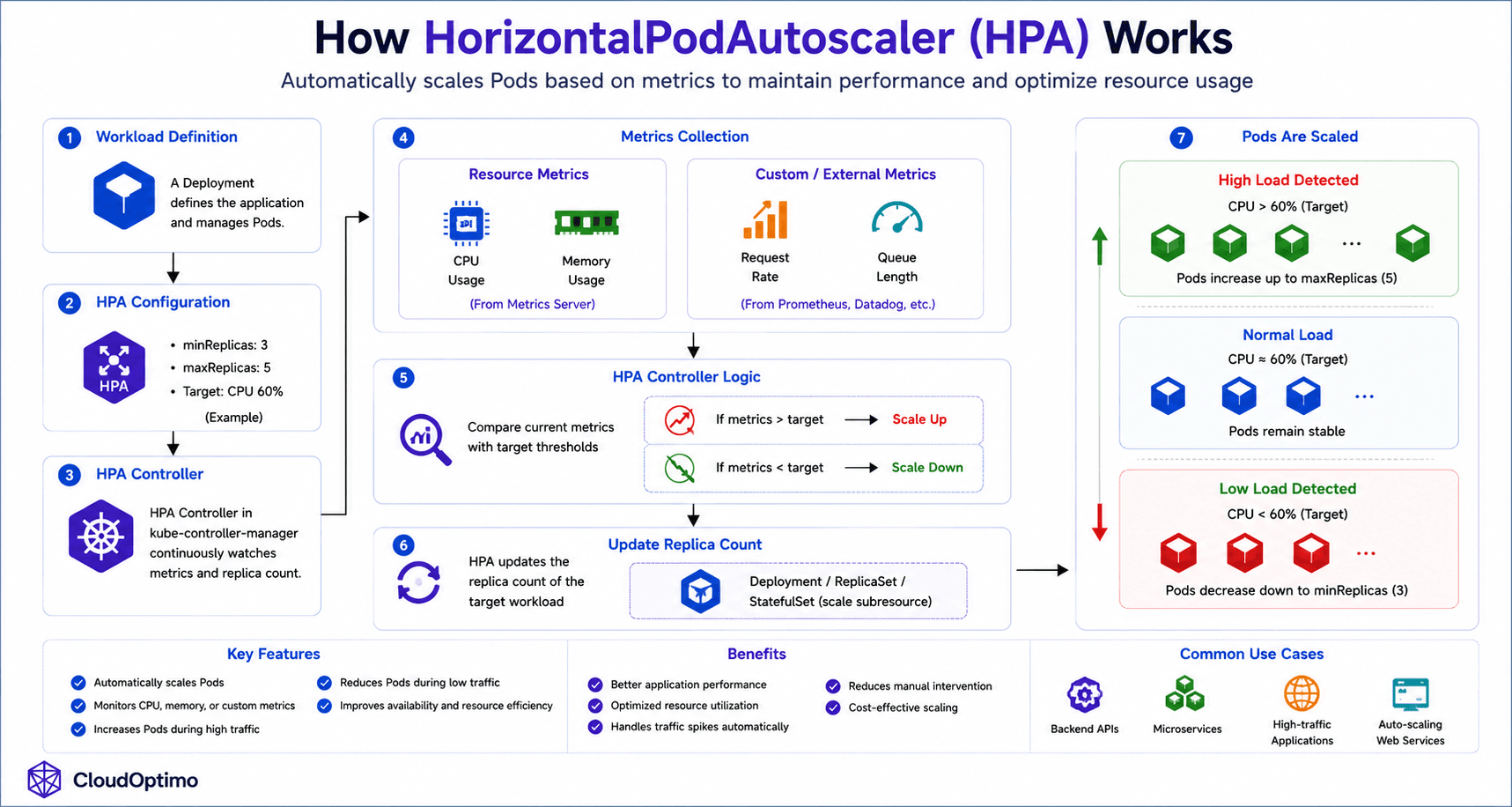
The HPA controller running inside the kube-controller-manager retrieves metrics from the Kubernetes Metrics Server or external monitoring systems and compares the current workload demand against the configured target thresholds.
If resource usage exceeds the configured threshold, Kubernetes automatically increases the number of Pod replicas. Similarly, when workload demand decreases, Kubernetes scales Pods down to reduce unnecessary resource consumption.
Example:
minReplicas: 3
maxReplicas: 5
Unlike Deployments or ReplicaSets that maintain a fixed number of Pods, HPA dynamically adjusts the replica count based on real-time traffic conditions.
The HPA does not create Pods directly. Instead, it modifies the replica count of workload controllers such as:
- Deployments
- ReplicaSets
- StatefulSets
Those workload controllers then create or remove Pods accordingly.
The complete internal workflow of HPA, including metric collection, scaling decisions, and automatic Pod scaling, is illustrated in the following architecture diagram.
10. Controllers & kube-controller-manager Internals
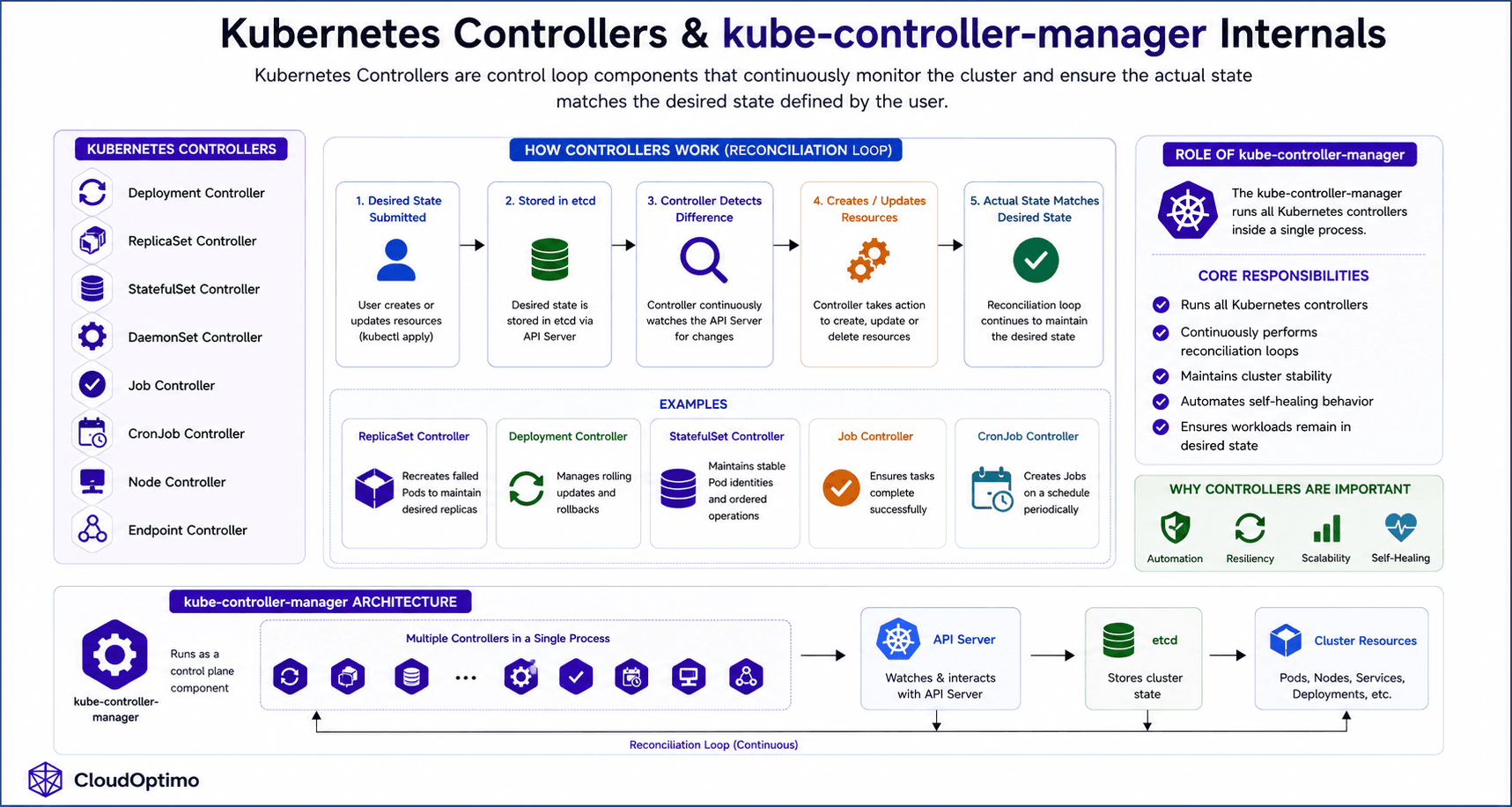
Kubernetes Controllers are control loop components responsible for continuously monitoring the cluster and ensuring that the actual state matches the desired state defined by the user. They automatically create, update, delete, or recover Kubernetes resources whenever inconsistencies are detected.
The kube-controller-manager is a core control plane component that runs multiple controllers inside a single process.
Kubernetes Controllers
- Deployment Controller
- ReplicaSet Controller
- StatefulSet Controller
- DaemonSet Controller
- Job Controller
- CronJob Controller
- Node Controller
- Endpoint Controller
How Controllers Work
Controllers operate using a continuous reconciliation loop, where they constantly compare the desired state defined by the user with the actual state running inside the cluster. Whenever a difference is detected, the controller automatically takes corrective actions such as creating, updating, deleting, or recovering Kubernetes resources to bring the cluster back to the desired state.
For example:
- ReplicaSet Controller recreates failed Pods
- Deployment Controller manages rolling updates
- StatefulSet Controller maintains stable Pod identities
- Job Controller ensures task completion
Role of kube-controller-manager
The kube-controller-manager:
- Runs all Kubernetes controllers
- Continuously performs reconciliation loops
- Maintains cluster stability
- Automates self-healing behavior
- Ensures workloads remain in desired state
Controllers are one of Kubernetes’ most important internal mechanisms because they provide automation, resiliency, scalability, and self-healing across the entire cluster.
Conclusion
Kubernetes workloads form the foundation of modern cloud-native infrastructure by automating how applications are deployed, scaled, updated, and maintained inside a cluster. From Pods and ReplicaSets to Deployments, StatefulSets, DaemonSets, Jobs, CronJobs, and HorizontalPodAutoscalers, each workload controller is designed to solve a specific operational challenge while working together through Kubernetes reconciliation-driven architecture. By continuously monitoring the cluster state and automatically taking corrective actions, Kubernetes provides self-healing, scalability, rolling updates, workload automation, and resilient application lifecycle management, making it one of the most powerful container orchestration platforms for building production-grade distributed systems.

