
Amazon S3 is a widely used AWS storage service that supports a variety of workloads, from application data and backups to analytics and operational records. To protect stored data, Amazon S3 provides security controls for access management, encryption, monitoring, and governance.
Amazon S3 and the Shared Responsibility Model
Amazon S3 is widely used across AWS environments to store application data, backups, logs, analytics datasets, and operational records. While AWS manages the infrastructure that delivers the service, customers remain responsible for how data is stored, accessed, and protected.
This division of responsibility is defined by the AWS Shared Responsibility Model. AWS secures the underlying infrastructure, including facilities, hardware, networking, and service operations. Customers are responsible for configuring access permissions, encryption settings, retention controls, and monitoring mechanisms.
As organizations adopt additional workloads and AWS accounts, Amazon S3 often becomes a shared storage layer across teams and applications. Understanding where customer responsibilities begin is an important step toward establishing secure and well-governed storage environments.
Understanding the Amazon S3 Security Model
Amazon S3 does not rely on a single permission mechanism. Instead, access decisions are influenced by multiple security controls working together.
This layered approach provides flexibility but also requires a clear understanding of how each control contributes to the overall security model.
1. Identity-Based Access Control
Identity-based access control is implemented through AWS Identity and Access Management (IAM).
IAM policies define which actions an authenticated user, role, or service can perform against Amazon S3 resources.
Typical permissions include:
- s3:GetObject
- s3:PutObject
- s3:DeleteObject
- s3:ListBucket
By associating permissions with identities, organizations can maintain granular control over how applications and users interact with stored data.
2. Resource-Based Access Control
In addition to IAM policies, Amazon S3 supports resource-based policies through bucket policies.
Bucket policies are attached directly to a bucket and define who can access the resource and under what conditions.
Bucket policies are commonly used to manage cross-account access, service integrations, and conditional access requirements.
Because bucket policies are attached to the storage resource itself, they provide centralized control over access to the bucket regardless of the identity requesting access.
3. Block Public Access Controls
Block Public Access serves as an additional layer of protection designed to prevent unintended public exposure.
These controls can override configurations that would otherwise make a bucket publicly accessible.
The feature operates at both the account and bucket levels and helps organizations maintain consistent restrictions across multiple environments.
4. Access Control Lists (ACLs)
Access Control Lists represent an earlier access management mechanism within Amazon S3.
ACLs provide bucket-level and object-level permissions. Although still supported, most modern environments primarily rely on IAM policies and bucket policies for access management.
Understanding ACLs remains important, particularly when managing legacy workloads or migrating existing storage environments.
How Amazon S3 Evaluates Access Requests
Understanding how Amazon S3 evaluates access requests is essential for managing permissions effectively. Authorization issues often occur because multiple policy layers interact with each other rather than because a permission is missing.
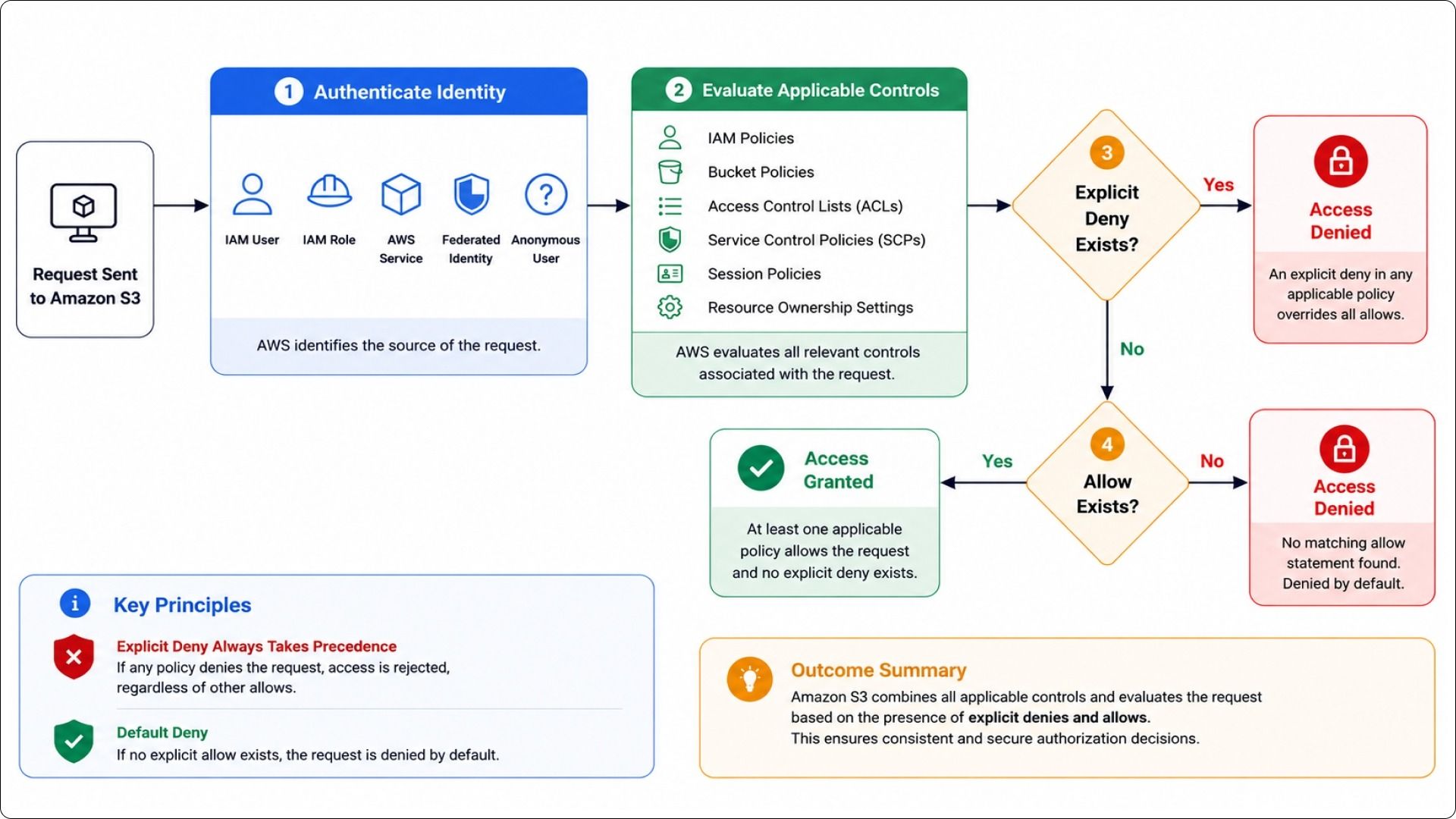
When a request reaches Amazon S3, AWS follows a structured evaluation process to determine whether access should be granted or denied. The request is first authenticated, after which all applicable authorization controls are evaluated. These controls can include IAM policies, bucket policies, Access Control Lists (ACLs), Service Control Policies (SCPs), session policies, and resource ownership settings.
During evaluation, AWS follows two fundamental principles:
- An explicit deny always takes precedence over an allow.
- Access is denied by default unless a matching allow statement exists.
The following flow illustrates how Amazon S3 processes authorization requests.
Amazon S3 Authorization Evaluation Flow
Figure 1: Amazon S3 evaluates access requests by authenticating the requester, assessing all applicable authorization controls, enforcing explicit deny conditions, and granting access only when the required permissions are explicitly allowed.
The evaluation process ensures that authorization decisions remain consistent across different access scenarios. Even when multiple policies apply to the same request, AWS combines them into a single decision based on the effective permissions and applicable restrictions.
Understanding Authorization Outcomes
The interaction between IAM policies, bucket policies, and organizational controls can produce different authorization outcomes.
| Scenario | Result |
| IAM policy allows access and bucket policy allows access | Access granted |
| IAM policy allows access but bucket policy denies access | Access denied |
| IAM policy does not allow access and bucket policy allows access (same account) | Access granted |
| IAM policy does not allow access and bucket policy allows access (cross-account) | Access denied |
| Explicit deny exists in any evaluated policy | Access denied |
| No matching allow statements exist | Access denied |
Understanding this evaluation process helps simplify troubleshooting and provides a clearer foundation for designing secure Amazon S3 access strategies.
Why Access Configuration Matters in Amazon S3
Understanding how Amazon S3 evaluates access requests is only part of the security equation. The effectiveness of any security strategy ultimately depends on how permissions are configured and managed across the environment.
In many AWS environments, Amazon S3 is accessed by applications, users, automation workflows, analytics platforms, and services operating across multiple accounts. As the number of workloads increases, so does the complexity of managing permissions consistently. Access that is appropriate for one application or team may not be suitable for another, making it important to define clear authorization boundaries.
Access configuration also influences operational efficiency. Well-structured permissions help teams understand who can access data, what actions can be performed, and how access aligns with business and technical requirements. This visibility simplifies administration, supports governance initiatives, and reduces the effort required to review or update permissions as environments evolve.
Because Amazon S3 relies on multiple authorization mechanisms, including IAM policies, bucket policies, and organizational controls, maintaining a structured access model becomes increasingly important at scale. Combined with encryption, monitoring, and data protection controls, access management forms a foundational component of Amazon S3 security and helps establish consistency across AWS environments.
Establishing Access Control Boundaries
Once the Amazon S3 security model is understood, the next step is defining clear access boundaries around stored data. Access controls determine who can interact with a bucket, what actions they can perform, and under which conditions those actions are permitted.
Restricting Public Exposure
Public access is one of the most widely discussed aspects of Amazon S3 security. While some workloads intentionally publish content through S3, most buckets are designed for internal use.
Amazon S3 provides Block Public Access settings that help prevent unintended exposure. These controls can be applied at both the account and bucket levels and are designed to override configurations that would otherwise allow public access.
Organizations managing multiple AWS accounts often enable these controls as part of their baseline security configuration to maintain consistency across environments.
Applying Least-Privilege Permissions
Permissions should align closely with operational requirements.
For example, an application responsible for uploading files typically requires object upload permissions but may not require object deletion or bucket administration privileges.
Similarly, development teams may need read access to specific datasets without requiring write access to production storage locations.
Applying permissions at an appropriate level of granularity reduces administrative complexity while helping maintain controlled access boundaries.
Managing Cross-Account Access
Multi-account AWS environments frequently require resources in one account to access data stored in another.
Amazon S3 supports this through a combination of bucket policies and IAM roles.
Rather than sharing credentials across environments, organizations commonly establish trust relationships that allow workloads to assume designated roles when access is required.
This approach simplifies administration while maintaining clear ownership boundaries.
Restricting Access Through Network Controls
In some environments, access requirements extend beyond identity-based permissions.
Organizations may choose to limit Amazon S3 access to specific network paths using VPC endpoints.
When access is routed through a VPC endpoint, traffic remains within the AWS network and can be governed through additional policy conditions.
This approach is frequently used for internal applications, regulated workloads, and environments with strict connectivity requirements.
Protecting Data Stored in Amazon S3
While access controls govern who can interact with data, encryption helps protect information throughout its storage lifecycle.
Server-Side Encryption
Amazon S3 supports server-side encryption, which automatically encrypts data before it is written to storage.
Encryption occurs transparently, allowing applications to interact with objects without requiring changes to application logic.
Server-side encryption protects stored data without requiring application changes.
AWS KMS Integration
For environments requiring greater control over encryption management, Amazon S3 integrates with AWS Key Management Service (AWS KMS).
AWS KMS provides:
- Centralized key management
- Key rotation capabilities
- Detailed audit records
- Access control for encryption keys
By separating key management from data storage, organizations gain additional visibility into how protected data is accessed and managed.
Encryption Enforcement Policies
Encryption requirements can also be enforced through bucket policies.
These policies can require that uploaded objects meet specific encryption conditions before Amazon S3 accepts the request.
This approach helps establish consistency across teams, applications, and automated deployment pipelines.
Protecting Data During Transit
Data protection extends beyond storage.
Whenever applications communicate with Amazon S3, data travels across network connections.
Transport Layer Security (TLS) provides encryption for data in transit and helps ensure information remains protected while moving between clients and Amazon S3.
Many organizations enforce secure transport requirements through bucket policies to ensure requests use encrypted communication channels.
Strengthening Data Integrity and Retention
Data protection is not limited to unauthorized access. Organizations must also account for operational changes, application errors, and long-term retention requirements.
Amazon S3 provides capabilities that support data integrity and retention objectives.
Versioning
Versioning allows Amazon S3 to maintain multiple versions of an object within the same bucket.
When an object is updated, previous versions remain available rather than being replaced permanently.
Versioning supports:
- Recovery from accidental overwrites
- Restoration of previous object versions
- Protection against unintended changes
For environments that manage frequently updated data, versioning adds an additional layer of resilience.
Object Lock
Object Lock introduces retention controls that help preserve data for a specified period.
When enabled, objects can remain protected from modification or deletion until retention conditions are satisfied.
This capability is often used for:
- Compliance records
- Financial documentation
- Audit archives
- Long-term operational records
Object Lock complements versioning by providing additional controls over how retained data is managed.
Backup and Retention Considerations
Although Amazon S3 provides high durability, organizations still define retention requirements based on operational and regulatory needs.
Retention strategies commonly consider:
- Business requirements
- Data lifecycle expectations
- Archival objectives
- Governance policies
Establishing retention guidelines helps align storage management with broader organizational requirements.
Visibility, Auditing, and Governance
Security controls become significantly more effective when supported by visibility and governance mechanisms.
Monitoring activity within Amazon S3 helps organizations maintain awareness of how data is accessed and managed.
AWS CloudTrail
AWS CloudTrail records API activity across AWS services, including Amazon S3.
These records provide visibility into actions such as:
- Bucket configuration changes
- Permission modifications
- Object-level operations
- Administrative activities
CloudTrail supports operational investigations, governance initiatives, and security reviews by providing historical activity records.
IAM Access Analyzer
IAM Access Analyzer helps identify resources that may be accessible beyond intended boundaries.
For Amazon S3, this capability can highlight buckets with external access paths and assist teams in reviewing access configurations.
AWS Config
AWS Config continuously evaluates AWS resources against defined configuration rules.
Within Amazon S3 environments, AWS Config can be used to assess settings such as:
- Encryption status
- Versioning configuration
- Public access controls
- Policy compliance
Continuous evaluation helps organizations maintain consistency across large numbers of buckets.
Continuous Security Assessment
Periodic reviews help verify that access controls, encryption settings, and retention requirements remain aligned with operational objectives.
Securing Amazon S3 Across Multiple AWS Accounts
Many organizations adopt multi-account AWS architectures to separate production, development, testing, and shared services workloads. As Amazon S3 resources are distributed across these environments, maintaining consistent security controls becomes increasingly important.
Centralized Security Standards
Organizations often establish common security requirements for encryption, logging, and access management across all AWS accounts. Consistent standards simplify governance and help reduce configuration differences between environments.
Access Boundaries
Cross-account access should be limited to specific workloads, services, or operational requirements. Defining clear boundaries helps maintain resource ownership while reducing unnecessary permissions across accounts.
AWS Organizations and Service Control Policies
AWS Organizations provides centralized account management capabilities, while Service Control Policies (SCPs) help define guardrails that apply across multiple accounts. Together, these controls support consistent security requirements without affecting day-to-day workload operations.
Frequently Asked Questions (FAQ)
1. What is the difference between an IAM policy and a bucket policy?
An IAM policy is attached to a user, group, or role and defines what actions that identity can perform. A bucket policy is attached directly to the Amazon S3 bucket and defines who can access the resource and under what conditions. Both are commonly used together to manage access.
2. Should Access Control Lists (ACLs) still be used?
ACLs remain available in Amazon S3, but most modern environments rely on IAM policies and bucket policies for access management. These approaches provide greater visibility, centralized administration, and more consistent permission management.
3. Does encryption affect application performance?
Amazon S3 encryption is designed to operate transparently. For most workloads, encryption introduces minimal operational impact while providing an additional layer of data protection. Encryption requirements are typically determined by organizational, security, or compliance objectives.

