
Most teams don't realize they're misusing Helm until something breaks in production. The chart works, the upgrade runs, the pod comes up, and then six months later, nobody can touch the values.yaml without fear, rollbacks fail silently, and every environment has quietly drifted into its own snowflake. Helm is not a templating engine. It's a release management system. That distinction changes everything about how you design charts, manage state, and think about upgrades. This guide is written for engineers who already use Helm and want to use it correctly at scale.
Why Helm Becomes Necessary at Scale
In a small environment, Kubernetes' declarative model is manageable. But as an organization scales to hundreds of microservices across heterogeneous clusters, a fundamental limitation surfaces: Kubernetes has no native concept of an "application." A single service might consist of a Deployment, a Service, an Ingress, several ConfigMaps, and a handful of Secrets. Kubernetes treats all of these as independent objects with no awareness of their shared purpose.
Helm bridges this gap by introducing the concept of a release, a versioned, named instance of a chart running in a specific namespace. A release is the single point of control for an entire application's lifecycle. Without this abstraction, rolling back means manually reverting each individual resource, a process that is error-prone, slow, and never truly atomic. Helm maintains a full revision history and can roll back every related resource simultaneously, in the correct order.
The second pressure that drives Helm adoption at scale is environment consistency. In a mature CI/CD pipeline, the goal is to promote the same artifact through dev, staging, and production. Helm's values system enables exactly this: environment-specific parameters are injected into a static chart at deployment time. The same chart logic tested in staging reaches production unchanged. This separation of template from configuration is the foundation of reproducible infrastructure.
Helm Architecture and Release Model
Helm's architecture changed fundamentally with version 3, and understanding why matters for anyone managing it in production.
The Client-Only Architecture and Security Model
Helm 2 required Tiller, a server-side component that typically ran with cluster-admin privileges. Any user who could reach the Tiller service could effectively control the entire cluster. Helm 3 removed Tiller entirely. The Helm binary now speaks directly to the Kubernetes API server using the operator's local kubeconfig context, which means all authorization flows through native Kubernetes RBAC. Helm operations are bounded by exactly the same permissions as any kubectl command run by the same user.
Release State Management
Helm 3 scopes release metadata to the namespace of the deployment, stored as Kubernetes Secrets rather than ConfigMaps. This prevents naming collisions across teams, improves multi-tenant isolation, and, critically, allows organizations to encrypt release state using Kubernetes' native encryption-at-rest features.
| Feature | Helm 2 | Helm 3 |
| Server Component | Tiller (Required) | None (Client-only) |
| Security Model | Tiller-based permissions | Kubeconfig / RBAC-based |
| Release Scope | Cluster-wide (kube-system) | Namespace-scoped |
| Storage Driver | ConfigMaps (Default) | Secrets (Default) |
| Upgrade Strategy | 2-way Strategic Merge | 3-way Strategic Merge |
The Three-Way Strategic Merge Patch
This is one of the most important internals in Helm 3 and one of the least understood. In Helm 2, upgrades compared only two inputs: the previous manifest and the new manifest. This broke in any environment where external controllers modified live resources, such as Istio sidecars, Velero annotations, and HPA-managed replica counts. A two-way merge would see those live changes as deviations and attempt to remove them on the next upgrade.
Helm 3's three-way merge considers three inputs simultaneously: the old manifest from the previous release, the current live state of the resource, and the new manifest generated by the chart. If a service mesh has injected a sidecar that isn't explicitly removed in the new manifest, Helm preserves it. This alone makes Helm 3 safe to run in environments with active operators and controllers.
Visual 1 - Helm Release Flow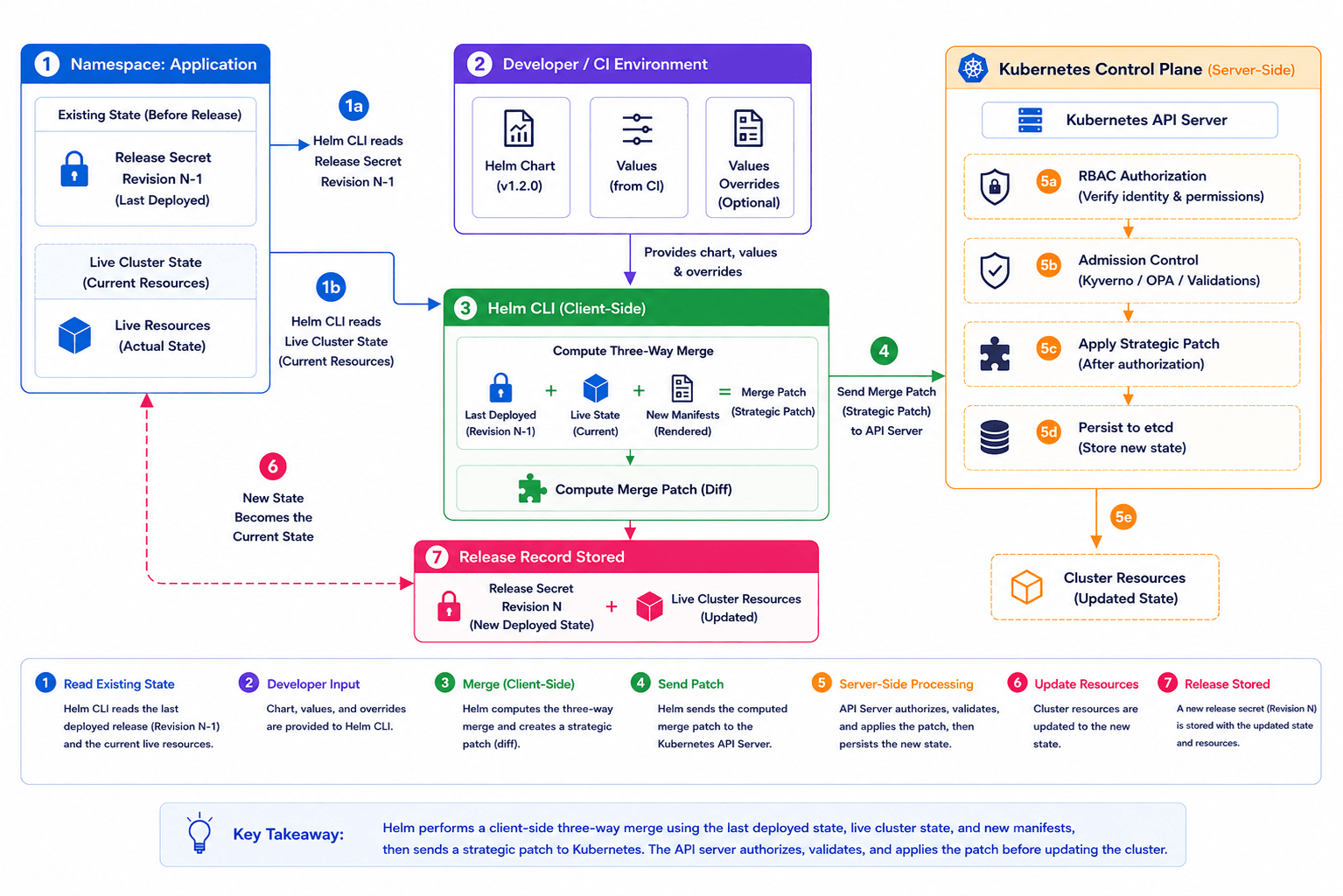 Chart Design Philosophy
Designing Helm charts for production requires a shift in mindset, from "organizing YAML files" to "engineering a deployable package." High-quality charts prioritize reusability, modularity, and strict DRY (Don't Repeat Yourself) principles.
Helper Templates and Global Scoping
The _helpers.tpl file is where reusable logic lives. Named templates are defined using {{- define "name" -}} syntax and called wherever needed. One non-obvious caveat: all template names are globally scoped within the rendering context. If a parent chart and a subchart both define a template called labels, the last one loaded wins, silently overriding the other. The only reliable mitigation is prefixing every named template with the chart name: {{- define "my-app.labels" -}}.
When calling templates, the distinction between template and include matters operationally. template is a native Go directive that writes output directly to the stream; its output cannot be captured or piped. include is a Helm-specific function that returns the rendered result as a string, which means you can pipe it into nindent, quote, lower, or any other function. In practice, always use include over template when inserting multiline snippets, or you will eventually produce invalid YAML indentation.
Library Charts for Organizational Standards
As organizations grow, the same patterns, such as logging sidecar injection, security contexts, Prometheus annotations, and standard labels, appear duplicated across dozens of charts. Helm 3's Library Charts (type: library) solve this. A library chart is not installable; it exists purely as a shared dependency that application charts import. The library defines base templates and helper functions. Application charts call them, passing their own overrides, while the library handles org-wide defaults and standards.
| Requirement | Implementation Pattern | Operational Benefit |
| Consistency | Library Charts | Enforces org-wide standards (labels, security contexts) |
| Formatting | include + nindent | Prevents broken manifests from YAML spacing errors |
| Modularity | Named Templates | Reduces boilerplate, simplifies global updates |
| Validation | required function | Fails the deployment when critical values are missing |
Managing Environments and Values
This is where most Helm implementations quietly fall apart, not in a single dramatic failure, but through slow accumulation of unmanaged configuration until nobody trusts the values files anymore.
Values Hierarchy and Merging Logic
The most maintainable pattern is a deliberate override hierarchy. The chart ships a values.yaml with sensible production-safe defaults. Environment-specific overrides live in separate files (values-staging.yaml, values-prod.yaml) committed to a config repository. During deployment, files are passed in order:
helm upgrade --install my-app ./chart -f values-prod.yaml --set image.tag=$BUILD_SHA
Later arguments override earlier ones. This is the full precedence chain from lowest to highest: chart defaults, then -f files in order, then --set flags.
For teams managing more than three environments or five services, Helmfile becomes essential. Helmfile wraps Helm with a declarative helmfile.yaml that describes which charts deploy to which environments with which values. Its key capability is layered values merging: a common.yaml layer holds shared defaults, environment-specific layers override only what's different, and secret files decrypted at runtime via SOPS contribute sensitive values, all merged in a defined order before Helm ever runs. This keeps configuration DRY across environments without duplicating entire values files per service.
Schema Validation with values.schema.json
Moving from "hope-based" configuration to "validation-based" configuration is a meaningful reliability upgrade. A values.schema.json file uses JSON Schema to define the structure, types, and constraints of your values.yaml. Helm validates all provided values against this schema during install, upgrade, lint, and template, catching errors before anything reaches the cluster.
In practice this catches four categories of failure:
- Type mismatches: a replica count passed as a string instead of an integer
- Missing required fields: failing the deployment if a mandatory key like a database host is absent
- Pattern violations: validating Kubernetes names against RFC 1123 using regex
- Invalid enums: restricting service.type to ClusterIP, NodePort, or LoadBalancer only
Upgrade and Rollback Realities
A single helm upgrade command conceals a significant amount of complexity. Understanding what can go wrong, and why, is the difference between an engineer who can manage production incidents and one who creates them.
Handling Immutable Field Failures
Kubernetes designates certain fields as immutable after resource creation: spec.selector on a Deployment, spec.clusterIP on a Service, and label selectors on StatefulSets. If a chart change touches these fields, the Kubernetes API rejects the update and the Helm upgrade fails with a "field is immutable" error, leaving the release in a failed state.
You have three options here, none of them clean:
- Manual deletion: Delete the offending resource with kubectl, then rerun the upgrade. Helm will recreate it with the new spec. Causes a brief outage for that resource.
- The --force flag: Tells Helm to delete and recreate any resource that can't be patched in place. Convenient, but causes downtime, as pods terminate before replacements are ready.
- Blue-green release: Deploy the new version as a separate Helm release, shift traffic at the load balancer or ingress level, then remove the old release. The safest option and the only one with zero downtime, but operationally heavier.
The right answer depends on the resource and how much downtime is acceptable. The wrong answer is running --force in production without understanding what it deletes.
The Lifecycle of a Rollback
helm rollback is not an undo button. It is a forward-moving revert. When rolling back from Revision 5 to Revision 3, Helm does not delete Revisions 4 and 5. It generates a new Revision 6 that is a copy of Revision 3's manifest state.
The release history remains an immutable, auditable trail. This matters for compliance and for understanding what state the system was in at any point in time.
What it does not do: roll back your database schema. If your pre-upgrade hook ran a migration, rolling back the Helm release does not undo that migration. This is one of the most dangerous assumptions teams make with Helm, and it needs to be accounted for explicitly in your migration strategy.
The other dangerous assumption is that rollback works at all. Many teams have never verified it under realistic conditions, such as a different image tag, different schema state, or different ConfigMap values. Does your application start cleanly on the previous image? Does the rolled-back schema still work with the current database state? The time to find out is during a planned drill, not a 2am incident. Treat helm rollback as a feature that requires testing, the same way you'd test a disaster recovery procedure. If you've never run it in staging, you don't know if it works.
Hooks: Power and Danger
Helm hooks execute arbitrary Kubernetes workloads at defined points in the release lifecycle. Most commonly implemented as Jobs, they enable workflows that standard manifests cannot express.
Strategic Use Cases
- Pre-upgrade database migrations: A pre-upgrade hook runs a schema migration job before the new application containers start, ensuring the database is compatible before any traffic is shifted.
- Post-install smoke tests:A post-install hook triggers integration tests against the fresh deployment. Failure can be configured to trigger an automatic rollback.
- Graceful connection draining: A pre-delete hook notifies a service mesh or traffic manager to drain connections before resources are torn down.
Hook Weights and Deletion Policies
When multiple hooks of the same type exist, Helm uses weights to determine execution order; lower weight runs first. This is how you sequence a "create database user" job before a "run migrations" job in the same release.
Helm does not automatically clean up hook resources. Without a helm.sh/hook-delete-policy, your cluster accumulates hundreds of Completed Jobs over time. The most common production-safe combination is before-hook-creation,hook-succeeded. This cleans up a successful prior run before starting a new one, while preserving failed jobs for debugging.
The operational consequences of skipping this are worse than they appear. At scale, uncleaned Jobs create noise in every kubectl get jobs output, inflate etcd storage, and make it harder to identify genuinely failing jobs. More critically, it becomes a direct source of upgrade failures. If a hook Job from a previous release still exists and the new release tries to create one with the same name, the upgrade fails before a single pod changes. Always define a deletion policy. There is no valid reason to omit it.
Visual 2 - Production Hook: Pre-Upgrade Database Migration
| # templates/migrate-job.yaml apiVersion: batch/v1 kind: Job metadata: name: {{ include "my-app.fullname" . }}-migrate annotations: # Trigger before resources are patched to ensure schema compatibility "helm.sh/hook": pre-upgrade # Execute after secrets are ready but before deployment updates "helm.sh/hook-weight": "-5" # Clean up on success to keep the cluster tidy; # 'before-hook-creation' ensures a fresh job for every release "helm.sh/hook-delete-policy": before-hook-creation,hook-succeeded spec: # Crucial: Disable retries. If a migration fails, we want the release to # fail immediately so an engineer can intervene, rather than # potentially corrupting data with repeated attempts. backoffLimit: 0 template: spec: restartPolicy: Never containers: - name: migration image: "{{ .Values.image.repository }}:{{ .Values.image.tag }}" command: ["/bin/sh", "-c", "./scripts/migrate-db.sh"] env: - name: DB_PASSWORD valueFrom: secretKeyRef: name: {{ .Values.db.secretName }} key: password |
The backoffLimit: 0 is the most important line in this file. A failed migration that retries is not a recovery; it's an opportunity to corrupt data. Fail fast, alert the on-call engineer, and let them assess whether it's safe to retry manually.
Helm in GitOps Workflows
In modern platform engineering, Helm is rarely invoked directly from a developer's terminal in production. It runs inside a GitOps controller, and the two dominant options take fundamentally different approaches.
Flux CD: The Helm SDK Model
Flux's Helm Controller wraps the Helm Go SDK and performs native helm install and helm upgrade operations. This means full support for Helm hooks, native release history, and proper rollback semantics via HelmRelease remediation strategies. The trade-off is that drift detection is interval-based rather than real-time, and the operational model is more CLI-centric.
ArgoCD: The Template-and-Apply Model
ArgoCD treats Helm as a manifest generator. It runs helm template, captures the YAML output, and applies it using its own sync engine. The benefit is near-real-time drift detection and a rich visual UI showing resource diffs between Git and the cluster. The significant downside: ArgoCD completely bypasses Helm's lifecycle management. There is no native Helm release history, helm rollback does nothing meaningful, and standard Helm hooks are ignored unless you replicate their behavior using Argo's Sync Waves and Sync Hooks, which is a different abstraction that behaves differently.
| Operational Dimension | Flux CD | ArgoCD |
| Drift Detection | Interval-based reconciliation | Real-time cluster resource watch |
| Lifecycle Hooks | Native Helm hooks supported | Requires Argo Sync Waves/Hooks |
| Rollback Path | Native Helm SDK rollback | Git revert + automated sync |
| Visibility | CLI-centric (Flux CLI) | Rich Web UI with resource tree |
Neither is universally better. The choice depends on whether you need Helm's full lifecycle semantics (Flux) or want real-time visibility and a strong UI (ArgoCD).
Security and Secrets
Security in Helm has two dimensions: how charts are distributed and how sensitive data within them is managed.
Secrets Management: SOPS vs. External Secrets Operator
The most common anti-pattern is committing plain-text secrets to Git inside a values.yaml. Every engineer who has ever done this knows the follow-up: the values file gets shared over Slack, pushed to the wrong branch, or ends up in a build log.
Two patterns actually work in production:
- SOPS: The helm-secrets plugin encrypts values files at rest using KMS (AWS, GCP) or age keys. The encrypted file is committed to Git. At deploy time, Helm decrypts it in-memory; the plaintext never touches disk and never appears in the Git history. Works well for teams that want secrets co-located with configuration.
- External Secrets Operator (ESO): The chart only defines an ExternalSecret resource pointing at a secret path in HashiCorp Vault, AWS Secrets Manager, or GCP Secret Manager. ESO fetches the actual value and injects it as a native Kubernetes Secret. The Helm chart has zero knowledge of the secret's value. Works better for organizations that already have a centralized secrets store and want a clear separation between deployment configuration and secret management.
OCI Registries and Chart Signing
Distributing charts via traditional HTTP repositories is increasingly treated as a legacy pattern. Helm 3 supports OCI-based chart distribution natively, using the same infrastructure as container images. Storing charts as OCI artifacts enables unified authentication via IAM roles or Workload Identity, and, critically, chart signing via Sigstore, ensuring only trusted, unmodified charts are deployed to production. In regulated environments, this is the path toward demonstrable supply chain integrity.
Common Operational Anti-patterns
Excessive Conditional Logic in Templates
Teams that accumulate {{ if .Values.env }}, {{ if .Values.feature.enabled }}, and {{ if eq .Values.cloud "aws" }} blocks in the same template produce charts that are nearly impossible to debug or test. Every conditional is a branch. Charts with 15+ conditionals in a single template file are a maintenance liability, not a flexibility achievement. The correct response is usually to externalize that logic into separate charts or to simplify the values model so fewer conditions are necessary.
Infrastructure-as-Helm
Using Helm to provision infrastructure, including VPCs, RDS instances, and IAM roles via CRDs, is a category error. Helm has no dependency graph equivalent to Terraform's, no real understanding of resource ordering beyond hook weights, and no concept of what to do when an external resource fails to provision. Race conditions and orphaned resources are the predictable result. Use the right tool: Terraform or Pulumi for infrastructure, Helm for application deployment.
Uncontrolled Dependency Drift
Using unconstrained version ranges in Chart.yaml (e.g., version: ">1.0.0") without a committed Chart.lock file means your dependency resolution is non-deterministic. An upgrade that passed in staging may fail in production if a subchart released a breaking change in the window between the two deployments. Lock your dependencies. Treat Chart.lock the same way you treat a package-lock.json or go.sum; it is not optional.
Hardcoded Environment Configuration in Templates
Embedding environment-specific logic inside chart templates, such as {{ if eq .Values.env "prod" }} wrapping production-only resource blocks, makes charts brittle, hard to test locally, and easy to break. All environment differentiation belongs in values files. The chart itself should be environment-agnostic.
Scaling Helm Across Teams
In a platform engineering context, the goal is to provide standardized deployment paths that allow product teams to move fast without making platform-level decisions they're not equipped to make.
Standardized Base Charts
The platform team provides a "Standard Application" chart that handles common cross-cutting concerns: Prometheus scrape annotations, Istio sidecar injection labels, pod disruption budgets, standard resource limit structures, and security context defaults. Product teams consume this chart by providing a minimal values.yaml, specifying only their image repository, tag, port, and service name. Nothing more. This reduces cognitive load on developers, ensures every service meets baseline observability and security requirements, and gives the platform team a single chart to update when org-wide standards change.
Governance and Policy Enforcement
Governance is enforced by combining Helm with policy-as-code tools, such as Kyverno or OPA Gatekeeper. These tools intercept the manifests generated by Helm at the admission controller layer and reject them if they violate security policies: running as root, missing resource limits, or using deprecated API versions. This creates a "trust but verify" model. Teams have the flexibility of their own Helm values, but the platform's safety guardrails are enforced regardless.
Key Helm Frequently Asked Questions (FAQ)
Q1. Does helm rollback also roll back my database schema?
No. helm rollback only reverts Kubernetes manifests; it has zero awareness of your database. If a pre-upgrade hook ran a migration, that schema change persists after rollback. Always design migrations to be backward-compatible and treat schema rollback as a separate manual operation.
Q2. When should I choose Flux over ArgoCD for Helm deployments?
Choose Flux when you need native Helm hooks, release history, and working rollbacks. Choose ArgoCD when real-time drift detection and a visual UI matter more. The key trade-off: ArgoCD runs helm template and discards release history entirely, so hook-based workflows like pre-upgrade migrations break silently.
Q3. What is the right way to handle secrets in a Helm chart?
Never commit plaintext secrets to Git inside values.yaml. Use SOPS via helm-secrets to encrypt values files at rest, decrypting in-memory at deploy time. Or use External Secrets Operator to pull values directly from Vault or AWS Secrets Manager at runtime, keeping secrets out of Git entirely.
Q4. How do I prevent values sprawl across multiple environments?
Use a deliberate override hierarchy, where chart defaults cover shared config and environment files contain only what genuinely differs. For more than three environments, adopt Helmfile to define a layered merge order: common base, then environment overrides, then runtime secrets. Changing a global default should touch exactly one file.
Q5. Why does my Helm upgrade fail with "field is immutable"?
Kubernetes locks fields like spec.selector and spec.clusterIP after resource creation. If your chart change touches these, the API rejects the patch. Fix it by manually deleting the resource and re-upgrading, using --force (causes downtime), or doing a blue-green release. Never run --force in production blindly.

