
1. What Is CrashLoopBackOff and How Kubernetes Restarts Containers
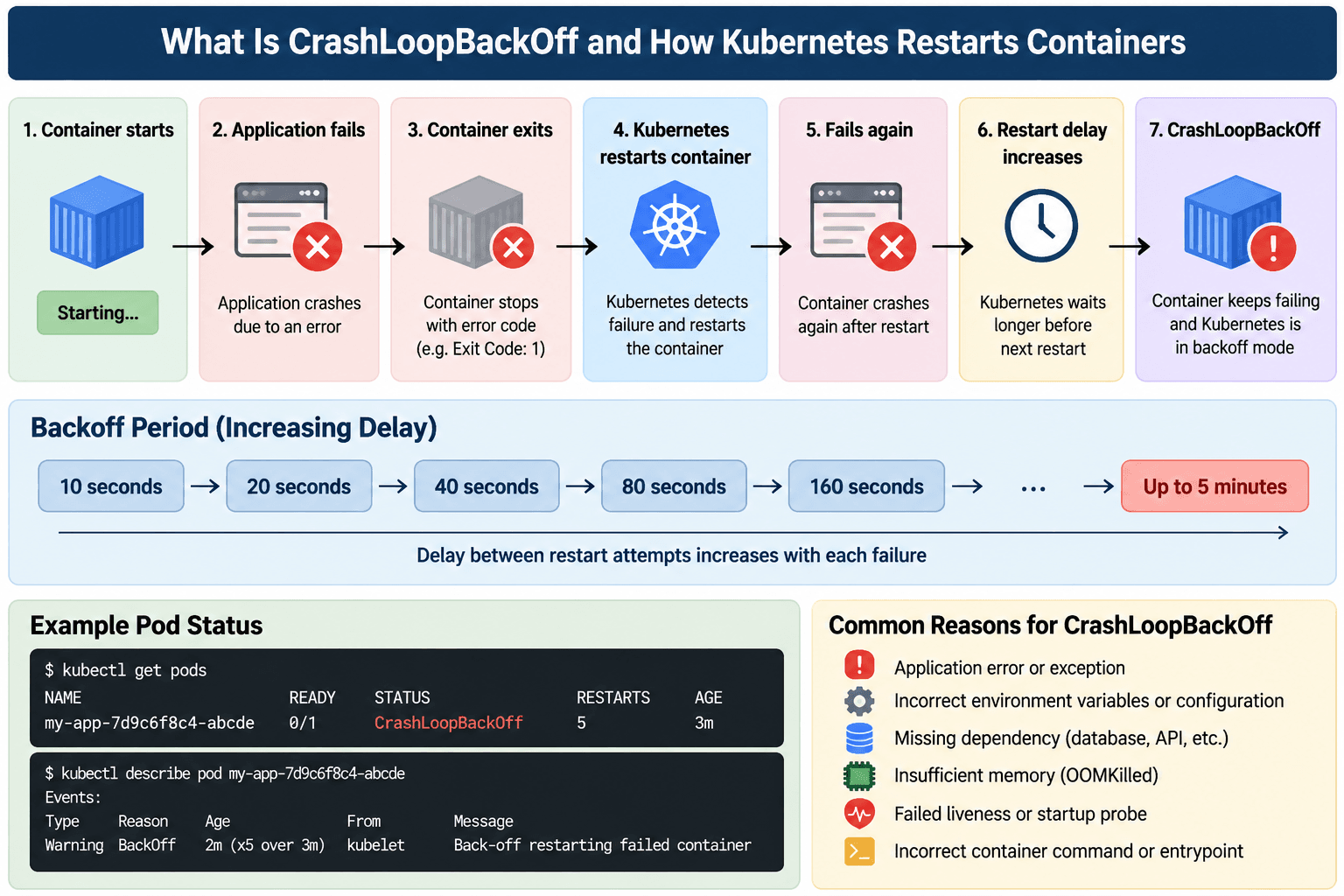
CrashLoopBackOff is a common Kubernetes status that appears when a container repeatedly starts and then fails or exits. Kubernetes detects the failure and attempts to restart the container according to the Pod's restart policy. When the container continues to fail, Kubernetes progressively increases the delay between restart attempts. This delay is known as the backoff period.
Kubernetes uses this increasing back off time to avoid continuously restarting a failing container and to give you a chance to identify and fix the underlying error. Instead of restarting the container immediately after every failure, Kubernetes waits progressively longer before trying again.
It is important to understand that CrashLoopBackOff is not the actual error or root cause. It indicates that the container is repeatedly failing and Kubernetes is temporarily backing off before attempting another restart. The underlying problem may be an application exception, incorrect configuration, insufficient memory, a failed health probe, an incorrect startup command, or an unavailable dependency.
Understanding the Backoff Period
The backoff mechanism prevents Kubernetes from continuously restarting a container that cannot start successfully. The delay begins at approximately 10 seconds and increases with repeated failures:
10s → 20s → 40s → 80s → 160s → up to 5 minutes
If the application continues to fail, Kubernetes progressively increases the waiting period before each restart. Once the container runs successfully for a sufficient period, the backoff state can eventually be reset.
The important takeaway is that restarting the Pod repeatedly is not a solution by itself. The underlying reason for the container failure must be identified and corrected first.
2. How to Diagnose CrashLoopBackOff
Once a Pod enters CrashLoopBackOff, the next step is to determine what is causing the container to terminate repeatedly. Kubernetes provides several sources of information that can be correlated to identify the failure, including the Pod and container state, previous container logs, Kubernetes events, and the container's exit code.
Inspect the Container State
The Pod's container state provides the first indication of what happened. Information such as the termination reason, exit code, restart count, and previous container state can distinguish between an application failure, a resource problem, or a Kubernetes level issue.
For example, an exit code of 1 generally points toward an application or runtime error, while an OOMKilled termination with exit code 137 indicates that memory usage should be investigated. These values provide useful clues, but they should not be treated as the complete diagnosis.
Check Previous Container Logs
Container logs often provide the most direct explanation of an application failure. This is particularly important with CrashLoopBackOff because the container may terminate and restart before the failure can be observed in the current instance.
Previous container logs can reveal unhandled exceptions, missing configuration, failed connections, startup errors, or missing application dependencies. Looking at the previous execution is therefore important when an application repeatedly fails during initialization.
Review Kubernetes Events
Kubernetes events provide another perspective by showing problems detected by the cluster itself. Events can reveal failed health probes, volume problems, image related issues, or repeated container restart attempts.
The most effective troubleshooting approach is to correlate the container state, logs, events, and exit code. This moves the investigation from the general CrashLoopBackOff status toward the specific condition that is causing the container to fail.
3. Application Crashes and Startup Failures
Application crashes and startup failures are among the most common causes of CrashLoopBackOff. A container can be created and started successfully by Kubernetes, but if the application inside the container encounters an error and exits, Kubernetes treats the container as failed and attempts to restart it. If the same failure occurs during every startup, the container eventually enters a restart loop.
Unhandled Application Exceptions
An application may encounter an unexpected exception while initializing a service, loading configuration, connecting to a required component, or performing other startup operations. If the exception is not handled and causes the main process to exit, Kubernetes detects the termination and starts the container again. Because the same application code runs after every restart, the same exception can occur repeatedly.
Missing Dependencies in the Container Image
An application may work correctly in a development environment but fail after being packaged into a container because a required library, runtime component, configuration file, or application module was not included in the image. The application starts, attempts to load the missing dependency, and exits. Kubernetes then creates another instance from the same image, resulting in the same failure.
Incorrect Startup Logic
Startup logic can also cause repeated failures. Applications often perform initialization tasks such as loading configuration, validating required settings, establishing connections, or preparing application resources before they begin serving requests. If this logic assumes that a particular file, service, or configuration value is always available, the application may terminate when that assumption is not satisfied.
The solution is to identify and correct the application level failure rather than repeatedly restarting the Pod. This may involve handling exceptions properly, ensuring all runtime dependencies are included in the image, or correcting the application's initialization sequence.
4. Configuration Problems: Environment Variables, ConfigMaps, and Secrets
Configuration problems are another common cause of CrashLoopBackOff. Applications frequently depend on environment variables, ConfigMaps, and Secrets for database connections, API endpoints, credentials, certificates, and other runtime settings. If the expected configuration is missing, incorrectly named, unavailable, or not properly exposed to the container, the application may fail during startup.
Missing or Incorrect Environment Variables
A required environment variable that is missing or incorrectly named can prevent an application from starting. For example, an application may expect DATABASE_URL while the deployment provides DB_URL. Kubernetes can still start the container, but the application does not receive the value it expects and may terminate with a configuration error.
Configuration values can also exist but contain incorrect information, such as an invalid database host, port, or connection string. These failures can look like application crashes even though the underlying problem is incorrect configuration.
ConfigMap and Secret Problems
ConfigMaps are commonly used for non sensitive application configuration, while Secrets are used for sensitive information such as passwords, API credentials, tokens, and certificates. Both can be provided to containers as environment variables or mounted files.
Problems occur when the referenced ConfigMap or Secret does not exist, the expected key is missing, the resource is referenced using the wrong name, or it is not correctly exposed to the container. Because ConfigMaps and Secrets are namespace scoped, the required resource must also be available in the same namespace as the Pod.
Resolving Configuration Failures
Configuration failures often occur during application initialization. The application starts, attempts to load its required configuration, discovers that a value or file is unavailable, and terminates. Kubernetes then restarts the container, but without a configuration change, the same failure occurs again.
The solution is to compare the configuration expected by the application with what is actually provided to the container. Required variables, key names, ConfigMaps, Secrets, and mounted configuration files should all be checked for consistency.
5. Resource, Command, Probe, and Dependency Failures
Not every CrashLoopBackOff is caused by an application exception or missing configuration. Containers can also repeatedly fail because of incorrect startup commands, insufficient memory, incorrectly configured health probes, or unavailable dependencies.
Incorrect Commands, Arguments, ENTRYPOINT, and CMD
Docker images define their startup behavior through ENTRYPOINT and CMD, while Kubernetes provides command and args fields that can override those image defaults. Kubernetes command corresponds to the image's ENTRYPOINT, while args corresponds to the image's CMD.
If the configured executable does not exist, the arguments are invalid, or the command starts a process that immediately exits, Kubernetes repeatedly starts the container with the same incorrect configuration. Understanding how these values interact is therefore important when an application works correctly in its Docker image but fails after being deployed to Kubernetes.
OOMKilled and Resource Limits
Insufficient memory is another common cause of repeated container restarts. When a container exceeds its configured memory limit, it can be terminated by the system and reported as OOMKilled. This is commonly associated with exit code 137.
Memory limits should not simply be increased without understanding the application's actual requirements. Startup memory usage, normal workload consumption, and expected peaks should be considered when sizing the limit. A limit that is too low can cause unnecessary restarts, while an excessively high limit can allow one workload to consume resources needed by other workloads.
Liveness and Startup Probe Failures
Health probes can also cause containers to restart when they are incorrectly configured. A liveness probe determines whether an application is healthy enough to continue running. If it repeatedly fails, Kubernetes can restart the container.
A startup probe is useful for applications that require more time to initialize. It gives the application an opportunity to complete startup before liveness and readiness checks begin determining its ongoing state. Incorrect timeouts, failure thresholds, health endpoints, or probe timing can otherwise cause Kubernetes to treat a healthy but slow starting application as failed.
A readiness probe is different. A failed readiness probe does not restart the container. Instead, Kubernetes removes the Pod from the endpoints used by the associated Service, preventing traffic from being sent to a Pod that is not ready. This distinction is important when diagnosing CrashLoopBackOff.
Dependency Failures
Applications commonly depend on databases, Redis, Kafka, APIs, and other services. If an application requires one of these dependencies during startup and immediately exits when the dependency is unavailable, the container can enter CrashLoopBackOff.
Temporary dependency failures should ideally be handled through application-level retry logic rather than immediately terminating the process. Kubernetes init containers can also help with dependencies that must be available before the main application starts. In addition, incorrect Service names, namespaces, ports, or DNS resolution can prevent an application from reaching a dependency even when that dependency is running correctly.
Conclusion
CrashLoopBackOff is a symptom of repeated container failure, not a diagnosis by itself. The most effective way to resolve it is to identify where the failure occurs and then address the underlying cause. Application crashes, configuration problems, incorrect startup commands, insufficient memory, failed liveness or startup probes, and unavailable dependencies all require different solutions.
A structured troubleshooting approach starts by understanding the container state, reviewing its previous logs and Kubernetes events, and interpreting the exit code. From there, the investigation can focus on the application, configuration, resources, probes, startup behavior, or dependencies. Once the underlying problem is corrected and the application can remain running successfully, Kubernetes no longer needs to repeatedly restart the container and the CrashLoopBackOff state is resolved.

