
Every infrastructure conversation eventually circles back to this question. A team is designing a new service, someone mentions "just containerize it," someone else asks why not spin up a VM like they've always done, and the room splits into two camps. Both are right, in their own context. Both are also frequently misunderstood.
Containers and virtual machines solve the same underlying problem: how do you run multiple isolated workloads on shared hardware without them stepping on each other? But they solve it at completely different layers of the stack, and that difference has real consequences for performance, security, cost, and how your team operates day to day.
This article breaks down what's actually happening under the hood, where each approach shines, where it falls short, and how to decide which one fits your workload instead of following whatever's trending on a conference stage.
The Core Difference: What Are You Actually Virtualizing?
A virtual machine virtualizes hardware. A container virtualizes the operating system.
That one sentence explains almost every practical difference between the two technologies, so it's worth sitting with.
When you create a VM, a hypervisor (like KVM, Xen, VMware ESXi, or Hyper-V) presents virtual CPU, memory, disk, and network devices to a guest operating system. That guest OS has no idea it's not running on real hardware. It boots its own kernel, manages its own memory, and runs completely independent of whatever OS is running on the host. You could run Windows Server as a guest on a Linux hypervisor host, and it would work fine, because the guest OS never actually shares a kernel with anything else on the box.
A container, on the other hand, does not virtualize hardware and does not run its own kernel. It's a set of processes running on the host's existing kernel, isolated from other processes through kernel features: namespaces (which give a process its own view of the filesystem, network stack, process IDs, and hostname) and cgroups (which limit and account for CPU, memory, and I/O usage). Docker, containerd, and CRI-O all build on the same underlying primitives that have existed in the Linux kernel for years.
This is why you can't run a Windows container on a Linux host without some form of virtualization underneath it (which is exactly what Docker Desktop does on Mac and Windows: it runs a lightweight Linux VM behind the scenes so Linux containers have a kernel to share). It's also why containers start in milliseconds and VMs take tens of seconds. A container doesn't boot an OS. A VM does.
A Quick Architectural Comparison
| Aspect | Virtual Machine | Container |
| Isolation unit | Full guest OS with its own kernel | Process isolated via namespaces/cgroups |
| Boot time | Seconds to minutes | Milliseconds to a few seconds |
| Image size | Gigabytes (full OS) | Megabytes to low hundreds of MB |
| Resource overhead | Higher (duplicate OS, kernel, drivers) | Lower (shared kernel) |
| Kernel | Own kernel per VM | Shared with host |
| Density per host | Lower | Higher |
| Cross-OS support | Any guest OS on any hypervisor | Must match host kernel type (Linux containers need a Linux kernel) |
| Typical unit of deployment | A server, a full application stack | A single service or process |
| Security boundary | Strong, hardware-enforced isolation | Weaker by default, kernel is shared |
Why This Distinction Actually Matters
It's tempting to reduce this to "containers are lightweight VMs." That framing causes more confusion than it resolves, because it hides the two things that actually matter in production: the security boundary and the packaging model.
Security boundary. Because a VM has its own kernel, a compromise inside a guest OS is contained by the hypervisor, which presents a much smaller and more heavily scrutinized attack surface than a general-purpose OS kernel. Containers share the host kernel, so a kernel-level exploit (a container breakout) can, in theory, let a process escape its namespace and touch the host or other containers. This isn't a hypothetical bogeyman; CVEs affecting container runtimes and kernel namespace handling appear regularly, which is why multi-tenant platforms (think public cloud providers running customer workloads) often add another isolation layer on top of containers rather than trusting namespaces alone. Google's gVisor and AWS Firecracker (the microVM technology behind Lambda and Fargate) both exist specifically to answer this problem: give you container-like speed and density with VM-like isolation.
Packaging model. A VM image bundles an entire operating system: kernel, system libraries, package manager, init system, your application, and all its dependencies. A container image bundles just your application and its direct dependencies, layered on top of a base image that's shared and cached across every container using it. This is the real reason containers changed how teams ship software. It's not that they're faster (though they are); it's that "it works on my machine" stopped being a meaningful excuse, because the image that runs in CI is bit-for-bit the same image that runs in production.
How Each One Actually Works
Virtual Machines
A hypervisor runs in one of two configurations. Type 1 (bare metal) hypervisors like KVM, Xen, and ESXi run directly on hardware and are what you'll find in any serious data center or cloud provider. Type 2 (hosted) hypervisors like VirtualBox or VMware Workstation run as an application on top of an existing OS and are mostly a developer or lab tool at this point.
The hypervisor allocates a slice of physical CPU, RAM, and storage to each VM and schedules guest OS instructions onto real hardware, using hardware virtualization extensions (Intel VT-x, AMD-V) to keep this reasonably fast. Each VM gets a full, independent OS install: its own kernel, its own patching cadence, its own attack surface, its own everything.
This is why VMs remain the foundation of public cloud IaaS. When you launch an EC2 instance, you're getting a VM. AWS, Azure, and GCP all use hypervisor technology under the hood (AWS moved most of its fleet to the KVM-based Nitro hypervisor specifically for the performance and security gains over Xen).
Containers
A container runtime (containerd and CRI-O are the two that matter in the Kubernetes world today; Docker Engine wraps containerd for local development) creates a new set of Linux namespaces for the process it's about to start: PID namespace so it sees its own process tree, network namespace so it gets its own IP and interfaces, mount namespace so it sees its own filesystem, and a few others (UTS, IPC, user). It then applies cgroup limits so the process can't consume more CPU or memory than it's been allocated. The container image, built from a Dockerfile, provides the filesystem contents through a layered, copy-on-write filesystem (usually overlayfs), which is why pulling a new image that shares base layers with one you already have is nearly instant.
There's no boot process. The runtime just starts your application's entrypoint process directly. That's the entire trick, and it's also why containers are fundamentally single-process-oriented even when people cram multiple processes into one (a practice most experienced engineers will tell you to avoid).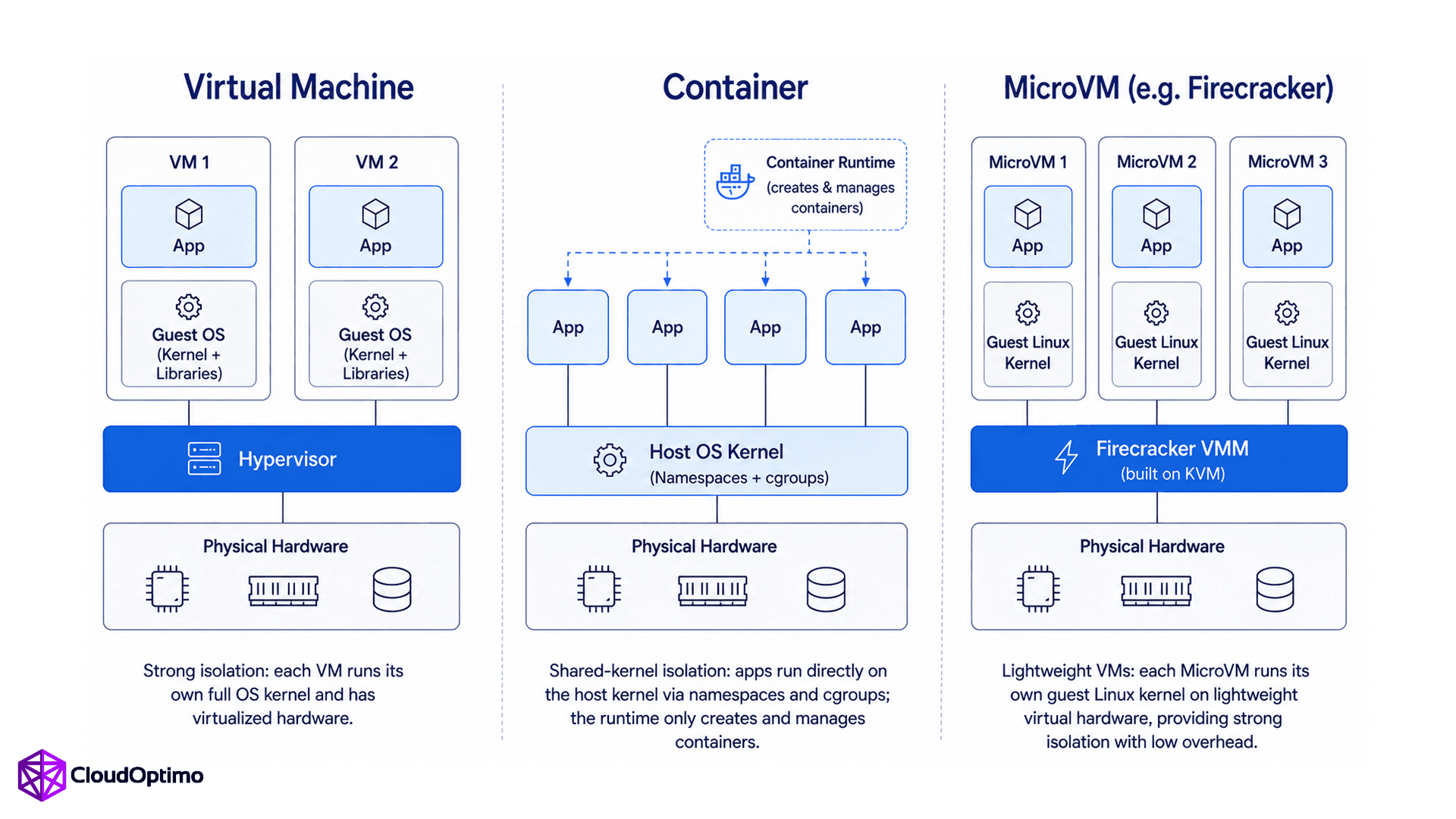
Figure: Comparison of Virtual Machine, Container, and Firecracker-based MicroVM architectures, highlighting differences in kernel architecture, virtualization, and isolation mechanisms.
Performance and Resource Efficiency
This is where the density argument comes from, and it's a real one, not marketing.
In practice, a minimal Linux VM typically consumes 150–350 MB of memory just for the guest OS, while a comparable container often uses only 5–20 MB of overhead. Cold-start times also differ sharply: traditional VMs commonly take 30–90 seconds to become ready, containers on a warm node usually start in under a second, and Firecracker microVMs typically boot in 100–300 milliseconds. These are ranges, not guarantees. Actual numbers shift with image size, kernel configuration, and host load, but they're useful anchors for capacity planning.
A t3.medium instance running five VMs spends meaningful CPU and memory just keeping five separate kernels and init systems alive. Run five containers on the same host instead, and they share one kernel, which is why container density per host commonly runs 5 to 10 times higher than VM density for equivalent workloads. That multiplier depends heavily on the workload's own resource footprint versus the OS overhead, so treat it as a starting point for estimation rather than a fixed rule.
This matters more for some workloads than others. A memory-heavy batch job that already consumes 16 GB of RAM won't see the same relative benefit from container packing that a fleet of small, stateless API services will, since the OS overhead becomes a rounding error next to the workload's own footprint. This is a common mistake teams make when they containerize resource-hungry legacy applications expecting the same density gains they read about for microservices.
If your workload has bursty, unpredictable traffic, the cold-start gap above is often the deciding factor between containers and VMs for autoscaling.
Security Considerations and Trade-offs
Security is where blanket statements do the most damage, so let's be specific.
VMs give you kernel-level isolation by default, which is why they remain the stronger choice for genuinely untrusted, multi-tenant code, such as a SaaS platform letting customers run arbitrary workloads.
Containers, run with sane defaults, are still a very reasonable security boundary for most internal workloads: services you build and control, running on infrastructure you control, where the threat model is "a dependency has a vulnerability" rather than "an anonymous third party is executing code on my platform." The mistake teams make is treating container isolation as equivalent to VM isolation when the threat model actually calls for stronger guarantees. Running containers as root, mounting the Docker socket into a container, disabling seccomp profiles, or skipping image scanning are the kinds of practical shortcuts that turn a reasonable isolation boundary into a weak one.
The honest, current-day answer for high-trust multi-tenancy is neither pure containers nor pure VMs but the hybrid approach: microVMs like Firecracker or sandboxed runtimes like gVisor, which give you a VM-grade security boundary with container-grade startup speed and density. This is exactly what powers AWS Lambda, Fargate, and Google Cloud Run under the hood, and it's worth knowing this exists before assuming your only two choices are "trust the container runtime" or "run a full VM per tenant."
Operational and Cost Implications
VMs come with an operational tax that's easy to underestimate: OS patching, kernel updates, and security baselines multiplied across every instance. If you're running 200 VMs, you're maintaining 200 individually patchable operating systems, even if configuration management tools like Ansible or Chef make this less painful than it sounds.
Containers push a lot of that concern down to the base image level. Patch the base image, rebuild, redeploy, and every container built from it is current. This is a genuine operational win, but it comes with its own discipline requirement: someone has to actually own that rebuild-and-redeploy pipeline, or you end up with containers running stale, vulnerable base images for months, which is arguably worse than an unpatched VM because it's less visible.
On cost, higher density directly translates to lower compute spend for equivalent workloads, since you're paying for fewer, more fully utilized instances rather than many partially utilized ones. But container orchestration (Kubernetes, ECS) has its own cost: cluster management overhead, the learning curve, and the very real risk of under-provisioning resource requests and limits, which can quietly degrade performance across an entire node rather than a single VM.
When to Use Virtual Machines
VMs are still the right call in several situations that containers don't handle well:
- Running a different OS or kernel than your host requires. Legacy Windows applications, specific kernel modules, or workloads tied to a particular kernel version.
- Strong multi-tenant isolation with untrusted code, where the extra security margin outweighs the density loss.
- Monolithic legacy applications not designed for horizontal scaling or process-level isolation, where refactoring for containers isn't worth the effort relative to the benefit.
- Regulatory or compliance requirements that specifically call for hardware-level isolation or dedicated OS instances.
- Stateful infrastructure workloads like traditional databases, where teams still often prefer the operational maturity of VM-based deployment and backup tooling, even though containerized databases with persistent volumes are increasingly common.
When to Use Containers
Containers are the better default for:
- Microservices and cloud-native applications where fast startup, high density, and consistent packaging matter.
- CI/CD pipelines, where ephemeral, identical environments for build and test are the whole point.
- Horizontally scalable stateless services that need to scale up and down quickly in response to load.
- Development environment consistency, eliminating the classic dependency mismatch between a developer's laptop and production.
- Kubernetes-based platform engineering, where the entire scheduling, scaling, and service discovery model assumes container-level granularity.
The Real-World Answer: You Probably Need Both
Most production environments running at any meaningful scale use both, and treating this as an either-or decision usually reflects a misunderstanding of the stack rather than a genuine architectural choice.
Kubernetes worker nodes are VMs (EC2 instances, Azure VMs, GCE instances) running containers on top of them. The VM gives you the isolated, patchable compute unit from the cloud provider's perspective; the containers give you the fast, dense, portable application packaging on top of it. Even fully "serverless" container platforms like Fargate are running your containers inside Firecracker microVMs, because AWS still needs a hardware isolation boundary between different customers' workloads, even when neither of you ever sees or manages that VM directly.
The practical question isn't "containers or VMs." It's "at which layer of my stack do I need which kind of isolation, and how much of that layer do I want to manage myself versus hand off to a cloud provider or orchestrator." A platform team choosing EKS versus self-managed Kubernetes versus Fargate is really choosing how much of the VM layer they want to own.
Common Misconceptions Worth Correcting
"Containers are just lightweight VMs." They're not VMs at all. They don't virtualize hardware, and conflating the two leads people to assume container isolation is stronger than it is.
"Containers are always more secure because they're smaller." Smaller image, smaller potential attack surface within the image, yes. But image size has nothing to do with kernel-sharing risk, which is the more consequential security factor for multi-tenant scenarios.
"You should containerize everything." Some workloads, particularly large stateful monoliths or those with heavy licensing tied to dedicated hardware, gain little from containerization and can pick up real operational risk in the migration.
"Kubernetes replaces the need for VMs." Kubernetes schedules containers, but its nodes are still typically VMs (or bare metal). Kubernetes is an orchestration layer, not a replacement for the underlying compute isolation model.
Where This Is Heading
The line between containers and VMs keeps blurring, and that's arguably the more interesting trend than either technology in isolation. Firecracker-style microVMs, Kata Containers, and gVisor are all attempts to get VM-grade isolation with container-grade speed and density, and they're increasingly the default rather than a niche choice for security-conscious platforms. Expect more managed platforms (Lambda, Fargate, Cloud Run, Azure Container Apps) to keep hiding this distinction from you entirely, running your container in something that is, technically, a very fast VM, without asking you to know or care.
For engineers building on top of these platforms, the practical skill isn't picking a side. It's understanding what isolation guarantee you're actually getting from whatever abstraction you're using, so you can make an informed call when a workload's requirements (security, density, startup time, OS compatibility) push you toward one end of the spectrum or the other.
Frequently Asked Questions (FAQs)
Q1: Is a container just a lightweight virtual machine?
No. A container doesn't virtualize hardware or run its own kernel at all; it's an isolated process sharing the host's existing kernel through Linux namespaces and cgroups. A VM virtualizes hardware and runs a completely independent guest operating system with its own kernel. The "lightweight VM" framing is common but misleading, because it implies containers offer the same isolation guarantees as VMs, which they don't by default. This distinction matters most when evaluating security for multi-tenant or untrusted workloads.
Q2: Are containers more secure than virtual machines?
Not inherently. Containers share the host kernel, so a kernel exploit can potentially let a process escape its container, while a VM's hypervisor boundary is a smaller, more isolated attack surface. For workloads running trusted, internally-built code, containers with proper hardening (non-root users, seccomp, image scanning) are reasonably secure. For untrusted, multi-tenant code, VMs or VM-grade sandboxes like Firecracker and gVisor offer stronger default isolation.
Q3: Can you run containers inside a virtual machine?
Yes, and this is actually the standard production pattern. Kubernetes worker nodes are typically VMs, and containers run on top of them, giving you the cloud provider's hardware isolation at the VM layer and fast, dense application packaging at the container layer. Docker Desktop on Mac and Windows also runs a lightweight Linux VM in the background so Linux containers have a compatible kernel to share.
Q4: Do containers replace the need for virtual machines?
No. Containers replace VMs for application packaging and deployment in many scenarios, but the underlying compute infrastructure, including Kubernetes nodes and serverless container platforms like Fargate, still runs on VMs or microVMs beneath the surface. Containers and VMs solve isolation at different layers of the stack, and most real-world architectures use both rather than choosing one exclusively.
Q5: Which is cheaper, containers or virtual machines?
Containers generally allow higher workload density per host because they share a kernel and avoid the overhead of running multiple full operating systems, which typically lowers compute costs for equivalent workloads. However, container orchestration platforms like Kubernetes introduce their own operational overhead and require careful resource request and limit tuning to actually realize those savings, so the cost advantage isn't automatic and depends on how well the platform is managed.

