1. Why CI/CD Is Non-Negotiable Today
Modern software delivery is no longer about writing code and deploying it manually. In today’s fast-paced digital landscape, businesses expect rapid releases, zero downtime, and consistent reliability. This is where CI/CD (Continuous Integration and Continuous Delivery/Deployment) becomes non-negotiable.
DevOps engineers, Site Reliability Engineers (SREs), and software developers must understand CI/CD fundamentals not as optional knowledge, but as a core competency. CI/CD is not just a trend or a buzzword; it is the automation backbone that enables teams to ship code faster, safer, and with confidence.
Without CI/CD:
- Releases become risky and stressful
- Manual deployments introduce human error
- Feedback cycles slow down innovation
- Scaling teams becomes chaotic
With CI/CD:
- Every code change is validated automatically
- Deployments become predictable and repeatable
- Teams gain faster feedback and higher confidence
- Software delivery becomes a continuous process
2. Understanding CI/CD Pipeline Architecture
 Core Components That Drive Automation Success
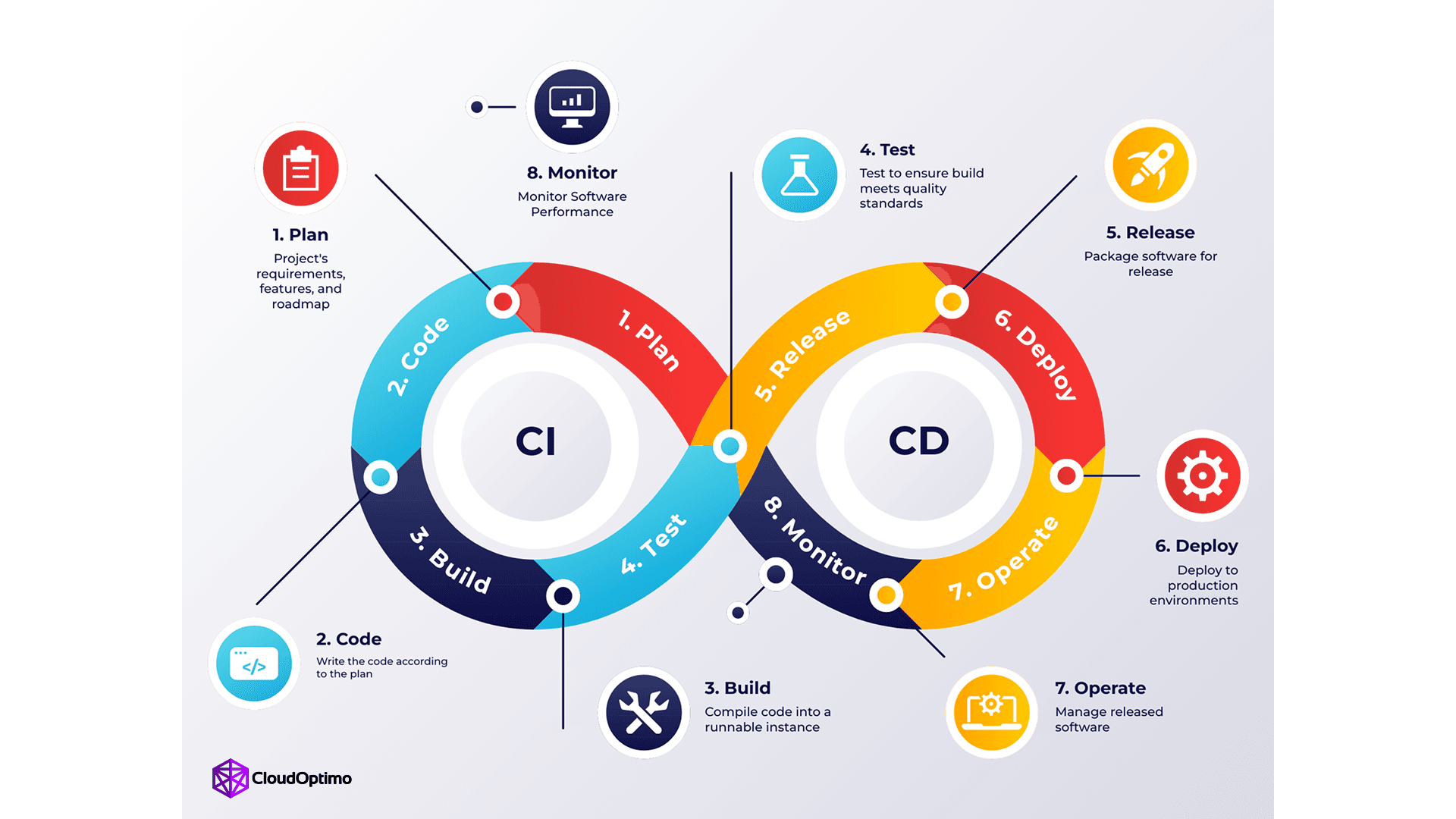
A robust CI/CD pipeline relies on interconnected stages to transition code from development to production:
- Source Control: The "single source of truth" (e.g., Git) where code and configurations reside, triggering the pipeline via webhooks.
- Build Server: Engines like Jenkins or GitHub Actions compile code and manage dependencies into executable artifacts.
- Automated Testing: A multi-layered validation strategy including Unit Tests (isolated components), Integration Tests (module interaction), and End-to-End Tests (user simulation).
- Artifact Repository: Secure storage (e.g., Nexus, Artifactory) for versioned binaries and container images.
- Deployment Orchestrators: Tools like Kubernetes or AWS CodeDeploy that manage infrastructure provisioning and release coordination.
- Monitoring & Notifications: Systems providing real-time visibility into pipeline health and immediate alerts on failures.
How Continuous Integration Eliminates Integration Hell ?
"Integration hell" occurs when isolated development leads to massive, conflicting code merges. CI solves this through:
- Frequent Commits: Merging daily ensures conflicts remain small, manageable, and caught early.
- Automated Conflict Detection: Immediate feedback loops identify incompatible changes before they reach the main branch.
- Environment Consistency: Using containers and Infrastructure as Code (IaC) eliminates "works on my machine" discrepancies.
- Quality Gates: Branch protection rules and mandatory Pull Request (PR) reviews ensure only validated code is merged.
The Role of Continuous Deployment in Faster Releases
Continuous Deployment (CD) transforms delivery from a manual risk into a predictable, automated routine:
- Minimized Human Error: Automated workflows ensure deployments are consistent across staging and production environments.
- Feature Flags: These allow teams to deploy code to production without immediately exposing unfinished features to users, decoupling deployment from release.
- Zero-Downtime Strategies: Zero-downtime deployment strategies ensure that new application versions are released without interrupting user experience. Instead of updating systems in place, traffic is carefully managed using techniques such as BlueGreen deployments, Canary releases, and Rolling updates. These approaches maintain service availability while reducing deployment risk, enabling safe rollbacks, controlled exposure to changes, and continuous delivery at scale.
3. How a CI/CD Pipeline Works: A Step-by-Step Walkthrough
A CI/CD pipeline is an automated "assembly line" for software. It transforms raw source code into a functional, production-ready application through a series of rigorous stages. If any stage fails, the pipeline halts preventing faulty code from ever reaching the end user.
Step 1: The Source Stage (The Trigger)
The lifecycle begins in the Version Control System (VCS).
- Automated Triggers: Modern pipelines utilize Webhooks to initiate the process. The moment a developer performs a git push or opens a Pull Request, the CI server (like GitHub Actions or Jenkins) detects the event and starts the workflow.
- Static Code Analysis & Linting: Before a single line of code is compiled, "Linters" scan the script for syntax errors, styling violations, and basic security flaws. This ensures the codebase remains clean and maintainable from the start.
| pipeline { agent any triggers { githubPush() } stages { stage('Build') { steps { echo 'Pipeline triggered successfully' } } } } |
Step 2: The Build Stage
Once the source is validated, the pipeline enters the "Construction" phase.
- Compilation: For languages like Java, Go, or C#, the source code is compiled into machine-readable binaries.
- Dependency Management: The build server resolves and fetches external libraries (via npm, maven, or pip) required for the application to function.
- Containerization: In modern DevOps, this stage typically culminates in creating a Docker Image. By packaging the application with its specific OS and dependencies, you eliminate the "works on my machine" problem entirely.
Step 3: The Test Stage (Continuous Testing)
This is the "Quality Gate" of the pipeline. Reliability is built here.
- Unit Testing: Validating individual components or functions in isolation to ensure they behave as expected.
- Integration Testing: Testing how different modules interact with one another, such as an API communicating with a database.
- SAST (Static Application Security Testing): Tools like SonarQube scan for "code smells" and security vulnerabilities, ensuring that performance and security are baked into the build.
Step 4: The Release/Artifact Stage
If all tests pass, the pipeline generates a "Golden Image" or Build Artifact.
- Artifact Storage: The resulting file (e.g., a .jar file or Docker image) is stored in a secure Artifact Repository like Docker Hub, JFrog Artifactory, or AWS ECR.
- The Principle of Immutability: A professional best practice is to build once. The exact same artifact that passed the test stage should be the one promoted to Staging and eventually Production to ensure total consistency.
Step 5: The Deploy Stage
This is where the code moves from a storage repository to a live environment.
- Staging/UAT: The artifact is first deployed to a Staging environment—a mirror image of Production. Here, automated "Smoke Tests" verify that the environment is stable.
- Production Rollout: Depending on the organization's strategy, this is either Continuous Delivery (the pipeline stops for a manual human approval) or Continuous Deployment (the system automatically pushes the code to users).
Step 6: Verification and Monitoring
The pipeline’s responsibility doesn't end at deployment; it extends into the application's runtime.
- Health Checks: The orchestrator (such as Kubernetes) continuously pings the application to ensure it is healthy and responding to traffic.
- Automated Rollback: If the monitoring systems detect a spike in error rates or a performance regression, the pipeline can automatically trigger a rollback to the previous stable version, minimizing downtime and user impact.
4. Essential Tools and Technologies
| Category | Tool | Primary Role | Best For |
| Orchestration | GitHub Actions | CI/CD automation inside GitHub | Fast setup, repo-native pipelines |
| GitLab CI/CD | Integrated DevSecOps platform | Built-in security + registry | |
| Jenkins | Highly customizable CI engine | Highly customizable CI engine | |
| Azure Pipelines | Microsoft-native CI/CD | Azure + .NET environments | |
| AWS CodePipeline | AWS cloud-native pipeline | Deep AWS service integration | |
| Google Cloud Build | GCP-native build system | GKE + GCP workloads | |
| Containerization | Docker | Container packaging standard | Container packaging standard |
| Kubernetes | Container orchestration | Scaling + self-healing apps | |
| Podman | Daemonless container engine | High-security environments | |
| Testing | Playwright | Cross-browser E2E testing | Fast, modern test automation |
| Cypress | Frontend E2E testing | Developer-friendly debugging | |
| Pytest | Python unit testing | Backend Python apps | |
| Jest | JS/TS unit testing | Frontend & Node apps | |
| Security | Trivy | Container vulnerability scanning | Shift-left container security |
| Snyk | Dependency vulnerability scanning | Third-party package security |
Building a high-performing pipeline is rarely about picking a single tool. In 2026, the trend has shifted toward a "Best-of-Breed" toolchain, where specialized services are integrated to create a seamless, automated workflow.
Below is a breakdown of the leading technologies currently powering modern DevOps ecosystems.
A. The "Control Center" (Orchestration Platforms)
These platforms act as the central nervous system of your pipeline, managing the logic of how code moves from a commit to a live environment.
- GitHub Actions: Currently the industry leader due to its native integration with GitHub repositories. Its YAML-based configuration and vast library of community "Actions" make it the top choice for rapid development.
- GitLab CI/CD: A comprehensive DevSecOps powerhouse. It is preferred by teams who want built-in security scanning (SAST/DAST) and container registries without integrating third-party plugins.
- Jenkins: The reliable "Grandfather" of CI. Despite newer competitors, it remains essential for enterprise-grade, highly customized environments that require complex, self-hosted logic.
- Azure Pipelines: The go-to for teams deeply integrated into the Microsoft ecosystem, offering seamless deployment to Azure cloud and .NET environments.
- AWS CodePipeline & Google Cloud Build: These cloud-native orchestrators provide the deepest integration for teams already operating within a specific cloud. They offer managed, serverless execution that leverages native security (IAM) and provides a direct path to services like AWS EKS or Google Kubernetes Engine (GKE)..
B. Containerization & Orchestration
Modern pipelines no longer deploy raw code; they deploy immutable artifacts via containers to ensure consistency.
- Docker: The definitive standard for packaging applications. It eliminates the "works on my machine" syndrome by ensuring the environment is identical across all stages.
- Kubernetes (K8s): The industry-standard orchestrator. It automates the deployment, scaling, and management of containerized applications, ensuring they remain highly available and "self-healing" if a failure occurs.
- Podman: A secure, lightweight alternative to Docker. It is favored in high-security environments because it doesn't require a background "manager" (daemon) to run, allowing users to launch containers without needing full administrative (root) access.
C. Automated Testing & Security (The Gatekeepers)
Quality and security are non-negotiable. If these tools detect a failure, the pipeline is automatically halted.
- Playwright & Cypress: The new leaders in End-to-End (E2E) testing. Playwright is favored for its cross-browser speed, while Cypress remains a developer favorite for its intuitive debugging.
- Pytest / Jest: The standard frameworks for unit testing in Python and JavaScript/TypeScript, respectively.
- Trivy & Snyk: These represent the "Shift Left" security trend. They scan container images and third-party dependencies for vulnerabilities during the build phase.
5. Navigating the Path: Mistakes and Best Practices
Even with the best tools, a pipeline is only as strong as the logic behind it. Avoid these common pitfalls to keep your delivery smooth.
Common Mistakes to Avoid
- The "Flaky Test" Trap: If your team starts ignoring "random" test failures, your pipeline loses its authority. Reliability is more important than total coverage.
- Manual Bottlenecks: A pipeline that requires manual approval at every minor step defeats the purpose of automation.
- Neglecting Security: Treating security as a final "check" rather than a continuous process leads to late-stage blockers and vulnerabilities.
Industry Best Practices
- Keep Feedback Loops Tight: A build that takes an hour is a build that developers will avoid. Aim for a "10-minute rule" for initial feedback.
- Environment Parity: Ensure your staging environment is a mirror image of production to eliminate "works on my machine" discrepancies.
- Automate Everything—Including Rollbacks: High-performing teams don't just automate the push; they automate the "undo" to ensure 99.9% uptime.
6. Why to Choose CI/CD
Choosing CI/CD is a strategic decision that directly impacts software quality, delivery speed, and operational stability. It replaces manual, error-prone deployments with automated, repeatable workflows that ensure every change is validated, tested, and released with confidence. For growing teams and complex systems, CI/CD provides the structure and scalability required to maintain consistency and reduce risk.
Beyond immediate benefits like faster releases and improved reliability, CI/CD fosters a culture of continuous improvement. It enables smaller, incremental updates, faster feedback loops, and safer deployment strategies making innovation sustainable rather than stressful.
Looking ahead, the future of CI/CD is even more transformative. With the rise of DevSecOps, AI-assisted testing, GitOps workflows, and cloud-native architectures, pipelines are becoming smarter, more secure, and fully integrated with infrastructure and observability systems. Automation will not just deploy applications it will manage entire ecosystems.
In modern software engineering, CI/CD is no longer optional. It is the foundation for building scalable, resilient, and future-ready systems.